


Risk Assessment Software: UK Buyer’s Guide 2026
What if the most feature-rich platform is the wrong choice for your risk assessment process? Choosing risk assessment software uk teams can use day to day means looking beyond feature lists to how assessments are created, authorised, updated and reviewed.
Generic templates may not reflect your workplace hazards or controls. Limited oversight can also make it harder to see which assessments are complete, authorised or due for review. The right system should support your working practices and make assessment activity easier to manage.
This guide sets out a practical framework for comparing software by workflow fit, control and adoption. You’ll see which capabilities support assessment creation and review, how customisable workflows can reflect business-specific risks, and what to consider when choosing a platform your teams will use. It also covers mobile-first, cloud-based workflows, including point-of-work assessments with structured controls and authorisation.
Key Takeaways
- Compare risk assessment software uk options against real work activities and the people responsible for each step.
- Check whether control measures can reflect your organisation’s specific hazards, rather than relying on generic templates.
- Define ownership, user roles and approval responsibilities before configuring a new digital workflow.
- Assess how clearly the system helps you track assessment completion, authorisation and review.
- Explore how Compliance Genie’s customisable, modular design could fit your organisation’s assessment processes.
Why UK organisations assess risk assessment software by operational fit
Risk assessment software helps organisations create, organise, authorise and review workplace risk assessments digitally. It can bring records and review steps into a consistent workflow, helping the people responsible find relevant information and see what needs attention. The software supports the process; it doesn’t identify every hazard or decide which controls are suitable.
That distinction matters. An assessment must reflect the work as it is actually carried out, including changing tasks, locations and conditions. A digital form that’s easy to complete but doesn’t match the work can add steps without improving clarity. Start by identifying what staff need to record, who reviews it and how the assessment will be kept relevant when work changes. The HSE guidance on risk assessment can help frame the process, but workplace decisions still need to reflect the organisation’s own activities and knowledge.
What does risk assessment software help an organisation manage?
Digital workflows can organise assessment records alongside their review and authorisation stages. This can help teams identify the relevant assessment, understand its status and follow a clear route for review. Consistent records can also make it easier to find the information staff need, rather than relying on different teams to store or describe assessments in different ways.
These are process benefits, not a substitute for judgement. Software can provide a structured place to record hazards and controls, but people familiar with the activity need to assess the risks and decide what action is appropriate. The workflow is only useful when its prompts and controls are relevant and staff use it in a way that reflects the work.
Which UK organisations may need a digital assessment workflow?
Suitability depends less on organisation size than on the range and coordination of work activities. A small organisation with varied or changing tasks may need a clear way to manage assessments. A larger organisation may need a process that works across sites, teams or departments.
- Construction and engineering: teams may need assessments that reflect specific tasks, work locations and changes in how work is planned or carried out.
- Manufacturing: assessments may relate to different work areas, equipment or operating activities, so staff need a practical way to access and review the relevant record.
- Housing and utilities: teams coordinating maintenance or field work may benefit from records linked to the task and the people responsible for reviewing them—particularly when managing broader property compliance alongside specialist energy assessors such as energysmartworld.co.uk.
- Government, medical and office-based organisations: assessment needs can span public-facing work, clinical or support activities, facilities and workstation risks.
These examples point to the same buying question: does the workflow fit how your organisation identifies work, records controls and assigns responsibility? Before comparing risk assessment software uk options, map a few typical activities from creation to review. Note where assessments are created, who contributes, who authorises them and how staff find the current version. This gives you a practical basis for judging operational fit without assuming that one template or process will suit every team.
Which risk assessment software capabilities support the full workflow?
Assess the workflow from the moment someone identifies the work to the point at which controls are reviewed. This shows whether the software supports the decisions and handovers your teams actually make, rather than simply offering a long menu of functions. To compare risk assessment software uk options, test each against a real task and the people who carry it out.
How should software support point-of-work risk assessments?
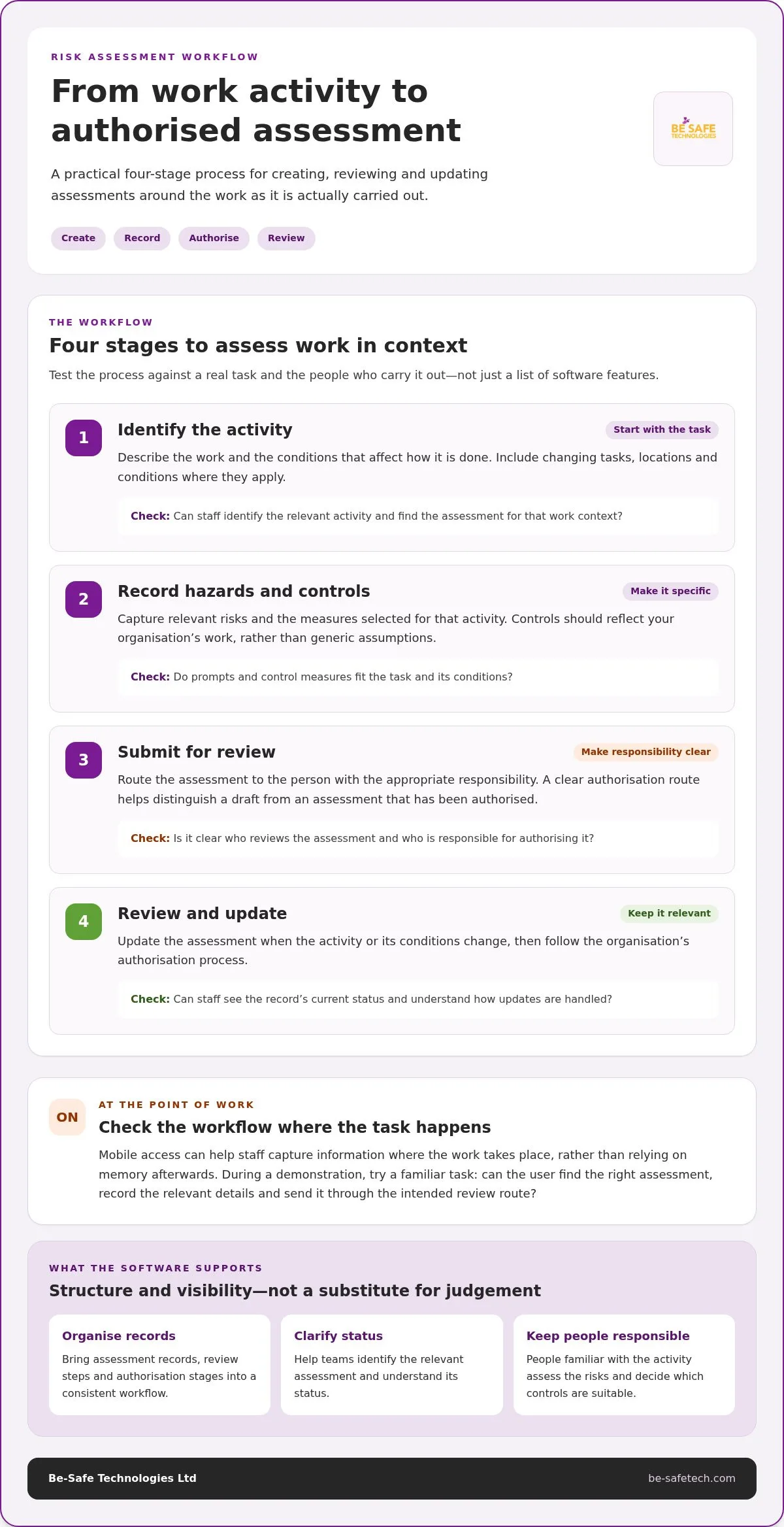
At the point of work, users need a structured way to record the activity, relevant hazards and proposed controls in context. Controls should reflect your organisation’s work, not generic assumptions that may miss specific conditions. A clear authorisation route then shows who is responsible for reviewing an assessment and helps distinguish a draft from one that has been authorised.
Map the core process in order:
- Identify the activity: describe the task and the conditions that affect how it is done.
- Record hazards and controls: capture the relevant risks and the measures selected for that activity.
- Submit for review: route the assessment to the person with the appropriate responsibility.
- Review and update: make changes when the activity or its conditions change, then follow the organisation’s authorisation process.
Mobile access can help staff capture information where the work takes place, rather than relying on memory afterwards. During a demonstration, try the workflow using a familiar task: can the user find the right assessment, record the relevant details and send it through the intended review route? Compliance Genie’s point-of-work risk assessments use structured, business-specific control measures and an authorisation workflow.
What helps teams keep assessment records organised?
Look for a clear way to locate an assessment by the activity or work context your organisation uses and to understand its current status. Ownership should be clear: users need to know who maintains a record, who reviews it and how updates are handled. The UK government risk management framework can provide a useful reference when considering how risk responsibilities are organised.
Separate essential workflow needs from optional functions. Start with the capabilities that make an assessment usable and manageable:
- Essential: structured assessment records, business-specific controls, accessible mobile workflows, clear authorisation and visible review status.
- Optional: additional functions that don’t directly support your assessment process or meet a defined operational need.
This distinction keeps comparisons focused on day-to-day value rather than feature count. To see how these workflow questions relate to a live platform, explore digital risk assessment workflows with Compliance Genie.
How to compare risk assessment software for UK workplaces
A feature list only tells you what a platform contains. To judge fit, see whether it supports your assessment process from recording the work and controls through review and access to current records. Use the same work activity and user roles to compare each option, then classify every criterion as essential, useful or not required. This turns a broad search for risk assessment software uk into a practical comparison.
How can buyers judge whether controls fit their work?
A large template library can provide a starting point, but volume alone doesn’t make an assessment suitable. Check whether users can represent your actual activities and adapt control measures to the conditions of the work. The HSE guidance on risk assessment offers a useful reference for reviewing how risks are assessed and managed.
Test one familiar task with the people who complete assessments and those who review them. Ask whether the prompts make sense, whether relevant controls can be recorded clearly and whether the approval step reflects your responsibilities. Software supports the organisation’s process; it doesn’t replace the competent judgement needed to assess the work.
What should a UK software comparison table include?
Use consistent criteria for every platform. Record what each capability needs to do for your organisation, then mark its priority. This makes trade-offs visible and helps prevent optional features from outweighing gaps in the core assessment workflow.
| Criterion | What to assess | Priority |
|---|---|---|
| Workflow fit | Can users record the work activity, relevant hazards and controls in a logical sequence? | Essential / useful / not required |
| Customisation | Can assessment content reflect your organisation’s activities and control measures? | Essential / useful / not required |
| Authorisation | Can the process show who reviews and authorises an assessment? | Essential / useful / not required |
| Mobile access | Can users access and record assessment information where the work takes place? | Essential / useful / not required |
| Oversight | Can responsible people locate records and understand their status and review ownership? | Essential / useful / not required |
Keep the comparison grounded in a real example. Choose a routine task where conditions or control measures vary according to the work context. Ask an assessor to complete the workflow, then ask a reviewer to locate the record, understand its status and identify the next step. Note where users hesitate, need extra explanation or cannot represent the work clearly.
Gather feedback from both roles before scoring the platforms. A workflow that seems clear to an administrator may feel cumbersome to the person recording the assessment, while reviewers may need clearer ownership or status information. Record these observations alongside the priority ratings. The result is a more balanced decision based on usability and process fit, not template count or claims of automatic compliance.
How to plan software adoption without disrupting assessment work
Introducing risk assessment software works best when it follows a defined process. Avoid asking teams to change how they assess work before responsibilities are clear. A staged approach helps maintain day-to-day assessment activity while giving staff a practical way to learn the new workflow.
What should an organisation prepare before implementation?
Document assessment types, typical work activities, existing review points and the people responsible for each stage. Note where staff need mobile access or timely information, such as when completing an assessment where the work takes place. Before configuration, agree who owns each assessment, who can complete or review it and who has authority to approve it.
Then move through the adoption steps in sequence:
- Map current processes: record how assessments are created, reviewed, authorised and updated, including differences between teams.
- Set roles and priorities: agree ownership, user roles, approval responsibilities and which parts of the workflow matter most.
- Configure and pilot: set up a representative assessment process, then test it with the people who complete and review that assessment.
- Gather structured feedback: ask users where instructions, controls or handovers are unclear, and record any difficult steps.
- Review early use: compare actual use with your intended process, then adjust guidance or configuration where appropriate.
Choose a pilot that reflects genuine work, not just the simplest possible example. Set practical measures before the pilot, such as whether staff can locate the right assessment, complete the required steps and understand who reviews it. Use these measures to guide improvement without relying on assumed targets or promised outcomes.
How can teams support consistent use after launch?
Give users clear instructions for completing, reviewing and authorising assessments, with responsibilities set out in everyday language. Provide a route for questions and feedback, then review recurring issues with the relevant process owners. If a step causes confusion, decide whether the guidance, role allocation or workflow needs refinement. This helps keep use consistent as teams become more familiar with the system.
For practical ideas on moving existing assessment records into a digital workflow, see How to Digitise Paper Risk Assessments Efficiently. A focused walkthrough can also help your team see how a real assessment process might work in Compliance Genie. Arrange a Compliance Genie demo to explore the workflow against your organisation’s needs.
How Compliance Genie supports digital risk assessment management
Compliance Genie is an award-winning, mobile-first, cloud-based health and safety platform that brings risk assessment management into a digital workflow. For organisations comparing risk assessment software uk options, assess its capabilities against practical criteria: point-of-work access, business-specific controls, authorisation and access to assessment information.
Compliance Genie is available on Apple and Android devices and includes real-time GPS-stamped data. This supports access to assessment workflows on mobile devices and provides location context for information recorded at the point of work. It is useful where staff need to complete or refer to assessments away from a desk, while the organisation’s own process determines what information is recorded and how it is reviewed.
How does Compliance Genie support point-of-work assessments?
Compliance Genie’s point-of-work risk assessments use structured, business-specific control measures. Organisations can shape assessment content around their activities rather than depend on generic assumptions. This structure gives users a consistent format for recording relevant details while keeping controls tied to the work being assessed.
An authorisation workflow forms part of the assessment process, clarifying review and approval responsibilities. Alongside mobile access and real-time GPS-stamped data, this supports a connected workflow from recording information at the work location through to review. In a demonstration, teams can follow a representative task and see how the assessment steps relate to their roles and existing practices.
As you assess the platform against your organisation’s needs, consider whether the workflow supports:
- Relevant assessment content: structured controls that can reflect business-specific activities.
- Clear review: an authorisation route that fits the organisation’s approval responsibilities.
- Point-of-work use: mobile access and location-stamped data in the assessment process.
What supports confidence in the Compliance Genie platform?
Be-Safe Technologies Ltd is ISO 9001/27001 certified and a G-Cloud Approved Supplier. These credentials provide useful organisational context as you assess the platform, alongside its workflow and fit with the way your teams work.
For further guidance on selecting capabilities and judging workflow fit, read the health and safety risk assessment software guidance. To see how Compliance Genie’s point-of-work workflow could fit your assessment process, book a Compliance Genie demo.
Make your next step a practical one
Choosing risk assessment software uk organisations can rely on is not just a technology decision. It’s a chance to shape how assessment work is owned and maintained as tasks, teams and working practices evolve. Bring the people involved together around one realistic scenario. Agree what a useful workflow should make clearer, where responsibility sits and what staff need to do with the information afterwards.
This gives your organisation a sound basis for moving forward: a decision rooted in its own working practices, rather than assumptions about what a platform should do. Keep the discussion focused on how the system fits the people using it and supports a process that remains relevant over time.
Take that next step by seeing the workflow in context. Book a Compliance Genie demo and explore how digital assessment management could fit your organisation. A considered choice can help your teams approach risk assessment with greater clarity.
Frequently Asked Questions
What is risk assessment software?
Risk assessment software is a digital tool for keeping workplace assessment records and the processes around them in one system. Records may include task details, hazards, control measures and review information. For example, a supervisor could use an assessment record to check which controls apply to a planned activity. The software provides a way to manage this information; the organisation remains responsible for its accuracy and relevance.
Is risk assessment software a legal requirement in the UK?
No specific software product is required by law. Organisations have health and safety responsibilities, but choosing a digital system is a separate decision about how to manage related processes and records. For guidance on assessing risks, consult the Health and Safety Executive’s guidance. A platform can help organise information, but having one does not, by itself, show that an organisation has met its responsibilities.
Can risk assessment software work for small businesses?
Yes. A small business can use risk assessment software if the system suits its needs and resources. A sensible starting point might be one recurring activity, such as equipment maintenance, and a defined group of people responsible for recording and reviewing its assessment. This lets the business see whether the process is manageable before extending it to other work. Focus on functions that serve a clear purpose.
How much does risk assessment software cost in the UK?
There isn’t a single figure that applies to every UK organisation. Pricing varies between platforms and depends on the product and scope. Compare what is included in each proposal, such as the functions your organisation needs, the number of users covered and any stated implementation or ongoing charges. Be-Safe Technologies Ltd offers Compliance Genie as a cloud-based SaaS platform. Book a demo to discuss how it could fit your organisation’s requirements.
Does risk assessment software replace a competent risk assessment?
No. A digital system cannot observe a task, understand every local condition or decide whether a proposed control is suitable. Those decisions depend on people with relevant knowledge of the work. For instance, a change in materials or work sequence may affect the assessment even if the existing record is still accessible. Treat software as a recordkeeping aid, and ensure assessment decisions are made and checked by appropriate people.
Can risk assessment software be used on mobile devices?
Yes. Compliance Genie is available on Apple and Android devices. When evaluating a mobile workflow, consider what users need to do away from a desk: read an existing assessment, enter details or submit information for review. Try the relevant task on a mobile device and assess whether the text, fields and steps are workable in the conditions staff face.
How can an organisation tell whether its risk assessment software is working well?
Look beyond login or completion figures. Sample assessment records to see whether details are clear, controls relate to the task and review information makes sense. Check for recurring issues such as duplicate records, outdated instructions or assessments that staff struggle to interpret. Compare findings across teams and discuss patterns with the people responsible for the process. This can help identify where guidance or assessment content needs attention.