



Manual handling risk assessment app for workplace teams

A manual handling assessment is most useful when it shows teams what needs attention, not just where a form has been completed. A manual handling risk assessment app helps record tasks, identify hazards and assess risks consistently, with records that are easy to access.
Paper forms can make it harder to keep assessments organised as tasks and working conditions change. In the UK, the Manual Handling Operations Regulations 1992 require employers to avoid manual handling where reasonably practicable, assess risks from unavoidable handling and reduce the risk of injury as far as reasonably practicable, according to the UK legislation register.
This article explains what manual handling risk assessment software does and how it can support workplace teams. You’ll learn what factors to assess, how methods such as MAC and RAPP fit into the process, and how digital records can help teams review risks and plan suitable controls.
Key Takeaways
- Assess each load’s weight and shape, the working environment and the person’s capability to understand where handling risks arise.
- Learn how software can organise assessments and how MAC supports assessment of lifting and carrying tasks.
- Use guided scoring to help make risk levels easier to interpret and identify where control measures may be needed.
- Map routine and occasional handling tasks, then follow a consistent process to assess hazards and review controls.
- See how Compliance Genie and Contractor Genie can support digital health and safety processes and contractor management.
Assessing loads, environments and individual capability
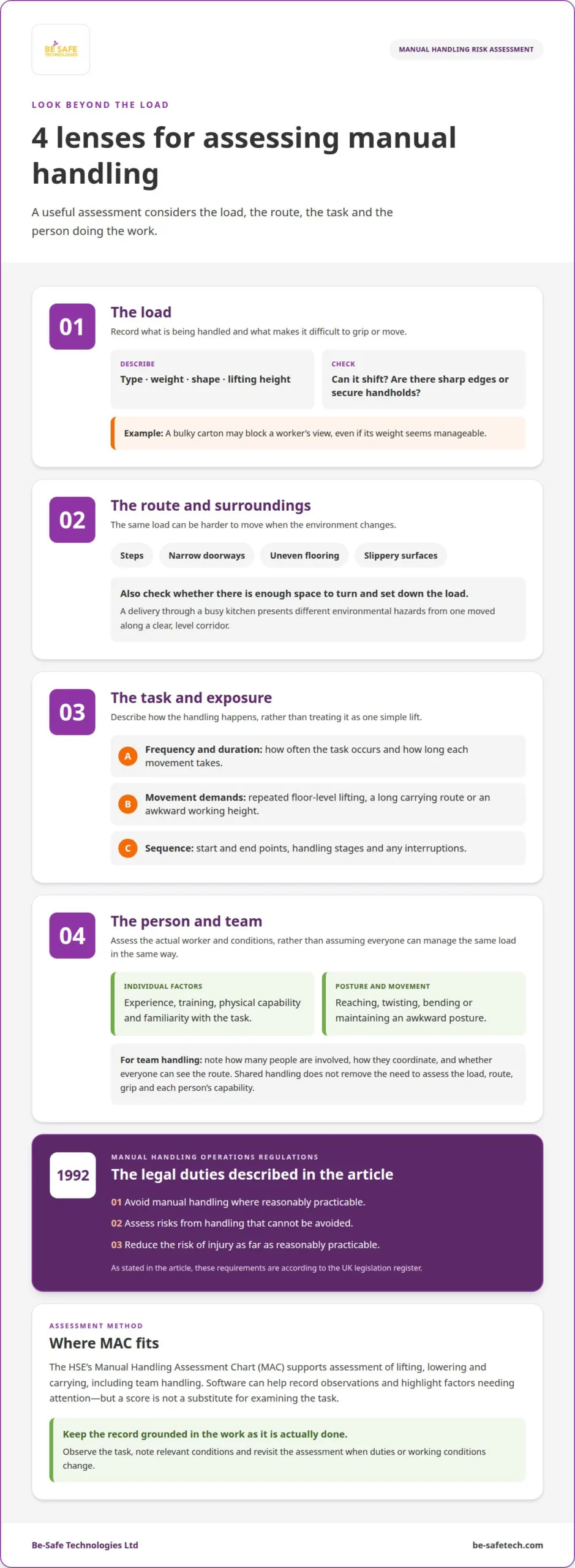
A useful assessment considers the load, the route and the person doing the work. Record the load’s type, weight and shape, along with its lifting height. For example, a bulky carton may block a worker’s view even if its weight seems manageable. Also note whether the load can shift, has sharp edges or lacks secure handholds.
Workplace conditions can make the same load harder to move. Note whether the route includes steps, narrow doorways, uneven flooring or slippery surfaces. Check whether there is enough space to turn and set down the load. A delivery carried through a busy kitchen, for example, presents different environmental hazards from one moved along a clear, level corridor.
Consider how often the task occurs and how long each movement takes. Repeated lifting from floor level, carrying over a long route or working at an awkward height can affect the assessment. Record the start and end points, handling sequence and any interruptions. These details show where exposure occurs, rather than treating the task as one simple lift.
Individual capability matters too. Consider the person’s experience, training, physical capability and familiarity with the task. Note whether the work involves reaching, twisting, bending or maintaining an awkward posture. Assess the actual worker and conditions rather than assuming everyone can manage the same load in the same way. A change in duties or working conditions may warrant a review.
Team handling needs separate consideration. Identify how many people are involved, how they coordinate their movements and whether everyone can see the route. Two workers carrying a long table, for example, may need to turn together through a doorway. Team handling does not remove the need to assess the load, route, grip and each person’s capability.
The Manual Handling Operations Regulations 1992 require employers to avoid manual handling where reasonably practicable, assess unavoidable risks and reduce injury risks as far as reasonably practicable, according to the UK legislation register. A health and safety assessment should therefore record the task and the factors that affect it. Capturing load details, surroundings and individual or team arrangements gives reviewers a clear basis for deciding what needs attention.
A consistent record helps apply these considerations from one task to another. Describe the load by its type, weight and shape, and note the lifting height. Then record environmental factors and the relevant capability of the person doing the work. Keeping these points together helps prevent the assessment from focusing on weight alone while overlooking other parts of the task.
When a task changes, revisit the same factors instead of relying on an earlier assessment. A different load may have a different shape or weight, while a change in lifting height or environment may alter what the task demands of the worker. Individual capability remains part of the assessment. Make clear which conditions were considered and how they relate to the handling activity, so decisions reflect the work as it is actually done.
What is manual handling risk assessment software?
Manual handling assessment software records tasks, hazards, scores and control measures digitally. Its value depends on whether its assessment method suits the work being reviewed.
Lifting and carrying risk assessments
For lifting, lowering and carrying, look for support for the HSE’s Manual Handling Assessment Chart (MAC). The tool assesses common risk factors across these activities, including team handling. A suitable app should help record observations and highlight factors needing attention, not treat a score as a substitute for examining the task.
In hospitality, tasks might include moving deliveries from a service entrance to a kitchen or carrying stacked supplies through a busy corridor. Assess the route, load and handling sequence, including where staff lift, lower or change direction. The best UK app for a workplace supports its actual tasks and assessment method, not simply the longest list of features.
App and paper assessment methods
Paper forms can document an assessment, but teams have to organise, retrieve and update records manually. An app can make entries easier to organise and review digitally, depending on its functions. Compare how each approach captures observations, records control measures and makes completed assessments available to relevant staff.
A digital form cannot make an assessment accurate on its own. If a worker records a delivery route without observing congestion or how the load moves, the record may miss important context. Apps also rely on suitable devices and staff who know how to complete the assessment. The process works best when the assessor observes the task and records what happens.
Features for risk assessment
Useful features include task descriptions, space for observations, risk scoring, recorded control measures and a clear review history. For lifting and carrying, check whether the app supports MAC factors and team handling. For hospitality, staff should be able to describe the delivery route and each handling stage, rather than being forced to fit the activity into an unsuitable template.
UK app costs vary by provider and charging model, and depend on the selected functions and package. For workplace data, assess how the app controls access, stores and protects records, and supports retention or export. These details matter because digital records may contain information about workers, tasks and identified hazards.
UK laws and HSE guidance
According to the UK legislation register, the Manual Handling Operations Regulations 1992 require UK employers to avoid manual handling where reasonably practicable, assess unavoidable handling risks and reduce the risk of injury as far as reasonably practicable. An app can help organise records, but it does not replace those assessments.
The HSE’s MAC tool assesses common risk factors in lifting, lowering, carrying and team handling. When comparing apps, check whether their process supports these activities and helps record observations and controls. An app has limits: a score cannot capture details the assessor has not observed or determine suitable measures without informed judgement. Use findings to guide review, not as an automatic verdict.
Guided risk scoring and colour-coded risk levels
Guided scoring turns observations about a handling task into a structured record. The assessor selects answers for relevant factors, then reviews the resulting score and what it means. This can make assessments easier to compare across teams, provided staff enter accurate task details. A score supports judgement; it does not replace observing the work.
For example, an assessor might record repeated lifting from a low shelf, limited space and a load that is difficult to grip. A guided assessment can prompt them to consider each factor before presenting a risk level. This helps reduce the chance of overlooking a relevant question and keeps the reasoning visible for later review.
Colour coding can make priorities easier to scan. An app might use green, amber and red to distinguish lower, medium and higher levels of attention. These colours are useful only if the tool explains what they mean. A red result should draw attention to the recorded hazards and suitable control measures, not stand alone as an instruction.
Risk scores should show how controls affect the assessment. Consider a task where a trolley changes how goods are moved between a storeroom and a work area. Record the initial concerns, the control measure and the remaining risk after it is introduced. This gives a clearer basis for review than keeping a single score without context.
Use the score to prioritise follow-up, not to declare a task safe. A low result may still need attention if the assessment missed a change in workload or route. A high result can prompt closer review of the task, existing measures and further action. Regulations require risks to be assessed and reduced as far as reasonably practicable, so the rationale behind the record matters.
When comparing tools, look for clear scoring guidance, visible answers and a record of decisions. Employees should understand why an assessment received its rating and what action follows. For example, a supervisor reviewing several assessments should be able to identify which tasks need discussion first and see whether the proposed controls were recorded.
Scores are most useful when assessments remain current. A changed load, route or work method can alter the factors behind an earlier result. Review the assessment when the task changes and update the score to reflect the new conditions. The colour then serves as a practical summary of documented findings, not a substitute for workplace observation and informed decisions.
Identifying manual handling tasks and hazards
Start by mapping where objects move during a normal work cycle. Include picking up, putting down, carrying, pushing and pulling. In a warehouse, for example, a task might begin when a worker takes stock from a pallet and end when it reaches a shelf. Recording each stage helps reveal hazards between the start and finish.
Include occasional work as well as routine duties. A maintenance worker might move a replacement component only when equipment needs repair, while a receptionist regularly shifts parcels. Ask the employees doing the work to describe the sequence, frequency and variations between shifts. Their examples may reveal handling tasks missing from written procedures.
Next, observe the task where it happens. Note obstacles, floor condition, available space, lighting and the distance between pickup and set-down points. Manual handling distances over 10 metres are generally considered long distances. For instance, measure a stockroom-to-workshop route and record doors, turns or shared walkways that affect the movement.
List hazards associated with the object and how it is handled. A container without secure handholds may be difficult to grip, while an unstable load may shift during movement. Record whether the task involves twisting, reaching, bending, repetition or an awkward posture. Specific observations distinguish the hazard from a general description such as “heavy lifting”.
For pushing and pulling, identify the equipment, route and conditions that affect movement. The RAPP method is used to assess pushing and pulling risks. For example, observe a worker moving a loaded trolley from its starting point, noting changes in flooring and turns. Record where the trolley starts or stops abruptly, rather than describing only its destination.
Consider the work pattern as well as the physical task. Note whether employees handle items alone or with colleagues, whether the task is rushed and whether interruptions change the sequence. A worker moving deliveries during a busy shift may use a different route from someone doing the same task during a quieter period. Record the conditions observed, not an assumed standard method.
Group similar handling tasks only when their loads, methods and working conditions genuinely match. Separate records may be needed if one item is bulky, another has loose contents or the routes differ. A practical task register can record the activity, people involved, hazards and observed conditions. Review it when equipment, materials or work arrangements change, so it reflects current operations.
Manual handling risk assessment
To complete an assessment using an app, create a record for the manual handling task, observe the work, enter hazards and score the risk. Then record measures, assign follow-up and review the assessment when the task changes. For example, assess how staff move archive boxes from a collection point to storage.
Start with the task’s purpose and sequence. Record what is moved, where the movement begins and ends, and how employees complete each stage. An assessment of archive boxes could cover taking them from a delivery area, carrying them along a corridor and placing them on shelving. This keeps the assessment specific to the work observed.
Next, identify factors that could contribute to injury. Note the object’s shape and stability, available grip, route, space to manoeuvre and the worker’s posture. For a box placed on a high shelf, record whether the employee has to reach above shoulder height or turn while holding it.
Assess how the task is performed in practice, not just how a written procedure describes it. Observe a representative handling cycle and ask employees about variations, such as a heavier box or blocked route. Record the conditions and who took part. This helps distinguish routine work from a change that needs separate consideration.
Use the app’s assessment prompts to capture findings consistently. Enter the task details, note hazards, complete the relevant scoring steps and save the reasoning behind the result. If the tool supports photographs or comments, use them to clarify details such as a narrow doorway or an obstructed set-down area.
Choose measures that address the recorded hazards, then document who will implement them and what needs follow-up. For example, changing the storage location may reduce repeated high-level placement. Reassess the task after making a change and record whether the new arrangement has altered the handling method or remaining risk.
The Manual Handling Operations Regulations provide the UK legal context for assessing and reducing manual handling risks. A digital record supports the process, but it cannot observe the work or make decisions for the assessor. Use the app to document actual task conditions, considered measures and review decisions, not simply to produce a score.
In the UK, work-related musculoskeletal disorders caused 7.1 million working days to be lost in 2024/25, and 43% of reported work-related musculoskeletal disorders affect the back. Musculoskeletal disorders account for 27% of all work-related ill health cases in the United Kingdom.
Employers should consider suitable equipment, including protective equipment or mechanical aids, and potential controls such as trolleys, lifts and non-slip floor coverings. A team leader or line manager should review the task after the assessment.
Be-Safe Technologies
Be-Safe Technologies Ltd offers software to help organisations manage health and safety processes and contractor activity. Its two platforms address related but distinct needs: Compliance Genie supports health and safety management, while Contractor Genie manages contractor information and site visits. Choose based on which workplace processes your team needs to organise digitally.
Compliance Genie is SaaS health and safety software that helps organisations digitise and manage processes such as risk assessments. It supports teams looking for a central digital way to record assessment work and other health and safety activity. For manual handling, teams still need to observe tasks, identify relevant hazards and decide on suitable measures. The software helps manage this work without replacing assessment and judgement.
Contractor Genie is SaaS contractor management software for managing contractors and their site visits in one place. It is relevant when contractors work at your sites and their information or visits form part of your management needs. For example, a team coordinating a contractor’s visit can use contractor management software as part of its wider approach to workplace oversight.
The distinction helps match the software to your requirements. Choose Compliance Genie when the priority is managing health and safety processes, including risk assessments. Choose Contractor Genie when contractor information and site visits are the focus. If both areas matter, each product addresses a different part of your organisation’s processes.
Before choosing a digital approach, define what your team needs to manage. This might include moving assessment records from paper to a digital process, organising health and safety activity or managing contractor site visits. A clear view of the work helps you determine which software is relevant and how it fits your existing practices.
Digital software can help organise records and processes, but assessment quality still depends on accurate information and informed decisions. For a manual handling assessment, record the actual task and consider its hazards and controls. The software provides a way to manage that information; workplace observation and sound judgement remain essential.
If you’re considering digital software for workplace processes, contact Be-Safe Technologies Ltd to discuss your requirements.
Frequently Asked Questions
What is a manual handling risk assessment app?
A manual handling risk assessment app is software for recording and managing assessments digitally. It can help an assessor create a task record, capture observations and keep related findings together. For example, a team could create separate records for moving incoming stock and transferring waste, making each activity easier to review. The app supports the process; entries must still reflect the work being performed.
Can a manual handling risk assessment app support MAC, RAPP or ART tools?
An app can support these methods if it provides a suitable workflow or lets assessors record their findings. MAC covers lifting and carrying, while RAPP addresses pushing and pulling. Don’t assume ART or another named method is included just because an app offers risk scoring. Make sure the chosen method’s prompts and results can be recorded clearly, and that the assessment identifies which method was used.
Which manual handling risk assessment apps are best in the UK?
The best app supports your workplace’s actual tasks and assessment method, with space to record observations and controls. For lifting and carrying, check for MAC support; for pushing and pulling, consider whether RAPP is supported.