



How to Build a Business Case for EHS Software

What if the strongest reason to invest in EHS software isn’t a new feature, but a clearer view of the work your organisation already needs to do? If you’re working out how to build a business case for EHS software, start with the operational problems it could address, such as disconnected safety records, unclear action ownership or time-consuming manual processes.
Putting a value on better oversight can be difficult, and stakeholders may view the decision through different lenses: risk, compliance, cost or efficiency. A convincing case doesn’t need to promise guaranteed savings. It should show how software could support your priorities, what the investment involves and how you’ll assess the results.
This article explains how to define the business need, build credible cost and benefit estimates, and set practical measures for comparing options. It also covers assumptions, implementation and adoption, so decision-makers can consider not only what the software may improve, but what’s needed to put it into practice. The result is an evidence-led basis for deciding whether to proceed and agreeing the next steps.
Key Takeaways
- Learn how to build a business case for EHS software. Start with the operational need, not a list of product features.
- Map current workflows, hand-offs and reporting delays to find where clearer oversight or less manual work could help.
- Use internal records and stakeholder input to distinguish verified baselines from estimates, then set practical measures for assessing outcomes.
- Compare the current approach with proposed software, including subscription, implementation, training and internal time.
- Turn the recommendation into a scoped evaluation with named owners, agreed requirements and realistic review points.
Why build a business case for EHS software now?
An EHS software business case is an evidence-led proposal that helps decision-makers choose a course of action. It explains the business problem, the change being considered, the outcomes to assess and the decision required. It is not a catalogue of features or a claim that buying software will automatically solve every health and safety challenge.
This distinction matters when records and processes are spread across paper forms, spreadsheets, email and separate systems. For example, a manager may need to contact several colleagues to find out whether an inspection action has been completed. Information can be harder to find, compare and share, while reporting may depend on manual updates. Treat these as visibility and coordination issues to investigate, not benefits to assume.
A well-scoped proposal connects the problem to organisational priorities, such as consistent processes, clearer oversight and operational continuity. It also tests whether software is the right response. A process change, clearer ownership or better use of existing systems may address some needs, so include these alternatives in the assessment.
What should an EHS software business case establish?
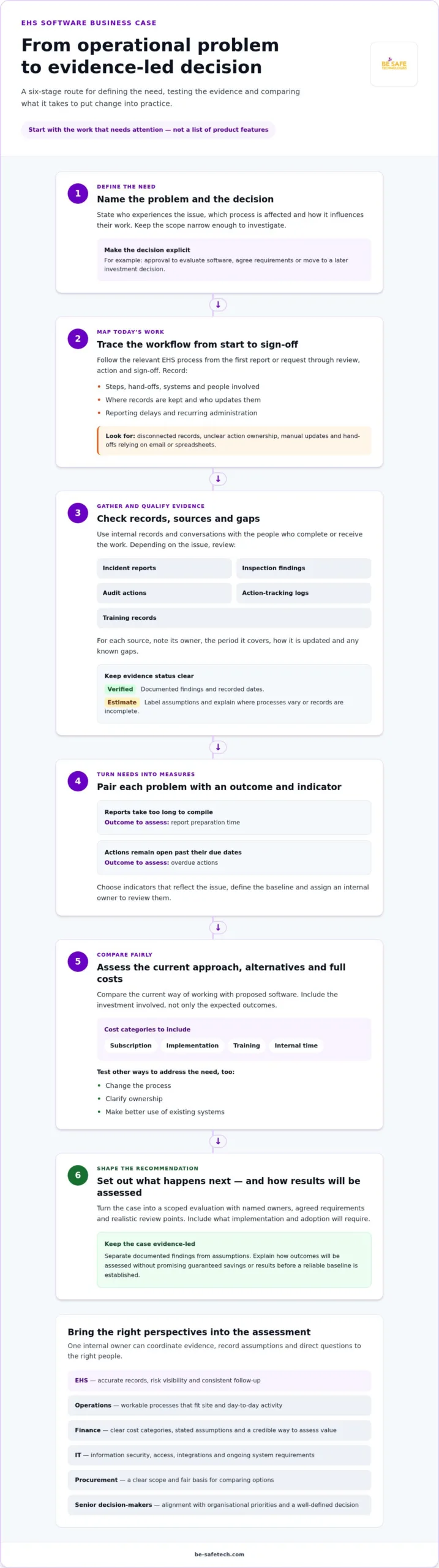
Begin by stating who experiences the problem and how it affects their work. Is it safety staff compiling reports, operational managers following up actions or employees trying to find the right form? Describe the current situation plainly, then set out the proposed change and the outcomes you intend to assess.
Make the decision explicit. It might be approval to evaluate software, agree requirements or proceed to a later investment decision. Separate documented findings, such as an observed reporting delay, from assumptions, such as the expectation that a digital workflow would reduce it. The following steps can show how to test both.
This is the starting point for how to build a business case for EHS software. Keep the scope narrow enough to investigate: name the affected process, the people involved and the evidence that would indicate improvement. Avoid promising a particular result before establishing a reliable baseline.
Who needs to support the proposal?
Involve stakeholders who can help assess the problem, feasibility and decision. Their priorities overlap, but they are not identical:
- EHS: accurate records, risk visibility and consistent follow-up.
- Operations: workable processes that fit site and day-to-day activity.
- Finance: clear cost categories, stated assumptions and a credible way to assess value.
- IT: information security, access, integrations and ongoing system requirements.
- Procurement: a clear scope and a fair basis for comparing options.
- Senior decision-makers: alignment with organisational priorities and a well-defined decision.
Assign one internal owner to coordinate evidence, record assumptions and direct questions to the right people. This person can keep the proposal consistent while giving each stakeholder space to raise concerns within their area of responsibility.
Build the evidence: link EHS needs to measurable outcomes
Move from a general concern to a clear picture of how work is done now. Trace relevant EHS workflows from the first report or request through review, action and sign-off. Note where records are kept, who updates them, which hand-offs rely on email or spreadsheets, how long reports take to prepare and which administrative tasks recur. This gives stakeholders specific details to assess instead of relying on impressions.
Speak with the people who complete and receive the work. An EHS lead may describe time spent assembling inspection records, while an operations manager can explain where follow-up becomes difficult. Compare these accounts with internal records where possible. If a figure is estimated or a process varies between sites, label that clearly rather than presenting it as a verified baseline.
Which evidence should you gather before proposing software?
Review records connected to the problem in scope. Depending on your organisation, these may include incident reports, inspection findings, audit actions, action-tracking logs and training records. For each source, note its owner, the period it covers, how it is updated and any known gaps. This helps distinguish differences in performance from inconsistencies in recording.
- Workflow: steps, hand-offs, systems and people involved.
- Timing: reporting or completion delays, based on recorded dates where available.
- Workload: recurring administration, with the source of each time estimate stated.
- Data quality: missing fields, duplicate records or inconsistent definitions.
Use this evidence to define which software functions are relevant to your proposal. A guide to health and safety compliance software can help frame the processes that may be managed digitally, while your own records show which needs should take priority.
How do you turn EHS needs into useful measures?
Pair each identified problem with an outcome and an indicator you can track. If inspection reports take too long to compile, measure preparation time. If actions remain open past their due dates, track overdue actions. Choose measures that reflect the issue, not simply data that is easy to collect, and assign an internal owner to review them.
Define the baseline in a sentence: “The EHS manager will record the median working days from inspection completion to report issue for all site inspections during the previous quarter, using dated inspection and report records.” This names the measure, period, population, source and owner. Adapt it to your process and available evidence.
Set a realistic target only after confirming the baseline, and label projected improvements as estimates to test, not proven results or guaranteed savings. If digitising health and safety workflows is relevant to your needs, Compliance Genie’s EHS software provides a mobile-first, cloud-based platform for health and safety processes, risk assessments and compliance management.
Compare the current approach with EHS software fairly
Use a consistent comparison to show what would change, what it would require and what remains uncertain. Set out the current process alongside a proposed software-supported process, using the same business need and measures for both. This keeps the case grounded in your organisation’s work rather than a general list of product features.
A simple comparison can cover:
- Process: how the task is handled now and how the proposed workflow would operate.
- Costs: current attributable effort alongside software subscription, implementation, training and internal time.
- Benefits: potential financial effects and non-financial outcomes, such as clearer oversight or easier access to records.
- Risks and assumptions: issues such as adoption, data migration or a change in responsibilities, with evidence noted for each.
- Evidence: the source for each cost, expected outcome or risk, and whether it is verified or still needs testing.
Keep direct financial effects separate from operational or assurance benefits. For example, assess time spent preparing reports using recorded staff time and an agreed method for valuing it. Easier access to records may matter to managers, but describe it as an operational outcome unless you have a defensible way to quantify its financial effect.
How should you assess costs, benefits and assumptions?
Record one-off and recurring costs separately, using current figures that relate to the proposal. Include staff time for evaluation and training as well as software charges, and state the period each figure covers. Don’t treat an estimate as a confirmed cost; identify who supplied it and what could change it.
For each projected benefit, write down the calculation method, measurement period and assumptions beside the estimate. ROI depends on verified costs, stated assumptions and measured benefits. If evidence supports different inputs, model cautious, expected and favourable scenarios. If it doesn’t, show the uncertainty rather than creating precise-looking projections.
How can you compare software options against business needs?
Turn the agreed needs into criteria that can be assessed consistently, such as workflow fit, usability, reporting and information security. Give each criterion an internal decision owner, then record the evidence and any limitation for each option. Where risk-assessment workflows are in scope, this health and safety risk assessment software guide can help frame the requirements to test.
Use the same practical scenario for each option, such as recording an inspection finding, assigning a follow-up action and producing a report. Note where the process needs configuration or a change to existing practice, and include that work in the assessment. This makes the comparison more useful than counting features alone.
That structure is central to how to build a business case for EHS software. Compliance Genie is a mobile-first, cloud-based platform for health and safety processes, risk assessments and compliance management. Assess it against the criteria you have defined.
How to write and present your EHS software business case
A clear proposal helps leaders understand the decision, the evidence behind it and what approval would make possible. Keep the main document easy to scan, with supporting detail available for people who need to examine costs, assumptions or technical requirements. A useful sequence is:
- Define the need: describe the affected process, people and operational issue.
- Gather evidence: set out the records and stakeholder input that support the case, including any gaps.
- Assess options: compare software and other practical responses against agreed requirements.
- Model value: present attributable costs, potential benefits, assumptions and uncertainties.
- Recommend action: state the decision sought and the next step if it’s approved.
The executive summary should lead with the decision required, then give the rationale and the outcomes the organisation intends to assess. Make the main uncertainties visible rather than burying them in an appendix. The aim is not to claim that the proposal removes every risk; it is to give leaders a sound basis for deciding whether to proceed, test further or take another route.
What should the written proposal contain?
Organise the supporting case around the problem, evidence, options, costs, benefits, risks and recommendation. Use a concise measure plan to show how progress will be assessed:
- Measure and baseline: what will be tracked and the current reference point.
- Target and owner: the intended outcome and the person responsible for monitoring it.
- Review date: when the measure will be checked and discussed.
Include implementation ownership and the work needed to prepare processes, records and users. Explain how adoption will be supported and assessed, and set out relevant information-security questions for IT to review. If audit workflows are in scope, account for how they will be handled during implementation. This digital audit checklist software implementation guide can help inform that part of the proposal.
Close with a precise approval request. For example, specify whether leaders are being asked to authorise a scoped evaluation or a further investment decision, and state what work depends on that approval.
How should you prepare for leadership questions?
Expect questions about affordability, implementation effort, user adoption and how value will be measured. Keep a source beside each important figure and label its confidence, such as verified, estimated or awaiting confirmation. If an estimate depends on staff time or participation, explain that dependency plainly.
Set review points before implementation begins, with an owner for each measure and a route for raising issues. Agree what would prompt a change in approach, such as poor workflow fit, adoption concerns or costs differing from approved assumptions. This makes the recommendation accountable without presenting forecasts as guaranteed outcomes.
For a practical example of software that supports digitised health and safety processes, explore Compliance Genie.
From business case to EHS software decision: agree practical next steps
Approval should lead to a defined evaluation, not an open-ended search for features. Turn the decision into a short plan with a named internal owner, agreed requirements, people to involve and review points. Confirm what the organisation is evaluating, which workflows are in scope and what evidence will inform the final recommendation.
Use scenarios drawn from real work. For example, assess how a user would record an inspection finding, assign an action, access a risk assessment or prepare a report. If mobile access matters to staff working across sites, include it in the scenario. Observe whether intended users can complete the task and note any steps, permissions or changes to existing processes that need further assessment.
How can you assess whether a platform fits the case?
Compare what you observe with the requirements and measures set out in the approved proposal. Assess workflow fit, usability for the people expected to use the system, reporting needs and your organisation’s information-security requirements. Be-Safe’s Compliance Genie is a mobile-first, cloud-based EHS platform for digitising health and safety processes, risk assessments and compliance management. Assess its relevance against your defined needs rather than assuming a particular outcome.
Record findings consistently. For each requirement, note the evidence, any gap, related dependency and who would own the next action. A feature that appears suitable may still depend on decisions about data, access, responsibilities or user training. Include those dependencies in the recommendation so decision-makers can see the work involved as well as the potential fit.
How should you plan review after implementation?
Before implementation, assign an owner to each selected measure and agree when it will be reviewed. Use the same definitions and data sources as the baseline where possible, so changes can be compared on a like-for-like basis. If the process or data collection method changes, record that too. Otherwise, a difference in results may reflect measurement rather than an operational change.
At each review, compare actual results with the baseline and target, and document any changes to assumptions. Ask users where workflows are clear or difficult, then use their feedback to refine processes and training. If results fall short, identify whether the cause is system fit, adoption, process design or an unrealistic assumption before deciding what to adjust.
This closes the loop in how to build a business case for EHS software. The original proposal sets the decision criteria, the evaluation tests fit, and the review checks whether expected outcomes are emerging. Keep the next action proportionate to the evidence, whether that means moving forward, adjusting the scope or reviewing the case again.
To consider a platform against your agreed requirements, explore Compliance Genie.
Make the next decision a practical one
Approval isn’t the end of the business case. It’s the point where your organisation can test its expectations against real use, learn from the results and decide what to improve. Keep that learning loop in view from the outset: assign responsibility for reviewing progress, give users a way to raise friction, and make space to adjust the approach if the evidence changes.
The discipline behind how to build a business case for EHS software is making a decision that can be explained and revisited, rather than relying on optimistic forecasts. Start with the scope and measures your stakeholders have agreed, then assess whether the proposed platform supports the work those measures relate to. Compliance Genie can be assessed against those requirements as part of the evaluation.
Explore Compliance Genie and assess how its health and safety workflows align with your organisation’s priorities. Use the agreed requirements and evidence to decide on the next step.
Frequently Asked Questions
How long should a business case for EHS software be?
There’s no fixed length; the document should match the size of the decision and the approval process. A short proposal may suit a limited evaluation, while a broader change may need more supporting detail. Keep the opening section readable for leaders who need to make the decision, and place detailed calculations, process maps or evidence extracts in appendices. A reader should be able to understand the request without working through every supporting record.
Can a small business justify investing in EHS software?
Yes, a smaller organisation can justify it if the case addresses a specific pressure it experiences. For example, it might examine whether staff spend time chasing inspection actions across email and spreadsheets, or whether records are difficult to retrieve when a manager needs them. Use the organisation’s own evidence and include the time needed to introduce a new process. A practical approach to how to build a business case for EHS software starts with local needs, not assumptions about large businesses.
How much does EHS software cost in the UK?
There’s no single figure that applies across the UK market because suppliers, scope, users and implementation needs differ. Use current public pricing where available or figures provided for the option being assessed, and note what each amount covers. For a fair comparison, show recurring charges separately from one-off work, training and staff time. Avoid treating an indicative figure as a confirmed quote, and assess the full expected cost against outcomes your organisation can measure.
Does EHS software guarantee legal compliance?
No. Software can support the organisation’s processes by helping staff manage information, records and follow-up, but it can’t guarantee that every relevant requirement is met. People still need to apply appropriate judgement and carry out their responsibilities. Avoid wording in the business case that promises compliance as an automatic product outcome. Instead, describe the specific processes the platform supports, and have statements about UK requirements checked against current, authoritative sources before approval.
What is the difference between EHS software and health and safety software?
EHS usually stands for environment, health and safety, while health and safety software may focus on workplace safety tasks. The labels aren’t a reliable guide to a platform’s exact functions, so assess what it supports in practice. For example, if your proposal covers risk assessments and inspections but not environmental processes, define that boundary clearly. This helps prevent stakeholders from comparing options against different expectations simply because the products use different terminology.
How can you show whether EHS software delivered value after purchase?
Review agreed measures using the same definitions and data sources used to assess the original position, then explain any changes that affect the comparison. For example, if the organisation changes how it records actions, note that before interpreting a shift in overdue items. Consider user feedback alongside numerical results, since a process may appear improved on paper but remain difficult to follow. If outcomes differ from expectations, investigate the cause before deciding whether to adjust the workflow or the measures.