



Using Safety Software Across Transport and Logistics Operations
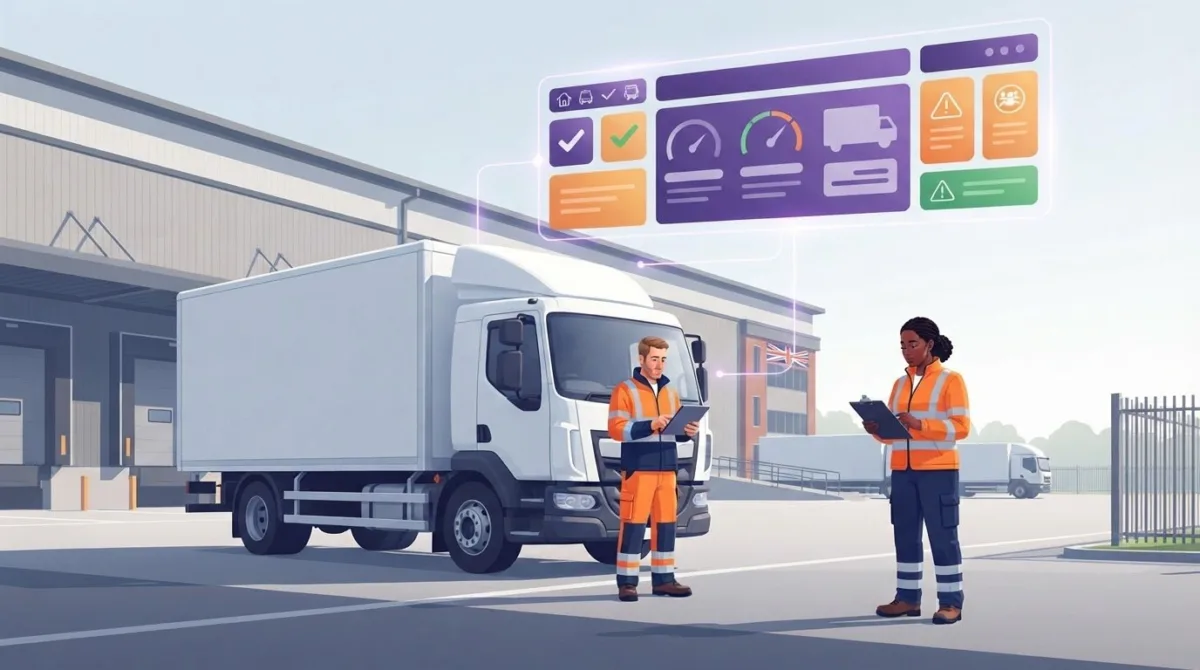
Transport safety depends on more than the vehicle. Logistics and transport safety software can bring inspection records, risk information and incident reports into a clear process, helping teams identify issues and respond with better-organised information.
Fleet checks, cargo security and work on the move create different demands. Safety processes need to fit daily operations without adding unnecessary administration. This article explains how software can support these tasks and help businesses manage transport risks consistently.
Learn how digital tools can support fleet inspections, emergency response, cargo security and mobile field work, alongside wider safety measures to protect people, vehicles and goods across UK transport and logistics operations.
Key Takeaways
- See how digital inspection records can make fleet checks easier to organise and review.
- Understand how cargo security depends on joined-up physical, data and incident-response measures.
- Explore how mobile tools can help drivers and field staff record changing conditions while working.
- Learn how safety measures can support people, vehicles and goods across transport operations.
- Find out how software can bring operational information together to help teams identify risks and plan their response.
Fleet inspections and compliance checks
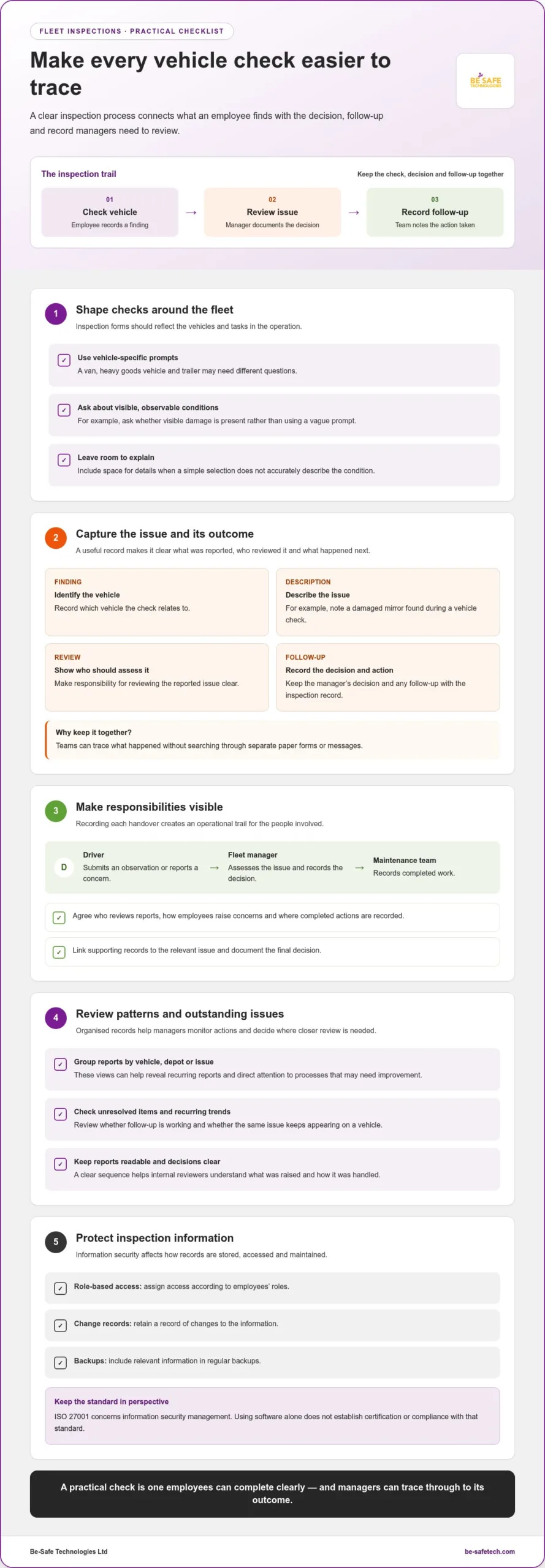
Fleet inspections make vehicle checks consistent and create records for managers to review. Digital processes can link a reported issue with its follow-up, giving teams a clearer view across vehicles and depots.
For UK operators, the practical test is whether employees can complete checks clearly and managers can trace what happened next.
Fleet inspection processes
A fleet inspection is a structured check of a vehicle’s condition, with findings recorded for review and action. A clear process helps teams identify and address reported defects before assigning the vehicle further work.
For example, an employee records a damaged mirror during a vehicle check. The record identifies the vehicle, describes the issue and shows who should review it. A manager can then document the decision and follow-up, rather than search through separate paper forms or messages.
Inspection forms should reflect the vehicles and tasks in the operation. A van, heavy goods vehicle and trailer may need different prompts. Keep questions specific and observable, such as whether visible damage is present. Include space for an explanation when a simple selection does not accurately describe the condition.
Managers can compare completed checks by vehicle or depot to identify recurring reports. If the same issue appears repeatedly on one vehicle, the pattern may warrant closer review. Keeping the inspection and decision together also gives internal reviewers a clear sequence to follow.
Information security affects how inspection records are stored and accessed. Assign access according to employees’ roles, retain a record of changes and include relevant information in regular backups. ISO 27001 concerns information security management, but using software alone does not establish certification or compliance with that standard.
Regulatory reporting and monitoring
Compliance reporting organises records so managers can monitor processes, review actions and prepare for internal checks. A useful report shows not only what employees raised, but also how the organisation handled it.
For example, a manager can review unresolved vehicle issues, assign responsibility and record the outcome. Reports grouped by vehicle, depot or issue can reveal recurring patterns and help focus attention on processes that need improvement. Consistent records also make decisions easier to explain during an internal review.
Keep responsibilities clear for everyone involved. A driver may submit an observation, a fleet manager may assess it, and a maintenance team may record completed work. Recording each handover creates an operational trail without implying a specific legal framework.
Agree who reviews reports, how employees raise concerns and where completed actions are recorded. Reviewing outstanding items and recurring trends helps managers assess whether follow-up is working. Keep reports readable, link supporting records to the relevant issue and document the final decision. This gives the team a practical basis for monitoring processes and improving consistency.
Cargo theft and other supply-chain threats
Cargo can be stolen during freight journeys, at ports or inside warehouses, so visibility should extend across each handover. For example, a pallet moving from a loading bay to a carrier can be logged at dispatch and receipt. This helps teams pinpoint where a discrepancy arose instead of relying on recollections after the event.
Threats also include vehicle accidents, delayed deliveries, carriers’ financial difficulties and cyberattacks. A compromised system can disrupt a supply chain and expose sensitive information. Treat physical security and data protection as connected tasks: a secure warehouse does not protect shipment records if access to transport platforms is poorly controlled.
Building supply-chain visibility
Visibility means having useful information about goods, vehicles and handovers across the supply chain. GPS tracking can show a vehicle’s location, while RFID tags can record cargo movement through a warehouse or loading area. Together, these tools can help staff locate a misplaced item or respond when a vehicle deviates from its planned route.
Tracking helps only when teams know how to act on the information. Set out who reviews location changes, who contacts the carrier and where staff record the outcome. If a delivery is delayed, for example, a dispatcher can log the revised arrival, notify the receiving site and update the shipment record. This creates a clearer trail than separate calls and manual notes.
Control access to shipment data. Encryption can protect sensitive information as it moves between platforms, while regular backups help preserve records if systems are disrupted. Warehouses can pair these digital measures with CCTV at loading docks, where footage may help clarify unauthorised access or a disputed handover.
Planning for supply-chain resilience
Resilience means preparing the operation to limit disruption and restore essential activity after an incident. A written response plan should identify who makes decisions, how staff report threats and which records help the team understand what happened. For example, suspected cargo theft may require securing tracking details, notifying responsible colleagues and documenting affected consignments.
Prepare for different disruptions, not just theft. A carrier delay, damaged goods or unavailable digital system can each affect delivery plans. Keep alternative contacts, escalation routes and essential shipment details in a controlled location. Review the plan with employees responsible for dispatch, transport coordination and goods receipt so everyone understands their role.
- Record each custody handover and note discrepancies promptly.
- Set clear ownership for reviewing tracking information and escalating concerns.
- Keep incident procedures and essential shipment records accessible to authorised staff.
These steps connect monitoring with action. When GPS, RFID, CCTV and incident records support the same response process, teams can trace goods more clearly and make informed decisions during disruption.
Mobile tools for drivers and field staff
Mobile tools let drivers and field staff record safety information away from the depot, helping office teams act on current reports. Compare platforms for mobile usability, relevant features and integration fit. Consider risks such as unreliable connectivity, incomplete entries and overlooked alerts.
Mobile tools for field staff
Mobile tools let employees access and submit operational information while working on the move. They are useful when a driver needs to report a hazard at a delivery site rather than rely on memory after returning to base.
A field report might describe a blocked loading area, damaged equipment or a change in road conditions. Clear forms help staff provide consistent details, while a central record lets managers review the issue and decide what action is needed. Keep prompts concise so reporting fits the task without distracting from safe work.
Driver apps and logistics
Driver apps connect information from the road with company logistics processes, helping dispatch teams and drivers work from the same operational picture. For example, a driver can report a delay or site access problem, giving the office a reason to adjust delivery coordination.
An effective process defines what drivers should report, who reviews it and how updates reach relevant colleagues. Separate safety reports from routine delivery messages so hazards are easy to identify. Clear communication helps logistics teams coordinate around changing arrival times, vehicle issues or temporary route disruptions.
Driver and road transport risks
Driver and road transport risks include changing weather, traffic and road conditions, all of which can affect a journey. A diversion, poor visibility or congestion may mean a driver needs to pause and report a concern instead of continuing with the original plan without reassessment.
Software can organise reports and help managers spot patterns, but it cannot assess every roadside situation for a driver. Keep instructions practical: record the location, describe the hazard and follow the organisation’s agreed escalation process. Staff should prioritise safe driving over entering information while a vehicle is moving.
Software features and integrations
Features are the tools a platform provides; integrations connect it with other systems used by the operation. Compare options against actual tasks, such as submitting a hazard report, sharing an update with dispatch and keeping a record for later review.
Check that mobile screens are clear, the system supports the required reporting process and information moves effectively between connected tools. A feature list is of little use if employees cannot use the system reliably during a shift. Map one driver report from submission through management review, then identify where duplicate entry or missing information could occur.
Consider limitations as carefully as features. Poor network access can delay a report, while unclear forms may result in incomplete records. Set expectations for offline work, data access and staff training before introducing a new process. Managers should keep a clear route for urgent communication, since an app entry alone may not prompt an immediate response.
Transportation and logistics safety measures
Effective safety combines people, procedures and digital records across vehicles, sites and deliveries. The right software helps teams document hazards, analyse operational information and coordinate follow-up.
According to the World Health Organization, approximately 1.16 million people die each year as a result of road traffic crashes. For UK operators, this underlines why journey risks, vehicle condition and incident learning need practical attention.
Transport safety software functions
Transport safety software organises information about hazards, incidents, vehicle conditions and operational risks. It matters because managers can review connected records instead of piecing together separate forms and messages.
For example, a team can record a reported vehicle defect, assign follow-up and analyse repeat issues across its fleet. Other tools may monitor cargo conditions such as temperature, humidity or vibration through connected sensors. Software can also help identify problem areas in operational data, supporting earlier decisions and backup planning.
Types of safety software
UK logistics companies can consider fleet telematics, inspection and maintenance tools, health and safety systems, and cargo-condition monitoring. Each category meets a different operational need, so identifying the risk to manage helps narrow the options.
No single platform suits every transport operation. Compare software by category and task, such as recording vehicle checks, monitoring fleet activity or managing workplace hazards, rather than assuming one provider leads the industry.
Software prices depend on required modules, users, integrations and deployment scope; a quote request establishes the cost. These factors matter because a system for one depot may need different functions from one supporting several sites and transport processes.
Choosing and implementing software
Choosing and implementing software means matching its functions to operational risks, then introducing it through clear processes. A tool supports safer decisions only when employees can use it and managers act on its records.
- Map the need: identify tasks such as vehicle inspections, incident reporting or cargo monitoring, and note where information currently sits.
- Compare the fit: assess mobile access, reporting, data handling and integrations against those tasks. Use a real example, such as recording a defect and assigning action.
- Plan adoption: set responsibilities, train employees and agree how managers review reports. Start with a defined process, then collect feedback and adjust forms or workflows.
After implementation, review whether records are complete and actions are closed. For example, a manager can analyse recurring vehicle issues alongside driver reports, then adjust inspection prompts or operational processes. Documenting these decisions helps teams learn from incidents and maintain a clear record of follow-up.
What does logistics and transport safety software do?
Logistics and transport safety software brings operational safety information into a system teams can review and act on. It can help identify risks, organise reports, monitor recurring issues and prepare backup plans for transport disruptions.
For example, a depot team can record a near miss, note its location and describe the conditions. Managers can review it alongside other reports, identify a recurring hazard and assign follow-up. Keeping the report, action and outcome connected makes it easier to understand what happened and whether the response addressed the cause.
Useful systems support decisions across different stages of an operation. A reported road closure, vehicle issue or cargo-condition alert can affect a delivery plan, so teams need clear information about the issue and its operational impact. Software can bring those details together, flag areas requiring attention and support an alternative plan, such as changing the collection sequence.
- Capture: employees enter a hazard, incident or operational change using a defined reporting process.
- Review: managers assess the report, compare it with related records and identify patterns.
- Respond: a responsible person assigns an action, records the outcome and updates relevant colleagues.
- Learn: teams use past reports to refine procedures and prepare for similar disruptions.
The value comes from connecting information with responsibility. If a driver reports a damaged loading area, a manager needs to see the report, assign an action and record its resolution. If the same problem occurs at another site, grouped records can reveal a wider issue that individual messages might obscure.
Operational data also supports contingency planning. A logistics team can review delays, recurring hazards or supplier-related issues, then document alternative steps to keep essential work moving. This gives decision-makers an organised basis for assessing options and coordinating a response.
Information security is part of the picture. Transport records can contain sensitive operational details, so access controls should reflect employees’ responsibilities. Regular backups help preserve records if an incident affects systems, while clear procedures explain who can view, change or share information. These measures support continuity but do not replace security management.
A review of digital health and safety processes can help teams assess whether their processes use operational data effectively. Logistics and transport safety software can use this data to help companies identify potential risks and develop backup plans. It can also analyse large volumes of operational data to flag problem areas for earlier action.
Be-Safe Technologies Ltd: Compliance Genie – SaaS health and safety software
Be-Safe Technologies Ltd offers Compliance Genie, mobile-first, cloud-based SaaS health and safety software for digitising workplace processes and risk assessments. For transport teams seeking clearer oversight of safety records and assessments, it provides a practical way to bring those processes into a digital system.
Where contractor coordination is also part of the operation, Contractor Genie centralises contractor information and site-visit activity in one system. The two products address distinct needs: health and safety management and contractor coordination.
Consider these tools when your organisation is ready to digitise safety processes or organise contractor visits through software. To discuss your requirements, contact Be-Safe Technologies Ltd.
Turn your safety priorities into a practical plan
Start with a focused review of where information is delayed, duplicated or overlooked. Choose one operational process, such as recording a hazard or reviewing an inspection report, and map how information should move from the person reporting it to the person responsible for action.
This exercise gives your team a clear basis for assessing logistics and transport safety software. Involve both the employees who will use it and the managers who need to review records. Their input can help shape workflows for real working conditions, without adding steps that do not support decisions.
Set a practical first goal, such as clarifying ownership of follow-up, then review how the process works in use. A considered approach can help build stronger safety processes over time.
Contact Be-Safe Technologies Ltd to discuss your organisation’s software needs. A clear next step can make safety management easier to organise and improve.
Frequently Asked Questions
How does a transport and logistics software benefit companies?
Software helps companies organise safety information so managers can make clearer operational decisions. For example, a transport manager reviewing a near miss can identify whether it involves a particular vehicle, work activity or location, then direct the report to the right team. A shared system can also reduce separate spreadsheets and messages, making it easier to see who owns each follow-up and what information supports the decision.
What UK laws and regulations should transport safety software support?
Software should help an organisation manage records relevant to its health and safety responsibilities, vehicle operations and workforce activities. Requirements depend on the work carried out, vehicles used and risks identified. Useful functions include recording assessments, incidents, inspections, employee training and corrective actions, then retrieving records for internal reviews. The platform supports administration and evidence management; it does not itself establish compliance with applicable law.
How can software help manage driver risk, vehicle inspections and maintenance?
Software can connect driver reports with vehicle records and maintenance follow-up, giving managers a clearer view of unresolved issues. For example, if a driver reports a steering concern, the organisation can document it, assign a review and record the decision before changing the vehicle’s status. Managers can compare recurring reports across vehicles, identify patterns that need attention and keep related records together for later review.
How do transport safety software providers compare on features and integrations?
Compare platforms for mobile usability, relevant features and integration fit. Check whether they support inspection records, incident reporting, shipment visibility and clear follow-up processes.