



Riddor compliance software for identifying and recording incidents

The HSE estimates that employers report only around half of the RIDDOR-reportable non-fatal injuries suffered by employees. RIDDOR compliance software can help staff capture incident details consistently and flag potential reporting requirements, making important information less likely to be missed.
RIDDOR is the UK’s Reporting of Injuries, Diseases and Dangerous Occurrences Regulations 2013, according to UK Parliament. It requires certain work-related incidents to be reported to the Health and Safety Executive, so organisations need a clear way to assess incidents, keep records and follow up on actions. Managing these responsibilities alongside day-to-day safety work can feel demanding, particularly when information is spread across forms, emails and spreadsheets.
This article explains how software can support the process, from identifying incidents that may be reportable to maintaining records, tracking corrective actions and setting reminders. Software can organise information and workflows, but the organisation remains responsible for deciding whether to report and submitting required reports. Used appropriately, it can make incident oversight clearer and more manageable.
Key Takeaways
- Understand which workplace incidents may need reporting under the UK’s 2013 RIDDOR regulations, and why accurate records matter.
- See how assigning actions, tracking progress and setting reminders can help keep incident follow-up organised.
- Learn which software features can support incident identification and record-keeping, and how to assess what your process needs.
- Find out what affects the cost of RIDDOR compliance software in the UK, without relying on a one-size-fits-all estimate.
- Know the role software can play in preparing incident information, while reports are submitted through the HSE’s reporting route.
Records of reportable injuries, diseases and dangerous occurrences
According to UK Parliament, the UK’s Reporting of Injuries, Diseases and Dangerous Occurrences Regulations are the 2013 regulations. Organisations need records that distinguish internal incident logging from reports required under RIDDOR.
Record-Keeping and Reporting Obligations
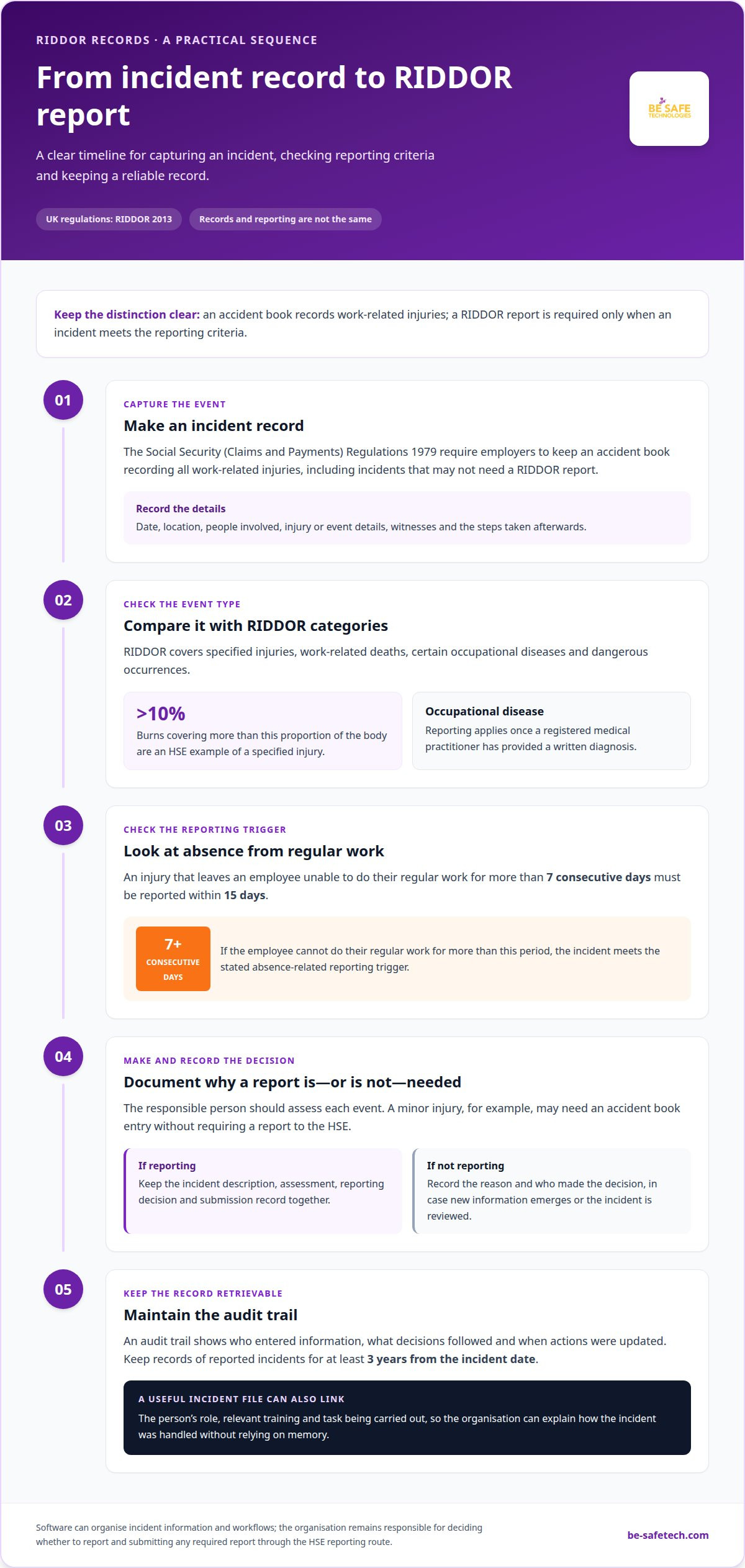
Legal record-keeping means documenting workplace incidents and reporting qualifying cases to the Health and Safety Executive. The Social Security (Claims and Payments) Regulations 1979 require employers to keep an accident book recording all work-related injuries. This gives the organisation a record of incidents, even when they do not meet RIDDOR reporting criteria. The responsible person should assess each event and keep the relevant record.
RIDDOR covers specified injuries, work-related deaths, certain occupational diseases and dangerous occurrences. The Health and Safety Executive includes burns covering more than 10% of the body among specified-injury examples. An injury that leaves an employee unable to do their regular work for more than seven consecutive days must be reported within 15 days. For occupational diseases, reporting applies once a registered medical practitioner has provided a written diagnosis.
An accident book entry and a RIDDOR report serve different purposes. An accident book records work-related injuries; a RIDDOR report is required only when an incident meets the reporting criteria. A minor injury, for example, may need recording without requiring a report to the HSE. Keep records of reported incidents for at least three years from the incident date so the organisation can retrieve its account later.
Audit Trails and Compliance Records
An audit trail records how an incident was handled, including who entered information, what decisions followed and when actions were updated. This helps an organisation explain its response and identify gaps in its process. For a reportable injury, keep the incident description, assessment, reporting decision and submission record together. A clear timeline also helps managers see whether information was reviewed promptly.
Records should explain the incident without relying on anyone’s memory. Include the date, location, people involved, injury or event details, witnesses and steps taken afterwards. If the decision is not to make a RIDDOR report, record the reason and who made the decision. This creates a useful account if new information emerges or the incident is reviewed.
Employee competence and job records add context to an investigation. A person’s role, relevant training and the task they were carrying out can help explain how an incident occurred. For example, records may show whether an employee was assigned to operate equipment or was working under supervision. Keep these details linked to the incident record rather than scattered across separate files.
Using RIDDOR software incorrectly can result in incomplete records, missed reporting deadlines or an unsuitable reporting decision. Failing to report an incident that RIDDOR requires an employer to report is a criminal offence and can carry unlimited fines or imprisonment for up to two years.
Corrective actions and close-out tracking
After an accident or near miss, corrective actions turn investigation findings into practical changes. Link each identified cause to an action, an owner and evidence of completion. This keeps safety follow-up connected to the incident, rather than leaving recommendations in meeting notes or email threads.
Start risk analysis by describing what happened and what could happen again. A worker tripping over a loose cable, for example, may point to poor cable routing, an obstructed walkway or an unclear inspection process. Each possible cause suggests a different control. Recording the evidence and reasoning helps the organisation address the source of risk, not just the immediate injury.
An action plan should state the change required, who is responsible and how completion will be assessed. For a cable-related incident, a facilities manager might reroute the cable while a supervisor updates walkway inspections. The record can specify the evidence needed, such as a completed inspection entry or a photograph of the changed layout. Clear ownership reduces ambiguity between teams.
Prioritise actions according to the potential harm and the likelihood of recurrence. A hazard that could cause specified injuries needs attention appropriate to that risk, while a lower-risk housekeeping issue may follow a different timetable. Record the priority and any interim control, such as restricting access until a repair is complete. This gives managers a reasoned view of outstanding work.
Corrective action tracking follows each item from assignment through review and close-out. Useful fields include the incident reference, action owner, target date, current status and completion evidence. A reminder can prompt the owner before a due date, while an overdue status shows managers where intervention may be needed. If a proposed fix fails inspection, keep the action open and record the next step.
Close-out should confirm that the control is in place and works as intended. After changing a walkway inspection routine, for instance, a supervisor can review a later inspection record and note any remaining obstruction. Closing an action simply because someone marked it complete weakens the record. A brief review can also reveal repeat issues across accidents, near misses and occupational health reports.
Over time, grouped action records can reveal recurring causes, such as repeated equipment faults or unclear task instructions. Managers can use those patterns to review procedures, training or maintenance arrangements. A digital health and safety system can keep incident actions and their follow-up together, making the status of unresolved work easier to see.
RIDDOR compliance software features
Useful incident software should support the work around a report, not merely store a form. For a UK organisation, this means capturing consistent incident details, helping staff assess what happened and connecting records to follow-up. A clear platform makes each stage visible, from the initial notification through review and learning.
Start with structured incident reporting. A form can prompt staff to record the date, location, people involved, event type, injury or illness and immediate response. Categories for injuries, diseases and dangerous occurrences help keep entries consistent. A report of a machinery-related injury, for example, can include the task, equipment and circumstances instead of a brief note that lacks essential context.
Assessment prompts can help the responsible person identify information relevant to RIDDOR criteria. They might guide the reviewer to record whether an injury appears to be specified, whether an employee’s work was affected or whether a dangerous occurrence took place. These prompts support consistent review, but cannot replace judgement or determine a legal reporting decision on their own.
Evidence management is another practical feature. An incident record can bring together witness accounts, photographs, supporting documents and follow-up notes under one reference. If a worker reports an occupational condition such as tendonitis, relevant information can be kept together while the organisation reviews the case. Access controls can help restrict sensitive employee details to appropriate users.
Look for workflow tools that show who is responsible for each review and what remains outstanding. An incident, for example, can move through statuses such as reported, under assessment, action required and closed. A task list can show the assigned person and due date, while reminders flag pending work. This makes the process easier to monitor across sites or teams.
- Search and filters: Find records by site, date, incident type or status, rather than scanning separate files.
- Record history: See when information was added or changed, and which user made the update.
- Reporting views: Group incidents by category or location to help managers spot recurring patterns.
- Exportable records: Prepare a clear incident file for internal review or a reporting submission.
These features are most useful when they connect reporting, review and improvement in one workflow. A dashboard showing open assessments alongside overdue actions, for instance, helps a manager prioritise work without treating every entry as reportable. Software can organise information and prompt consistent steps, but the organisation remains responsible for accurate records and appropriate decisions.
How much does RIDDOR compliance software cost in the UK?
There is no single standard UK price for incident and RIDDOR management software. Costs depend on the organisation’s requirements and are set out in a bespoke quotation. Factors such as software choice, user numbers, contractor volume, and onboarding and training needs inform the quotation. A single-site office may need a different setup from a business coordinating records across several workplaces.
Define the work the system should support before comparing options. Is the main need to capture accidents, assess possible RIDDOR cases, assign follow-up actions or manage health and safety records more broadly? A system for incident logging differs in scope from one that supports review workflows and oversight across departments. A clear requirements list helps make the quotation relevant.
The intended user group also shapes the proposed setup. A process used by health and safety managers differs from one involving employees, supervisors and site managers. The number of workplaces matters too: multiple sites may need distinct access arrangements and central oversight. Consider how incident information should move between staff and decision-makers, rather than focusing on user totals alone.
Include setup requirements in the discussion. Transferring existing incident information from spreadsheets or paper forms may require planning, as may configuring categories and review steps. Ask how this work is reflected in the quotation. For RIDDOR compliance software, compare the full scope offered, including ongoing access and any stated setup or onboarding work, rather than viewing a headline figure in isolation.
Compare proposals against the same requirements. Check whether each quote explains:
- The users and locations covered.
- The incident, assessment and action-tracking functions included.
- Any data transfer or configuration work.
- The subscription period and payment frequency.
- How changes to the organisation’s requirements affect the quoted scope.
A useful comparison looks at what each proposal covers. One system may include incident records and corrective-action tracking, while another may cover record-keeping alone. These are not directly comparable. Ask for the scope and relevant costs to be clearly set out, so decision-makers can understand the differences.
Also consider the time spent on the existing process. Staff may need to locate paper forms, chase action updates or prepare reports from spreadsheets. Estimate that effort using your organisation’s own experience, then weigh it against the proposed software scope. This gives a more grounded view of value than relying on an assumed industry saving.
Ultimately, assess the quotation against the workflow your organisation needs. A defined user group, site count and feature list make it easier to compare options and choose a suitable system.
Can RIDDOR software submit reports directly to the HSE?
Some systems can help prepare report information, but the HSE online reporting portal is the primary route for submitting a UK RIDDOR report. A saved incident record or completed draft is not the same as a report sent to the Health and Safety Executive. The organisation remains responsible for making the report through an accepted route and retaining its records.
Software can bring incident details together before submission. A reviewer can organise the date, location, people involved, event description and relevant evidence, then use those details to complete the appropriate HSE report. This reduces the need to search repeatedly through emails or paper notes. It does not, by itself, confirm that a report has reached the HSE.
For a reportable death, specified injury or dangerous occurrence, the HSE must be notified immediately, with a full written report submitted within 10 days. For an employee unable to do their regular work for more than seven consecutive days, the report is due within 15 days. These deadlines make it useful to record the incident date and reporting progress clearly.
RIDDOR incidents can be reported online, by phone or by post using the appropriate HSE forms. A phone call does not replace a required written report. If an organisation notifies the HSE by telephone, for example, it still needs to submit the written information required for that incident. A workflow should distinguish notification from written submission.
Before treating a report as complete, the responsible person can record:
- The reporting route used, such as the HSE online portal.
- The date of notification and any written submission.
- The person who submitted the report on the organisation’s behalf.
- Any reference or confirmation details received.
- Where the submitted report and supporting records are stored.
This information creates a practical audit trail. If an incident record says “submitted” but has no date or supporting confirmation, managers may struggle to establish what happened. Recording submission separately from investigation and corrective actions helps colleagues see what remains outstanding.
When assessing software, distinguish preparation tools from direct HSE integration. A platform may organise incident information, prompt reviews and track deadlines; direct transmission is a separate capability. Do not assume an automated status means the HSE has received a report. Clear process ownership remains essential, even when digital workflows support reporting.
To organise incident information and follow-up in one workflow, explore health and safety software.
Be-Safe Technologies: Compliance Genie – SaaS health and safety software
Compliance Genie from Be-Safe Technologies Ltd is cloud-based health and safety software for organisations that want to manage safety processes and risk assessments digitally. Consider it when incident information, assessments and follow-up are spread across paper records or spreadsheets and a more organised digital process would help.
Compliance Genie is a mobile-first, cloud-based platform for managing health and safety digitally. It supports incident recording and safety workflows alongside an organisation’s RIDDOR assessment and HSE submission process. Responsible people still make reporting decisions.
For contractor and site-visit management, Contractor Genie is a separate SaaS option. To discuss how Compliance Genie could support your organisation’s health and safety processes, contact Be-Safe Technologies Ltd.
Make incident oversight part of everyday practice
The next step is to decide how incident information should move through your organisation. Agree who reviews new reports, who assesses whether they need further action and how managers will see unresolved work. Clear ownership helps staff understand what happens after an incident is recorded, rather than treating software as a standalone compliance measure.
When assessing RIDDOR compliance software, consider how it will support these responsibilities alongside your wider health and safety processes. The approach should fit how your teams work and give decision-makers a clear view of outstanding tasks. Be-Safe Technologies offers Compliance Genie for health and safety management and Contractor Genie for contractor management. Request a demo or pricing to discuss your organisation’s needs and next steps.
Contact Be-Safe Technologies to explore a practical way forward for your safety processes.
Frequently Asked Questions
What is RIDDOR and why is it important?
RIDDOR is a legal framework for reporting certain work-related events to the relevant regulator. It matters because external reporting gives regulators information beyond an organisation’s internal records. For safety managers, deciding whether to report is also an opportunity to check whether incident procedures work as intended. A report does not replace an internal investigation or learning; both help inform future risk controls.
How does software help with RIDDOR compliance?
Software can make incident information easier to share between the person reporting an event and the manager reviewing it. A staff member at one site, for example, can submit details for a central safety team to review. This can help organisations with dispersed teams apply a consistent internal process. Software supports coordination, but cannot take legal responsibility for the organisation’s reporting decisions.
What are the RIDDOR reporting deadlines and record-keeping requirements?
The over-seven-day incapacity period excludes the day of the accident and includes weekends and rest days. This helps avoid miscounting when an employee’s working pattern differs from a standard week. Record the accident date and dates of absence clearly, so the responsible person can assess the timeline against the reporting criteria explained earlier.
What features should RIDDOR compliance software include?
Prioritise features that fit the organisation’s reporting process rather than choosing a system by its feature count. Check whether staff understand the terminology, whether the reporting form suits the incidents they encounter and whether review stages reflect internal responsibilities. During a demonstration, use a realistic example and note where users hesitate or need help. Suggested classifications should support review, not replace responsible judgement.
Which RIDDOR reporting software providers are available in the UK?
UK organisations can consider standalone incident-reporting tools or wider health and safety platforms that include incident management. The right category depends on whether the need is limited to incident records or forms part of broader safety management. This article focuses on the functions and processes to assess, rather than listing suppliers. Compare options against the organisation’s specific workflow and oversight requirements.
How do incident management software tools compare in features and ease of use?
Judge ease of use by how readily different staff roles can complete their part of the process. Consider whether a worker can describe an event in plain language and whether a manager can understand the record without extra explanation. Compare the effort involved in handling routine and unusual incidents alike. A tool suited to one team’s terminology may need adapting for another department.
How to choose and implement RIDDOR compliance software for a UK organisation?
Assign clear ownership before introducing a new system. Appoint a system owner to maintain internal guidance, manage access and collect user feedback. Brief staff on what information to record and whom to notify when an event occurs. After launch, review feedback and recurring difficulties, then refine internal instructions where needed. This keeps the software aligned with working practices as responsibilities or organisational arrangements change.