



COSHH management software for UK chemical safety
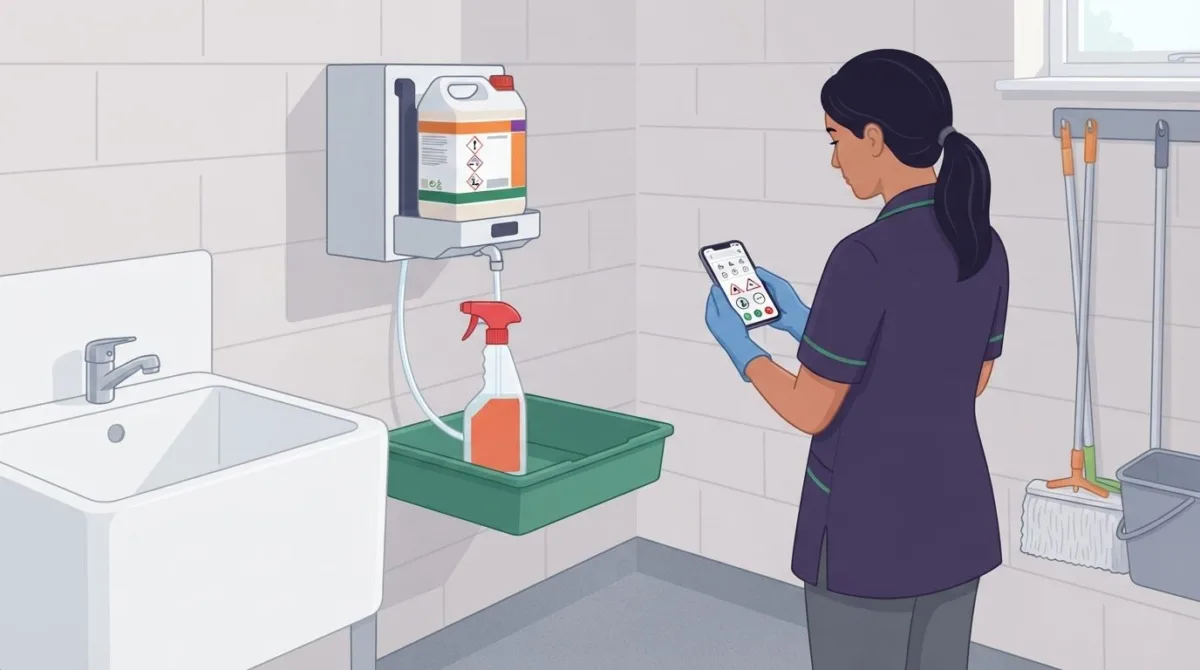
COSHH software can organise chemical safety, but it does not replace the assessment itself. COSHH management software in the UK brings substance records, assessment templates, control measures and reporting tools together, helping businesses keep information accessible and manage processes consistently.
It’s understandable to want a clear system when safety data sheets, chemical inventories and workplace procedures all need attention. A safety data sheet provides important information about a substance, but it isn’t a risk assessment. The Control of Substances Hazardous to Health Regulations 2002 require employers who use or produce hazardous substances to carry out COSHH assessments, according to The National Archives.
This guide explains what COSHH software does and how it can support assessments, control measures, compliance, chemical inventories and safety data sheets. It also covers when a digital system may suit a small UK business, how to assess whether it fits your needs, and how software can help organise reviews and updates when substances or work processes change.
Key Takeaways
- Understand what COSHH software can organise, and why a safety data sheet alone is not a risk assessment.
- Learn which details an assessment should capture to connect hazardous substances, potential exposure and control measures.
- See how a structured chemical inventory can help keep substance records and safety data sheets easier to manage.
- Assess whether a digital system suits your business by considering the number of substances, sites and the effort involved in keeping records current.
- Explore how health and safety software can support the way your business manages assessments and related processes.
What is a COSHH Assessment Software?
COSHH software helps teams create, organise and review workplace assessments for hazardous substances. Look for clear substance records, practical assessment fields, review reminders and accessible document storage.
Creating and storing digital assessments
A digital risk assessment brings task and substance information into a structured record. It can prompt the person completing it to identify who may be exposed, how exposure could occur and which controls apply. Templates support consistent records, but the answers must reflect the actual workplace and work method.
Choose a system that stores each assessment alongside relevant safety data sheets, task details and control information. For example, a cleaning task might involve a product, its dilution method and the protective measures used. Searchable records help authorised staff find the right assessment without sorting through separate paper files.
Reviewing and updating assessments
Assessments need review when the work changes. A new substance, revised process, incident or new information can affect the risks and controls recorded. Under regulation 6(3) of COSHH, assessments must be reviewed regularly and whenever circumstances change. A reminder feature can prompt a review, whilst version history helps show what changed and when.
Keep the current version easy to identify, and retain previous versions as a record of decisions. The review should check whether the substance, people exposed, work method and control measures remain accurate. Under regulation 7 of the Management of Health and Safety at Work Regulations 1999, UK employers must appoint competent people to help them comply with health and safety requirements, according to The National Archives (legislation.gov.uk).
Features and system integration
Useful features include assessment templates, substance records, document storage, review reminders and reporting. The right combination depends on how your workplace manages chemicals and who needs access. A safety data sheet (SDS) describes a substance and provides safety information, but it is not a risk assessment. The assessment considers how that substance is used in a particular task.
Integration with existing health and safety systems, HR platforms or mobile devices varies by software. Before choosing COSHH management software, establish which records need to connect and whether staff need to view or update assessments on mobile devices. Compare how clearly each system supports those workflows. A competent person should review assessments for accuracy and workplace relevance.
A COSHH assessment is required when hazardous substances are used, stored or handled at work and there is a risk of harm to people in the workplace.
Set a review schedule of at least once a year, and review again whenever a new substance is introduced. Update the assessment when substances or work processes change, new information becomes available or an incident occurs.
Control measures and implementation tracking
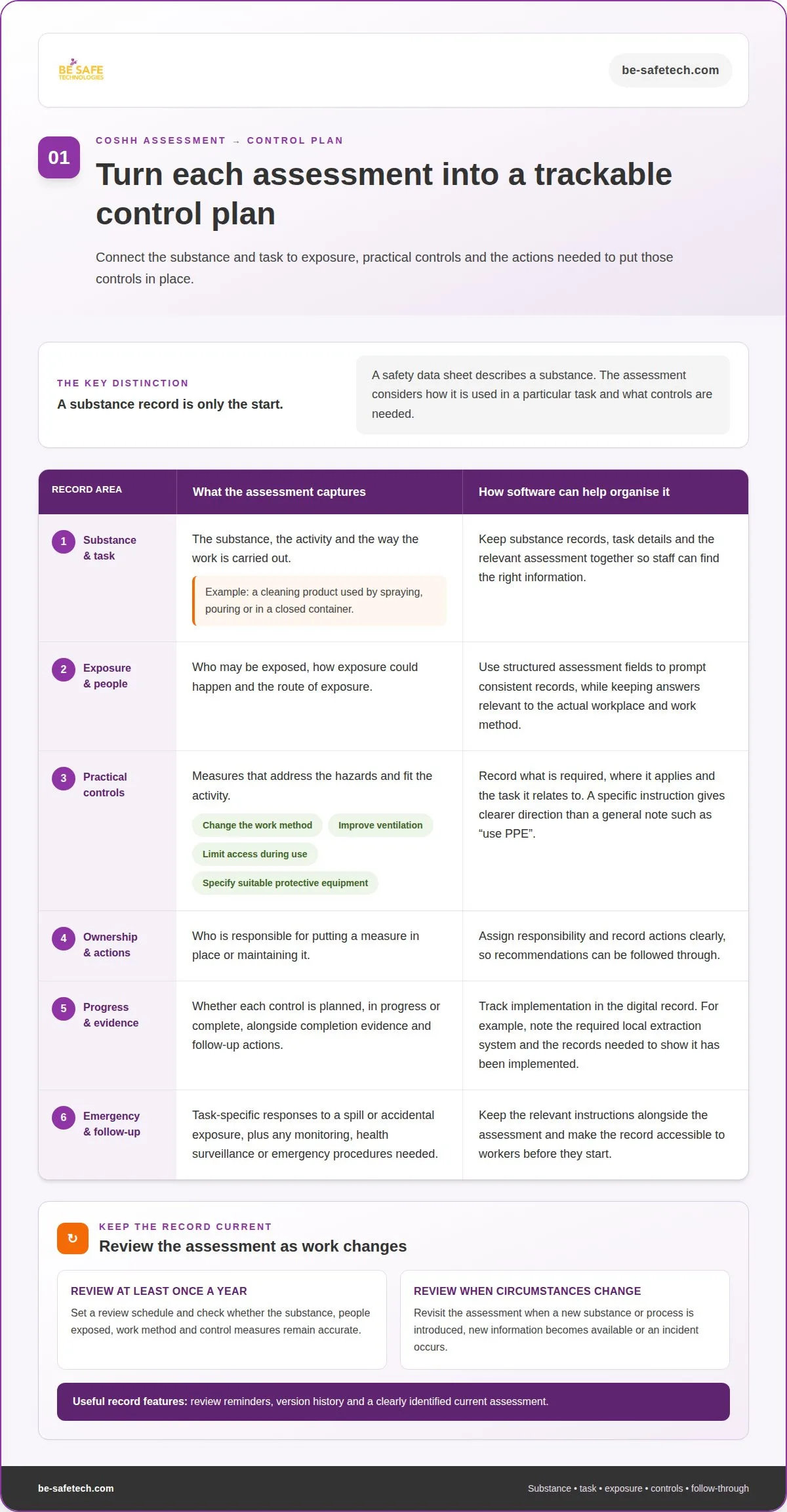
A useful COSHH assessment connects each hazardous substance to its workplace task, likely exposure and practical controls. It should identify who may be exposed, how exposure could happen, and whether monitoring, health surveillance or emergency procedures are needed. Assessment software can keep these details together, helping responsible staff manage controls from assessment through implementation.
Start by describing the activity, not just naming the product. For example, a substance used during cleaning may create different exposure scenarios when sprayed, poured or handled in a closed container. Record the route of exposure and the people potentially affected, such as staff completing the task or others working nearby. These details help make control measures specific to how work actually takes place.
Choose measures that address the identified hazards and fit the task. Depending on the assessment, these might include changing the work method, improving ventilation, limiting access during use or specifying suitable protective equipment. Record what is required, where it applies and who is responsible for putting it in place. A generic instruction such as “use PPE” gives less direction than naming the task and the measure required.
Implementation tracking turns recommendations into clear actions. A digital record can show whether a measure is planned, in progress or complete, alongside the responsible person and supporting evidence. For instance, if a process requires a local extraction system, the assessment should identify the control and the records needed to demonstrate its implementation. Review outstanding actions when the task, equipment or substance changes.
- Identify: the substance, task, people exposed and potential routes of exposure.
- Specify: the control measure and the work activity it applies to.
- Assign: responsibility for implementing or maintaining the measure.
- Record: completion evidence, monitoring needs and any follow-up action.
Set out emergency actions in the context of the task. The assessment should explain the response relevant to the substance and activity, including what staff should do if a spill or accidental exposure occurs. Keep these instructions easy to find alongside the related assessment, and ensure workers can access the applicable record before starting.
On-site access controls matter when staff, supervisors and contractors need different records. Look for permission settings that let authorised users view or update information relevant to their roles, while limiting changes to assessment records. Mobile access can help staff consult instructions at the work area. Clear permissions and current records make it easier for teams and sites to follow the process.
A COSHH assessment should identify hazardous substances, people who may be exposed, the nature and degree of exposure, control measures, any monitoring and health surveillance needed, and emergency procedures.
COSHH compliance
The National Archives (legislation.gov.uk) says UK employers must make a suitable and sufficient assessment of risks to health under COSHH regulation 6(1). Software can organise these tasks, but staff must keep information accurate and apply it to the work being done.
The Control of Substances Hazardous to Health Regulations 2002 require UK employers who use or produce hazardous substances to carry out COSHH assessments, according to The National Archives (legislation.gov.uk). Under COSHH regulation 6(1), UK employers must make a suitable and sufficient assessment of risks to health, according to The National Archives (legislation.gov.uk). The COSHH Regulations 2002 and Management of Health and Safety at Work Regulations 1999 apply in England, Wales and Scotland; Northern Ireland has its own equivalent provisions, according to The National Archives (legislation.gov.uk).
Monitoring compliance and audit trails
An audit trail records who created or changed an assessment and when. It can also show review dates, assigned actions and whether control measures were recorded as complete. These records help managers trace changes rather than rely on paper copies or email threads. Check that the system can retrieve a record by substance, task or site.
Compliance monitoring should connect records with workplace practice. For example, a manager can review overdue actions, missing assessment details and changes awaiting approval. A system can flag these issues, but a competent person still needs to decide whether the assessment reflects the current task and controls.
Manual and automated compliance
Paper forms and spreadsheets can work for a straightforward process, but staff must manage version control, review dates and access themselves. A digital system can standardise fields, prompt reviews and make records easier to find. Neither approach ensures compliance on its own: inaccurate substance details or copied controls can leave gaps in either system.
Compare the workflow, not just the format. Check whether the software captures relevant hazards, control measures, responsibilities and review history. HSE guidance sets out eight steps for a COSHH risk assessment, providing a useful structure for organising the process. Staff still need to apply each step to the substance and workplace task.
Managing COSHH, REACH and CLP compliance
COSHH, REACH and CLP relate to different parts of chemical safety management. COSHH assessments consider health risks from hazardous substances at work. REACH and CLP information can help staff understand substance identity, hazards and labelling. Keep applicable data sheets and product details linked to the relevant assessment, rather than treating one record as a substitute for another.
For example, a label may identify a hazard, while an assessment considers how the product is handled during a specific task. Software should help organise these records and make relevant information accessible. It cannot determine whether controls suit a particular exposure scenario without accurate workplace details and competent review.
Compliance checklists and gap risks
A COSHH checklist can prompt staff to record the substance, task, people potentially exposed, controls, emergency arrangements and review status. Use it to identify missing information, not as proof that every risk has been assessed. A completed field may still contain an outdated process or a control that workers cannot follow.
Common gaps arise when a new substance enters use, a process changes or updated information is not reflected in the assessment. Assign responsibility for each action, record its status and review unresolved items. This helps prevent a tidy digital file from masking differences between documented controls and workplace practice.
Chemical inventory and Safety Data Sheets
A reliable chemical inventory gives staff a clear view of substances held, used and assessed across workplace locations. COSHH assessments and safety data sheets (SDS) are easier to manage when each substance record links to the correct product, site and task. This structure also helps health and safety teams identify inventory changes that may affect their processes.
Build each record around details that distinguish one chemical product from another. Include its product name, supplier details, storage location and relevant SDS, then connect it to the applicable COSHH risk assessment. A cleaning product stored in a maintenance cupboard, for example, should not be confused with a similarly named product used elsewhere. Clear identifiers make retrieval and review more reliable.
The scale can be substantial: AB Agri reported almost 2,500 products or substances requiring COSHH assessment. For a large inventory, search, filters and links between records can make it easier to find an SDS or assessment without browsing disconnected folders. Assign responsibility for adding products and removing obsolete records, so the inventory reflects what teams actually use.
Businesses operating across locations need to distinguish shared information from site-specific details. A product may be used at several sites, while quantities, storage arrangements, tasks and control measures can differ. Organise records by location and link each assessment to the relevant activity. This helps a site manager find applicable information without assuming another site follows the same processes.
For example, a substance used in a workshop and a warehouse may need separate task records if handling or exposure differs. The central inventory can identify the same product across both sites, while local records show how staff use it. This supports oversight of substances hazardous to health without treating one generic assessment as suitable for every workplace.
Multilingual teams need safety information they can understand and follow. Where workers use different languages, keep translated instructions aligned with the current assessment and SDS, and make clear which version applies. Translation should preserve the meaning of hazard information and control instructions. A digital record can help organise language versions, but teams still need a clear process for reviewing changes across them.
For useful inventory management, establish a simple sequence:
- Record each product and its workplace location.
- Attach the relevant SDS and COSHH assessment.
- Assign responsibility for record updates.
- Review site and language versions when product information or work processes change.
This structure makes it easier to find the right chemical information and keep workplace records consistent.
Choosing COSHH software for a small UK business
HSE does not require businesses to use software for COSHH management. The decision depends on the number of substances, how many sites use them and the effort needed to keep records current.
Comparing features and ease of use
UK platforms vary in their assessment templates, chemical records, reminders, mobile access and reporting. Compare how each supports your actual workflow, from recording a substance to reviewing exposure controls. Ease of use matters because employees need to find and understand the right assessment during work, not just during an office review.
Test a typical task, such as recording a cleaning product and assigning a review. Check whether staff can complete the necessary fields without duplicate data entry, and whether managers can see outstanding actions. Software may make sense for businesses with 10 or more hazardous substances. A system can also be useful when several sites manage different tasks or records.
Assessing setup and subscription fees
The cost of COSHH software depends on the case and is given after a quote request. Factors include the number of users, substances and sites, the records being transferred, and the setup or training required. Ask how setup fees and ongoing subscription fees are structured, then consider the total against the time needed to maintain your current process.
For a business with fewer than five hazardous substances at one site, a Word template and calendar reminder will probably suffice. Around 25 or more substances, or substances managed across several sites, a dedicated system may earn its cost. These are practical decision points, not legal thresholds. Match the investment to the workload and record-keeping needs.
Reviewing available providers
UK options include specialist COSHH platforms and broader health and safety systems with COSHH functions. Compare how clearly each platform handles assessments, templates, substance records, review prompts and reporting. The right fit depends on whether your priority is chemical records alone or a wider set of workplace processes.
Before deciding, map the steps employees follow: adding a product, recording exposure, finding its assessment and updating the record. Then compare those steps against each platform’s features and ease of use. Check that onboarding and training support the people who will maintain records, and that reporting helps managers identify overdue reviews or incomplete information.
A simple takeaway: choose an approach that keeps assessments accurate, accessible and current without adding unnecessary complexity. For a small team, a template and reminder may be enough. As substances, sites or reporting needs grow, software can help organise the expanding workload.
Be-Safe Technologies: Contractor Genie – Saas contractor management software
Be-Safe Technologies Ltd offers Compliance Genie, mobile-first, cloud-based health and safety software that helps organisations digitise and manage health and safety processes and risk assessments. Its modular features can support businesses looking to manage COSHH records alongside wider safety processes.
Where contractors and site visits are part of workplace operations, Contractor Genie centralises contractor information, documents, site visits and compliance. It helps organise oversight of contractor activity, while COSHH assessments remain specific to the hazardous substances and tasks involved.
Request a demo of Compliance Genie or Contractor Genie to discuss how Be-Safe Technologies Ltd’s software can support your organisation’s health and safety processes.
Make your next step a practical one
Set a clear goal for your next phase of chemical safety management. You might want a more joined-up view of records, a smoother way to manage change or better alignment between safety processes and daily operations. Defining the priority first gives your software decision a useful business context.
When choosing COSHH management software in the UK, consider how a platform could support that goal as your organisation’s needs develop. A focused discussion can help you explore whether digital health and safety tools fit your plans, without assuming every feature is necessary.
Contact Be-Safe Technologies Ltd to discuss the software options available for your organisation. A clear starting point can make the next decision easier.
Frequently Asked Questions
What does COSHH stand for?
COSHH stands for the Control of Substances Hazardous to Health. The acronym appears in workplace documents, training materials and assessment records, so employees should recognise it when reviewing safety information. In practice, it signals that a task involves considering potential health risks from substances, rather than dealing only with general housekeeping or product administration.
How can businesses create and maintain COSHH risk assessments using software?
Build a consistent record structure before entering assessments. Agree how tasks and products will be named, and avoid using the same label for different activities. During initial entry, gather workplace-specific observations from the people performing the task, then have a competent person review the details. This gives the software useful information to organise, rather than transferring unclear or inconsistent records into a new format.
How does COSHH software manage safety data sheets, chemical inventories and exposure controls?
Use product identifiers, such as the supplier’s name and product code, to connect an inventory entry with the correct safety data sheet. This helps distinguish similar products and makes document retrieval more precise. Periodic stock reconciliation can compare recorded products with those held or used at work, highlighting mismatches for review before staff rely on the associated assessment.
How should a UK business choose, implement and roll out COSHH management software?
Set decision criteria before choosing a platform, such as the records it must handle, the teams that will use it and the reports managers need. Plan implementation around data preparation, access arrangements and a review point after launch. A staged rollout lets the business resolve practical issues in one part of its operation before extending the process more widely.