



Health and Safety Management Software for UK Compliance
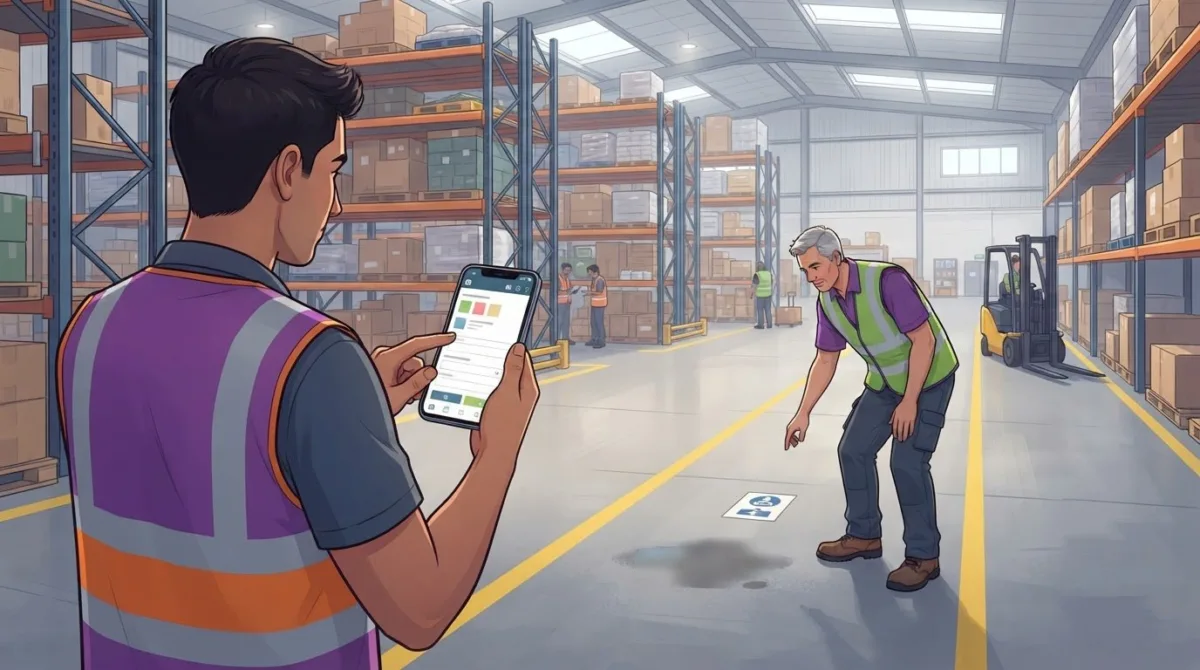
Employee engagement improves when reporting a hazard, completing an inspection or finding a training record is straightforward. Health and safety management software in the UK can bring these tasks into one accessible system, helping employees take part in safety processes while giving managers a clearer view of actions and records.
Paper forms and scattered records can make it harder to report concerns and follow them up. A practical digital system clarifies the next steps and supports a consistent approach across teams and sites.
This article explains how software can support employee involvement through incident reporting, inspections, compliance tracking and training records. It also covers what to consider when choosing a platform, how it can fit into everyday work and when a dedicated system can make safety management more organised.
Key Takeaways
- Choose a platform that supports structured risk assessments and makes it easier for employees to contribute from the workplace.
- Make incident reporting straightforward so teams can record concerns promptly and support effective follow-up.
- Use digital inspection checklists to bring consistency to audits and keep a clear record of findings.
- Track compliance tasks and corrective actions in one place to make outstanding work easier to oversee.
- Pair training records with everyday use of the system so employees understand how to take part in safety processes.
What is the difference between safety management software and a health and safety app?
A health and safety app usually gives employees mobile access to specific tasks, such as reporting an incident or completing an inspection. Safety management software connects those activities with risk assessments, records and performance data, giving managers a broader view across the organisation. With a mobile-first platform, frontline staff can use a smartphone or tablet to take part in safety processes.
Risk assessment management shows how a digital system can help. Online templates can guide assessors through hazards, people affected, existing controls and further actions. Required fields and consistent templates can make assessments more consistent across an organisation. For example, a warehouse checklist can prompt the assessor to record a hazard, its controls and a follow-up action in the same format.
Software can also bring assessments together for review. Teams can compare findings across departments, identify recurring hazards and use charts to track performance. The results help managers decide whether controls need attention, rather than treating each risk assessment as a standalone document. For office workstations, Regulation 2 requires every employer to perform a suitable and sufficient analysis of relevant workstations, including computers that could cause eye or wrist strain, according to the UK Government’s legislation.
What are the best health and safety management software platforms in the UK? The right fit is a platform that supports your organisation’s assessments, employee workflows and reporting needs. Look for relevant templates, consistent records, mobile access and useful performance reporting, rather than judging a platform by its appearance alone.
How much does health and safety management software cost in the UK? Pricing depends on the provider, charging model and the organisation’s needs, including the number of users, sites and required functions. Compare what each subscription includes against the workflows you need to manage.
How do you choose and implement health and safety management software in a UK business? Start by mapping current processes and identifying where assessments, records or follow-up actions are difficult to manage. Choose a platform that fits those workflows, prepare templates and assign responsibilities, then introduce it through staff training and regular use.
Which UK industries benefit most from health and safety management software? It can support organisations that manage workplace risks, including in construction, engineering, manufacturing and office-based work. The most useful system reflects the hazards, work patterns and assessment processes in the organisation using it.
Software can also collect risk assessment data and create charts of a company’s health and safety performance, helping teams identify patterns in their work.
Incident reporting
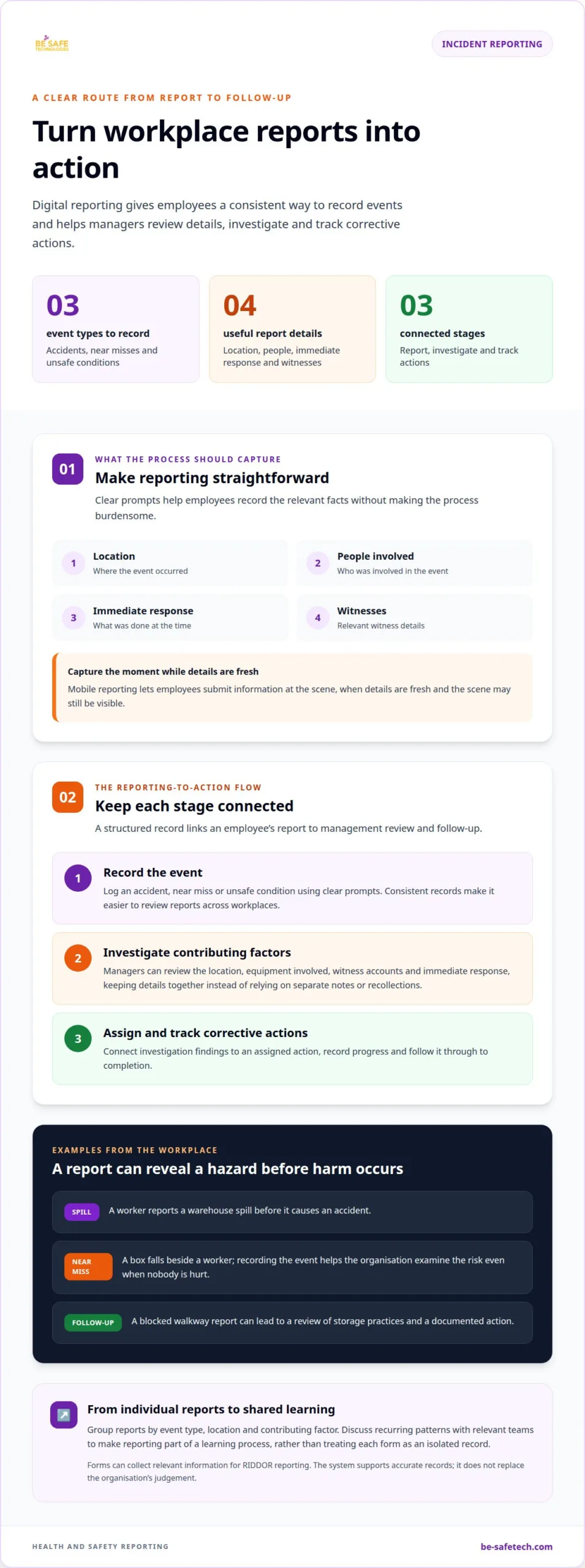
Digital incident reporting gives employees a consistent way to record workplace events and helps managers review reports and follow up on actions. A useful process covers accidents, near misses and concerns, not just incidents that cause injury.
Moving Beyond Paper Reporting
Paper forms can leave reports buried in folders or make details difficult to share with the right manager. A digital form gives employees a clear place to record what happened, where it occurred and when it was noticed. For example, a worker can report a spill in a warehouse before it causes an accident.
Choose templates that guide staff through relevant details without making reporting burdensome. Clear prompts can capture the location, people involved, immediate response and any witnesses. Consistent records help managers review reports across workplaces and identify missing information before an investigation begins.
Reporting Incidents and Near Misses
A useful reporting process covers accidents, near misses and unsafe conditions. A near miss, such as a box falling beside a worker, can reveal a hazard even when nobody is hurt. Recording these events alongside injuries helps an organisation examine risks before a similar event causes harm.
Mobile reporting lets employees submit details at the point of an incident, when information is fresh and the scene may still be visible. Forms can collect relevant information for RIDDOR reporting, while managers assess each report and decide what follow-up is needed. The system supports accurate records; it does not replace the organisation’s judgement.
Investigating and Tracking Reports
Once a report arrives, managers can use its details to investigate contributing factors. They might review the location, equipment involved, witness accounts and immediate response. A structured record keeps these details together instead of relying on separate emails, paper notes or recollections.
Tracking connects investigation findings to corrective actions. An organisation can assign an action, record its progress and follow it through to close-out. For example, a report about a blocked walkway could lead to a review of storage practices and a documented follow-up. Reviewing related reports can also reveal recurring hazards across sites.
For a practical review, group reports by event type, location and contributing factor, then discuss recurring patterns with relevant teams. This helps turn reporting into a learning process, rather than treating each form as an isolated record. A digital incident reporting system can support that joined-up workflow by bringing employee reports and management follow-up into one process.
Office incident reporting should give employees a clear, official way to record accidents and other events that need reporting. Health and safety management software can support this process by helping businesses report and track incidents, maintain records and manage compliance activity.
Mobile reporting at the scene can capture information before details are forgotten or circumstances change, supporting a more thorough investigation. Safety management software can also support incident reporting that captures information relevant to RIDDOR. Bringing reports, tracking and relevant details into one process helps managers review incidents and follow up.
Audits and inspections
Digital checklists help teams carry out workplace inspections consistently and retain findings for review. UK Government legislation states that every employer must perform a suitable and sufficient analysis of relevant workstations to assess users’ and operators’ health and safety risks.
UK government guidance and legislation set requirements for assessing relevant workstations and managing health and safety risks. Inspection records can organise findings, assigned actions and close-out evidence, giving managers a traceable account of follow-up.
Managing Audits and Checklists
Built-in checklists can give each inspection a clear sequence, from checking an area to recording issues and assigning follow-up. For example, a warehouse inspection might cover walkways, storage areas and equipment, with space to record findings for each check. This helps teams follow a consistent process across different workplaces.
Look for editable checklists that reflect the workplace instead of forcing every inspection into one generic form. A facilities team may need different prompts from a production team. Clear fields for observations, responsibility and action status help managers monitor findings after an inspection.
Regulatory Alignment and Audit Trails
UK organisations should choose software that can support relevant UK requirements and maintain an audit trail for reviewing inspections. A useful trail records findings, changes and follow-up actions clearly. It should show the path from observation to resolution, rather than leaving evidence scattered across forms and files.
For workstation assessments, Regulation 2 requires a suitable and sufficient analysis of relevant workstations. Software can help structure the assessment and keep its findings accessible, but the organisation remains responsible for the analysis itself. A clear record can show what was examined and which actions followed.
Audit management involves more than completing checklists. Managers can schedule inspections around work activities, compare results across departments and identify repeated findings. For instance, storage issues recurring in separate areas may point to a process that needs attention, rather than a one-off reminder to one team.
After an inspection, connect each finding to an owner and corrective action. Record its status and close-out evidence, then review overdue or recurring items. This creates a practical trail from observation through follow-up and helps managers see where risks remain active.
Reporting can also turn inspection results into performance data. Comparing findings by location, category or action status helps an organisation prioritise attention and allocate resources. Reviewing patterns regularly can inform future checklists, keeping inspections relevant as work activities and conditions change.
Health and safety compliance tracking
Digital compliance tracking brings safety records, planned tasks and corrective actions into an organised process. Software has limits: it cannot replace competent decisions, accurate records or staff training.
Cloud-Based Compliance Management
A cloud-based system can bring workplace health and safety records together, including incident reports, training records and certification details. Managers can use this shared information to plan work, assign responsibilities and monitor outstanding actions across sites.
For example, a facilities team can bring inspection findings and hazard records together, then plan related follow-up tasks. Before implementation, assess how the platform fits existing processes and supports the organisation’s needs as they change.
Digital Audit Trails
A digital audit trail links a recorded issue to its assigned corrective action and eventual close-out. Managers can review who is responsible, what remains outstanding and how the issue was addressed.
During an internal audit, a manager could follow a hazard from its original report through action assignment to recorded completion. Consistent records also make relevant documents easier to find than searching separate folders or email threads.
Compliance tracking can support a shift from reactive reporting to proactive risk management. Bringing incident reports, training and certification records together helps managers review activity and identify areas needing attention. For instance, recurring incident reports alongside incomplete training records may prompt a closer review of staff instruction.
Corrective actions need clear ownership and follow-up. Software can track each action from assignment to close-out, helping managers distinguish completed work from unresolved hazards. A dashboard can highlight overdue tasks, while reviews help teams decide which issues need priority attention.
Contractor and asset records can also support an organisation’s compliance processes. Contractor management software can organise contractor information and site visits, while asset records can sit alongside other safety documents. Keeping relevant information connected can help managers prepare for audits and follow up on identified gaps.
Risks arise when employees do not use the system, records are incomplete or actions remain open. Software alone does not improve safety: organisations need to train employees, embed the system in daily workflows and use its data to make improvements. A digital record supports oversight, but does not prove that a hazard has been controlled.
To make tracking useful, define who updates each record, who reviews outstanding actions and how teams use the findings. For example, a manager can review open corrective actions at a regular team meeting, assign follow-up and record progress. This connects digital documents with the work they are intended to support.
Training records and course building
Training supports safer work when employees can apply what they learn to real tasks. Clear records help managers see completed learning, relevant certifications and areas where further instruction may be needed.
Training and Certification Tracking
A training record can link each employee to relevant learning, completion details and certification information. Managers can use these records to identify upcoming refreshers and gaps before assigning work that requires particular knowledge. In high-risk premises, an available first-aider should hold the correct, in-date certification. Tracking certification details helps managers keep this information visible when planning cover.
Training and Competency Records
Completion alone does not show whether an employee can apply a procedure correctly. Pair training records with practical competency checks, such as observing a worker follow a safe equipment procedure. Record the task assessed, the outcome and any further instruction needed. This gives managers a clearer basis for planning support than a course attendance entry alone.
Build courses around the work employees actually do. A warehouse module, for example, could explain how to report a damaged pallet and keep an aisle clear. Short, task-focused materials connect learning with everyday decisions. Include clear instructions, examples and a way for employees to record completion.
E-learning can help deliver consistent information to staff working across different locations or shifts. It works best alongside practical instruction when a task requires demonstration or supervised practice. For a new starter, an induction programme might cover site procedures, reporting routes and relevant hazards before regular duties begin.
Training records can also help managers connect learning with safety compliance. If an inspection identifies repeated errors in a task, managers can review the related instruction and decide whether employees need further guidance. This turns a record into a prompt for improvement, rather than simply storing a completion date.
Staff onboarding matters when introducing new safety software. Employees need to know how to access the system, complete relevant tasks and report issues through the right process. A brief walkthrough using a familiar example, such as submitting a hazard report, can show how the software fits into daily work.
Software alone does not improve safety. Organisations need to train employees, embed the system in daily workflows and use its data to make improvements. Managers can reinforce learning by discussing questions raised by teams and linking them to relevant procedures or course materials.
Build clearer training and competency records with health and safety software that supports your organisation’s safety processes.
Be-Safe Technologies Ltd: Compliance Genie – SaaS health and safety software
Compliance Genie is Be-Safe Technologies Ltd’s SaaS health and safety software for organisations that want to digitise and manage safety processes and risk assessments. It can help when paper-based records make assessments difficult to organise or obscure a clear view of safety activity.
For organisations managing contractors and site visits, Contractor Genie brings contractor management into one system. The right fit depends on the processes you need to manage: workplace health and safety, contractor oversight, or both.
Contact Be-Safe Technologies Ltd to discuss your organisation’s health and safety management needs.
Make your next safety improvement practical
Start by identifying where your current safety processes create friction. Choose one workflow, such as reviewing actions after an internal inspection, and consider what information employees and managers need at each stage. A focused starting point makes it easier to set priorities and plan implementation around real working practices.
When assessing health and safety management software in the UK, consider how it will fit employees’ routines and who will oversee its records. Clear ownership keeps information useful over time, while staff involvement supports consistent use across the organisation. The aim is not simply to move forms online, but to make safety responsibilities easier to understand and follow.
If you’re ready to discuss the next step for your organisation, contact Be-Safe Technologies Ltd. A considered approach can help you build a system that supports safer, more organised work.
Frequently Asked Questions
How does Health & Safety Software promote employee engagement?
It gives employees a clear way to take part in everyday safety processes and see their input lead to action. For example, a worker can submit a concern from an Apple or Android device, and managers can record the follow-up. Closing this feedback loop helps staff understand how reports inform workplace decisions. Keep access simple, explain responsibilities during onboarding and discuss recurring themes with teams.
What is health and safety management software and what features should UK businesses look for?
It is software for organising workplace health and safety activity, not just a single-purpose mobile app. When assessing health and safety management software in the UK, consider mobile access, risk assessment tools, audit and incident records, training information, document management and reporting. Compliance Genie is a mobile-first, cloud-based SaaS platform for digitising safety processes and risk assessments. Choose features that meet real work needs and fit existing routines.
Can health and safety software help businesses comply with UK HSE regulations and legislation?
Yes, software can help organise compliance activity, but it cannot make an organisation compliant by itself. Managers still need to understand the requirements relevant to their work, assign responsibilities and act on identified risks. For example, a business can use digital records to make evidence easier to review during an internal compliance check. Employees also need training, and safety processes must be followed in practice, not just recorded in software.
What integrations should UK health and safety management software support?
Useful integrations depend on how your organisation manages information and work. Consider whether health and safety management software in the UK can exchange relevant data with existing tools, such as personnel records or document management systems, to reduce duplicate entry. Be-Safe Technologies Ltd’s software has an open RESTful API for integration with existing systems. Define what information needs to move between platforms and who maintains it, so connected processes remain clear and reliable.