


EHS software for compliance and incident workflows across multiple sites
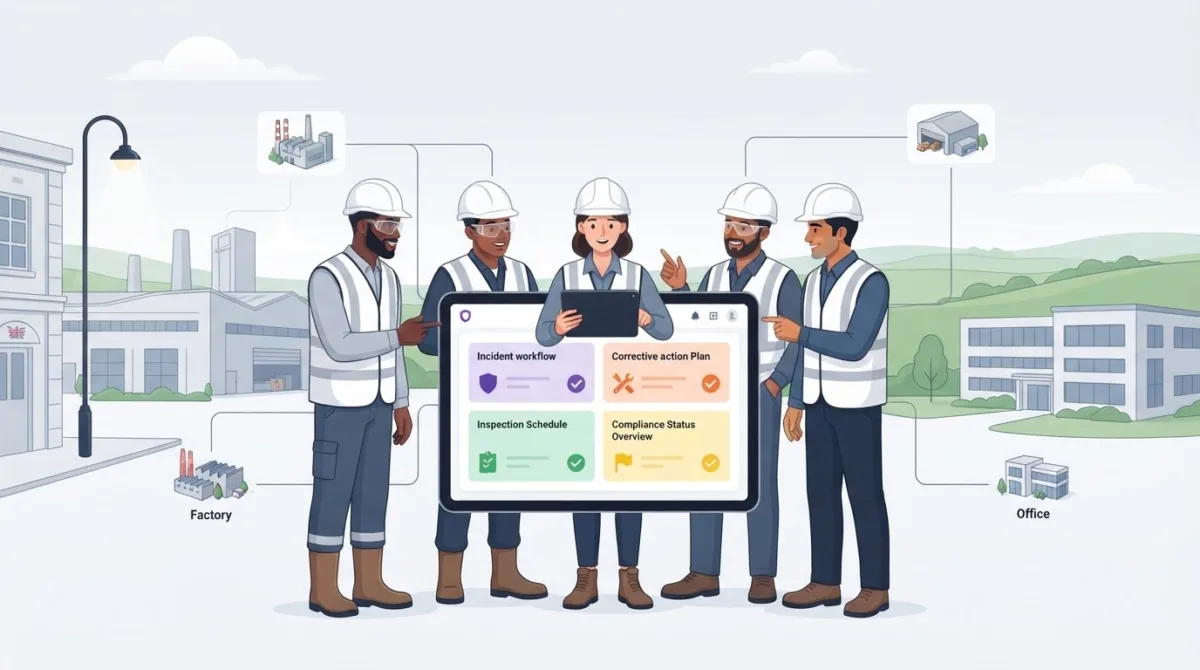
EHS software for multi-site operations brings incident records, risk assessments, inspections and corrective actions into connected workflows, giving teams a shared view across locations. A successful rollout starts with clear ownership, a representative pilot site and a configurable standard that accommodates local needs. The aim is consistent oversight, not identical controls at every workplace.
Managing safety across several sites can make it harder to organise information and follow consistent processes. A central system can help teams see what is happening, while clear workflows make issues easier to record and follow up. This guide explains how EHS management software supports multi-site teams, how common standards can accommodate local requirements, and what to plan for during rollout. It also covers the factors that affect software costs and how to assess whether a platform suits your sites, systems and working practices.
Key Takeaways
- Use automated reminders and structured reporting to keep compliance tasks visible across sites, while recognising that software supports compliance rather than guaranteeing it.
- Connect incident reports to corrective actions so teams can track patterns and follow-up consistently across locations.
- Choose reporting measures that help leaders spot emerging risks, not just review incidents after they happen.
- Set clear ownership, audit trails and enterprise controls before rolling out a shared system across sites.
- Use ISO 45001 as a common framework for managing occupational health and safety, while adapting controls to each organisation and workplace.
How does EHS management software strengthen environmental health and safety compliance?
For multi-site teams, the main benefit is a shared way to record requirements, actions and evidence. Configure the system by site so local tasks fit within a consistent operating framework.
Automated Incident Reporting
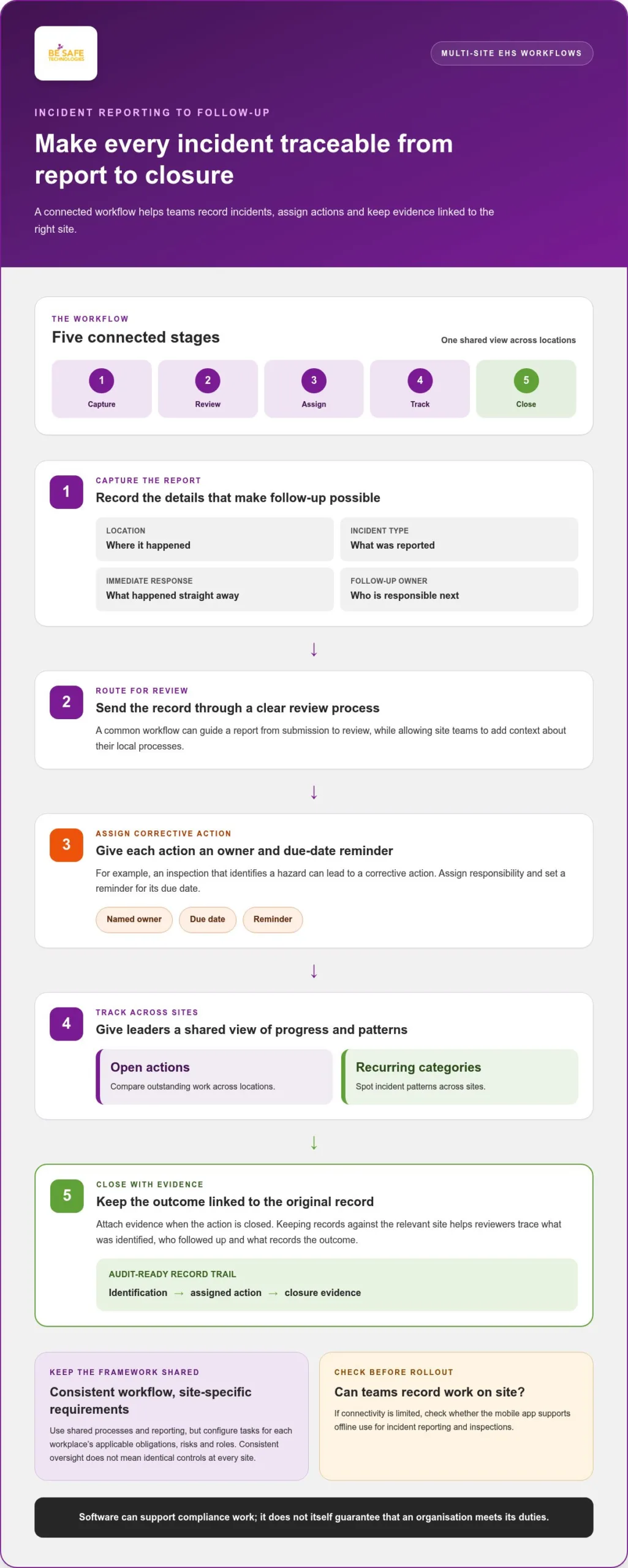
Incident reporting software can turn a worker’s report into a trackable workflow. A form can capture the location, incident type, immediate response and follow-up owner, then route the record for review. Managers can use reporting dashboards to compare open actions and recurring incident categories across sites. If connectivity is limited, check whether the mobile app supports offline use so workers can record incidents and complete inspections on site.
For compliance tracking, assign an owner to each task and set a reminder for its due date. For example, a site inspection that identifies a hazard can lead to a corrective action, with evidence attached when it is closed. Leadership can then see outstanding actions without relying on separate spreadsheets or email chains. Automated reporting supports compliance work, but the software does not itself guarantee that an organisation meets its duties.
Local Compliance Frameworks
A common framework needn’t mean identical controls at every location. Start by recording the organisation-wide process, then map each site’s applicable regulatory obligations, risk assessments, inspections and responsible roles. This lets central teams compare completion and status, while site managers work from requirements relevant to their activities and location.
What UK health and safety regulations should multi-site EHS software help track? Configure it to record the duties, site-specific assessments, inspections, incident records and actions that apply to each workplace. The exact register depends on the organisation’s activities and risks, so avoid applying one generic checklist across sites with different work.
Which EHS software platforms support multi-site operations in the UK? Look for a platform with site-level records, shared workflows, clear task ownership and organisation-wide reporting. Assess whether it can accommodate local requirements without splitting records across disconnected systems.
Audit-Readiness Support
Audit readiness depends on finding current records and tracing an action from identification through to closure. Store inspection results, incident details, assigned actions and supporting evidence against the relevant site. Use consistent categories and named owners so a reviewer can trace what happened, who followed up and what evidence records the outcome.
Environmental and waste compliance can sit alongside health and safety records in a shared framework. Create site-level registers for relevant environmental tasks, inspections, waste records and corrective actions, then assign review dates and owners. A manufacturing site, for example, may need different environmental checks from a distribution site. The system should make those differences clear in its tasks and reports.
Before rollout, agree which records leadership needs to review and how often, then configure dashboards to support those decisions. Use a sample audit to test whether staff can retrieve evidence by site, date, task and owner. This practical test can reveal gaps in naming, record ownership or workflow design before they affect other locations.
Centralised EHS data and connected incident workflows
A shared EHS system gives site teams and leaders a common view of records and actions. Its value depends on practical workflows that fit the work at each location.
Centralised EHS Information
Cloud-based EHS systems can give managers access to safety and compliance data across locations. Bring incident records, inspections and action statuses into a shared structure, with each record linked to its site. This makes it easier to compare patterns without treating separate spreadsheets as a single source of truth.
Before adopting a platform, assess its site hierarchy and reporting during a demonstration. Check whether leaders can move from organisation-wide summaries to the underlying site records. For example, imagine three distribution centres reporting damaged racking within six weeks. A shared system can help teams compare the reports and consider whether similar conditions need attention elsewhere.
Consistent Corrective-Action Workflows
A common incident workflow can guide workers from initial reporting through review, assignment and corrective action. Use shared categories and clear ownership, while allowing for relevant differences between sites. A local manager may need to add context about a particular process, while leadership still sees consistent action statuses and reporting fields across the organisation.
Map the process before configuration: identify who records an incident, who assesses it and who closes the resulting action. Then test a typical report from submission to closure with users at different locations. Include related processes, such as inspections or permit records, only where they are part of the organisation’s actual workflow. This keeps the system useful and reduces the risk of workers bypassing unnecessary steps.
Business-System Integration
EHS software can connect operational systems and technology with digital safe systems of work through certified APIs. For HR, ERP and maintenance systems, first identify the information teams need to share and which system owns each record. Then define how an incident or action should move between systems, who can access it and how teams will handle mismatched or incomplete data.
Successful implementation also needs visible leadership and a dedicated team. Explain to workers why processes are changing, involve representatives from different sites, and gather feedback during the rollout. Adjust forms and workflows where they create unnecessary friction, whilst retaining consistent reporting. A practical evaluation should test real tasks, site-level views, integrations and corrective actions, rather than relying on a feature list alone. Explore multi-site health and safety software as one option for bringing these workflows into a shared system.
Is this a software product?
Yes. EHS management software is a digital tool for organising environmental and workplace safety records, tasks and reports. Corporate teams can use it to prepare management information from records gathered at different locations while retaining the detail behind each entry. For example, a report can distinguish an incident category from its supporting account, helping leaders interpret trends rather than treating every record as an interchangeable figure. People remain responsible for reviewing information and deciding what action to take.
Corporate reporting can include both outcomes and preventive activity. Recorded incidents describe events that have occurred; measures such as hazards raised or inspections completed can show work undertaken to manage risk. ISO 45004 supports monitoring, measurement, analysis and evaluation to improve occupational health and safety performance. When setting up reports, define what each measure means, who records it and how leaders will use it. These decisions help make comparisons meaningful rather than simply adding more figures to a dashboard.
Consistent reporting relies on categories that staff can apply to everyday situations. Agree how to classify incidents, hazards and near misses, and provide enough context for managers to understand each record. For example, a near miss involving a vehicle should not be assigned a different category at each location. Common definitions help corporate teams interpret information and identify where further review may be useful.
Environmental and workplace safety information can be managed through related reporting processes while keeping each measure distinct. Map which environmental records matter to each UK site, who maintains them and how often they are reviewed. A manufacturing site and a distribution site may need different environmental checks. Clear labels and ownership help leaders distinguish environmental performance information from occupational health and safety reporting.
Software costs depend on the chosen modules, users, sites, integrations, configuration, data migration, training and support. These factors shape the system’s scope and the work needed to put it into operation. For example, an organisation with several distinct sites and existing systems to connect may need a different configuration and migration plan from one using fewer workflows. Define the required scope before comparing proposals.
How do leading EHS software providers compare for multi-site businesses? Compare how each platform structures site records, builds reports and presents information to different management roles. Use a sample report based on contrasting site activities, then assess whether its categories and detail answer real business questions. This keeps the comparison focused on practical fit, not feature names alone.
Before selecting a product, write down the decisions its reports should support and the information needed to make them. Identify who owns each data type and who reviews the resulting reports. For example, a report on preventive activity should help its intended audience decide whether further discussion or follow-up is needed. This preparation gives procurement and operational teams a clearer basis for assessing software scope and implementation needs.
What is EHS management software, and why does a multi-site rollout need a playbook?
EHS management software organises incidents, risk assessments, audits, inspections, corrective actions, training records and compliance documents. A multi-site playbook sets governance, ownership and a configurable standard before teams use the system.
Standardised Training and Reporting
Start by agreeing which training records and reports every site must maintain. Define common categories, required fields and owners, then adapt local guidance where work differs. For example, warehouse and manufacturing teams may need different task instructions, while reporting can still use shared categories for training status and completion.
Set governance before configuration: name the people who approve changes, maintain records and review site reports. A dedicated implementation team can explain why processes are changing and gather feedback from workers. Use a representative pilot site to test training records and reporting forms, then revise the shared standard before wider rollout.
Keep training aligned with the workflow rather than treating it as a separate register. When a risk assessment or procedure changes, assign someone to review the relevant training material. During the pilot, test whether staff can find the right record and managers can identify outstanding actions. This can expose unclear ownership before the process reaches other sites.
Site Audits and Inspections
Use a consistent audit structure to compare findings across sites, while allowing each location to record its own hazards and controls. An inspection should capture what was observed, where it occurred, who owns follow-up and what evidence supports closure. For example, a recurring hazard can be recorded consistently in a site audit and reviewed alongside findings from other locations.
Link each finding to a corrective action with an owner and status. Leadership can review open actions across sites, while local managers retain the detail needed to resolve them. Test the process with a sample inspection before launch: submit a finding, assign follow-up, attach evidence and confirm the record remains traceable through closure.
A controlled rollout needs clean information as well as clear roles. Before migration, remove duplicate records, agree naming conventions and identify which site owns each record. Then move the data and manage go-live site by site. This phased approach gives teams the opportunity to resolve data or workflow problems before another location starts using the system.
There is no reliable, universal implementation timeframe. Site diversity, project scope, data quality, integrations and training needs all affect duration. Build the plan around those factors, with decision points for pilot review, data migration and each site’s go-live. A schedule tied to completed tasks gives leadership a clearer view of readiness than a single fixed date.
Finally, define how changes to the shared standard are approved and communicated. If an audit identifies a new hazard category, for instance, decide who reviews the change and how it reaches every site. This governance keeps local learning visible without allowing inconsistent forms or processes to develop across the organisation.
Common EHS standards across multiple plants
A shared EHS standard gives leadership a stable basis for reviewing how each plant manages occupational health and safety. According to the International Organization for Standardization, ISO 45001 provides an international framework for occupational health and safety management rather than requiring identical controls for every organisation or workplace. The useful distinction is between common management practices and controls shaped by local work.
Set shared expectations for how sites identify hazards, assign responsibility and review outcomes. Then document where a plant needs a different control because its equipment, processes or working conditions differ. For example, a manufacturing plant and a distribution centre may use the same method to record a hazard, while their site procedures address different risks. This keeps the standard consistent without making local controls artificial.
Map each shared process to an owner, the records that show it is working and the review method. An inspection template might use common fields for date, finding and action status, while allowing an additional check for equipment used only at one plant. Record the reason for the variation and who approved it. EHS software for multi-site operations can help keep approved variations visible alongside the shared standard.
Choose measures with definitions that all sites can apply. ISO 45004 supports monitoring, measurement, analysis and evaluation to improve occupational health and safety performance. For instance, define what counts as a completed inspection and what evidence supports closing a corrective action. Without agreed definitions, plants may report similar work differently, making comparisons difficult to interpret.
Spreadsheets can help teams map existing procedures, but separate copies can drift out of date. Maintain a controlled record of approved procedures, version ownership and changes. When a plant proposes a local adjustment, record its reason and review it against the shared approach. This makes exceptions visible and helps prevent inconsistent practices from becoming informal standards.
To align processes, identify common management activities, map each plant’s hazards, agree shared measures and review proposed exceptions with local managers. Leadership can then consider whether differences in inspection findings reflect different work or different recording practices. EHS software for multi-site operations can make those comparisons clearer while preserving the context behind each site’s results.
Review the standard when activities or risks change. Assign responsibility for assessing updates, communicating approved changes and identifying any affected records or training. A central EHS system can help teams keep those decisions and site-specific procedures organised. Explore health and safety software to support consistent management across multiple plants.
Be-Safe Technologies Ltd: Compliance Genie – SaaS health and safety software
Be-Safe Technologies Ltd offers Compliance Genie, SaaS health and safety software that helps organisations digitise and manage safety processes and risk assessments. Its mobile-first, cloud-based platform helps teams organise health and safety information across locations.
For businesses that also need to manage contractors and their site visits, Contractor Genie is a dedicated contractor-management platform. The right starting point depends on whether your priority is managing internal health and safety processes, contractor activity or both.
If you’re planning a multi-site rollout, consider how Compliance Genie or Contractor Genie fits your workflows and the records your teams need to manage. Book a demo with Be-Safe Technologies Ltd to discuss your requirements.
Set your next steps for a confident rollout
Before moving from research to selection, turn your priorities into a concise decision brief. Record the operational problems you want to address, the teams affected and the outcomes that would make a new system useful. For EHS software for multi-site operations, this gives stakeholders a shared basis for comparing how each platform fits real work, rather than relying on feature lists alone.
Use the brief to focus internal discussions: which processes need attention first, who will own the decision and what evidence will show that the chosen approach works? Bringing these points together early can make conversations more focused and help teams move from broad requirements to a practical next step.
Be-Safe Technologies Ltd can discuss how its software may fit your organisation’s health and safety needs. Contact Be-Safe Technologies Ltd to start a conversation and consider the right path for your sites.
Frequently Asked Questions
How does multi-site EHS management create consistent reporting?
Shared definitions help teams interpret the information they collect. Create a short data dictionary explaining terms such as “high-risk finding” and “action overdue”, then use it when reviewing reports. If a result looks unusual, compare the underlying records before drawing conclusions. For example, increased reporting may reflect improved reporting habits rather than a change in site conditions.
How long does a rollout take?
The rollout schedule depends on the project’s scope and readiness, so plan around the work involved rather than choosing a date first. Map dependencies such as access to source records, decisions about reporting definitions, system connections and staff availability. Identify which tasks can happen in parallel and which need approval first. This gives project leads a realistic view of the critical path and makes schedule changes easier to explain.
How should organisations approach multi-site EHS software implementation?
Give the implementation team clear decision rights before configuration starts. Agree who can approve changes to forms, categories and reports, and how unresolved decisions will be escalated. Record decisions in a change log so site teams can see what changed and why. This is especially useful when operational leaders and central EHS staff have different priorities, as it helps prevent conflicting instructions during implementation.
What EHS adoption challenges stop software from working at scale?
Software can struggle to gain routine use if staff see it as extra administration or receive training that does not match their tasks. Observe how different roles handle a real reporting task, then remove unnecessary steps and provide guidance at the point of use. Consider staff turnover too: new starters need a clear way to learn the process. Review user feedback for recurring friction, not just isolated preferences.
What features should EHS software have for managing multiple sites?
Match features to the decisions users need to make. A site supervisor may need to record information quickly, while a group administrator may need to manage permissions or maintain shared categories. Ask for a demonstration using a realistic task for each role, and assess how the system handles corrections, duplicate entries and reassigned responsibilities. This reveals whether the platform supports everyday work, not just an ideal demonstration.
Can EHS software provide site-level dashboards and organisation-wide reporting?
It can, provided the reporting design serves different audiences without obscuring source information. Decide which questions each audience needs answered, then use a sample dataset to test whether each view is clear. For instance, an executive may need exceptions requiring attention, while an analyst may need to examine changes over time. Agree who can access each view and how often its information should be reviewed.
How does EHS software manage different legal requirements across UK sites?
Map requirements to the work performed at each location, rather than assigning them solely by postcode or business unit. Ask relevant internal specialists to identify which obligations apply to each activity, then record the accountable owner and review trigger. A change in equipment or work process may require a fresh assessment of the register. Software can organise this information, but it does not replace competent interpretation.
What steps are involved in implementing EHS software across multiple locations?
Before launch, set acceptance criteria for each site: the records users must retrieve, the tasks they must complete and the reports managers need. Test unusual cases as well as routine ones, such as a corrected record or an action transferred to another owner. Capture the outcomes in a sign-off record. After launch, establish a route for reporting issues and reviewing requested changes, so local feedback reaches the right decision-makers.