



Digital Permit to Work Systems for Construction Sites

What needs to be in place before a high-risk construction task can start? A digital permit-to-work system for construction gives teams a structured way to request, review, authorise and close work. It brings permit details, worker qualifications, equipment checks and approvals into a shared process, making responsibilities and work conditions easier to track.
Paper permits can be difficult to coordinate across workers, supervisors and subcontractors, particularly when activities overlap. A digital workflow keeps requests, inspections, checklists and sign-offs together, helping teams record checks and approvals as work progresses. A permit supports safe planning, but it does not replace a suitable risk assessment or on-site judgement.
This guide explains how permit software works, how subcontractors can submit requests, and how qualifications, equipment checks and inspection records fit into the process. It also covers system features to consider, relevant UK guidance, and how Compliance Genie and Contractor Genie support digital health and safety and contractor management.
Key Takeaways
- Use permit workflows to set out the task, authorised workers, work conditions and approval steps before work begins.
- Link permit requests with maintenance and task planning to make work status and potential clashes easier to track.
- Build worker competence checks, contractor records and site safety checks into the permit process.
- Use digital inspections, checklists and electronic sign-off to record checks and approvals as work progresses.
- Keep permits aligned with risk assessments and relevant HSE guidance; issuing a permit alone does not make a job safe.
What is Permit to Work Software?
Permit-to-work software manages requests, checks, authorisation and close-out for higher-risk tasks. It gives construction teams a shared record of who is authorised to do the work, under what conditions and for how long.
A permit sets out the task, authorised workers, hazards, controls and approval steps before work starts. For example, a hot-work permit can record required precautions, while a confined-space permit can specify entry conditions. The workflow can require relevant isolation, gas-test or fire-watch details before authorisation, making conditions clear to workers and supervisors before work proceeds.
Connecting permits with maintenance and task-management software can link them to planned work orders. For example, an electrical maintenance task can be associated with its permit, location, equipment and approval status. Site managers can review the job and permit together instead of matching separate paper records. A shared workflow can also help teams identify overlapping work, such as a confined-space task scheduled near hot work.
For isolation management, the system records which equipment must be isolated and what checks are required before work begins. It can require isolation details before a permit progresses. This supports lock-out/tag-out procedures by keeping isolation information with the relevant task rather than in a separate record.
Permit Tracking and Issue Management
Permit tracking shows whether a request is awaiting approval, active, suspended or closed. If an inspection identifies a missing control, teams can record the issue against the permit, assign corrective action and track it to completion. Look for clear status records, named responsibilities and an audit trail of changes, so teams can see what is happening and which issues still need attention.
UK software costs depend on factors such as licence scope, user numbers, site coverage, integrations and implementation.
A digital permit process can fail if it does not reflect site procedures or workers are not trained in the process and software. Map the existing steps, consider risks from changing paper processes, and involve supervisors, workers and subcontractors early. A permit does not replace a suitable risk assessment, so retain that assessment in work planning.
Site Management Benefits and Reduced Paperwork
For site managers, a digital record brings permit status, approvals and outstanding actions into a searchable workflow. Health and safety teams can review recurring issues and see where corrective actions remain open. Replacing duplicate forms and manual filing reduces administrative handling, while shared records help teams coordinate work across contractors and site areas. Check that the workflow captures the information managers need to oversee tasks.
Can subcontractors submit permit requests?
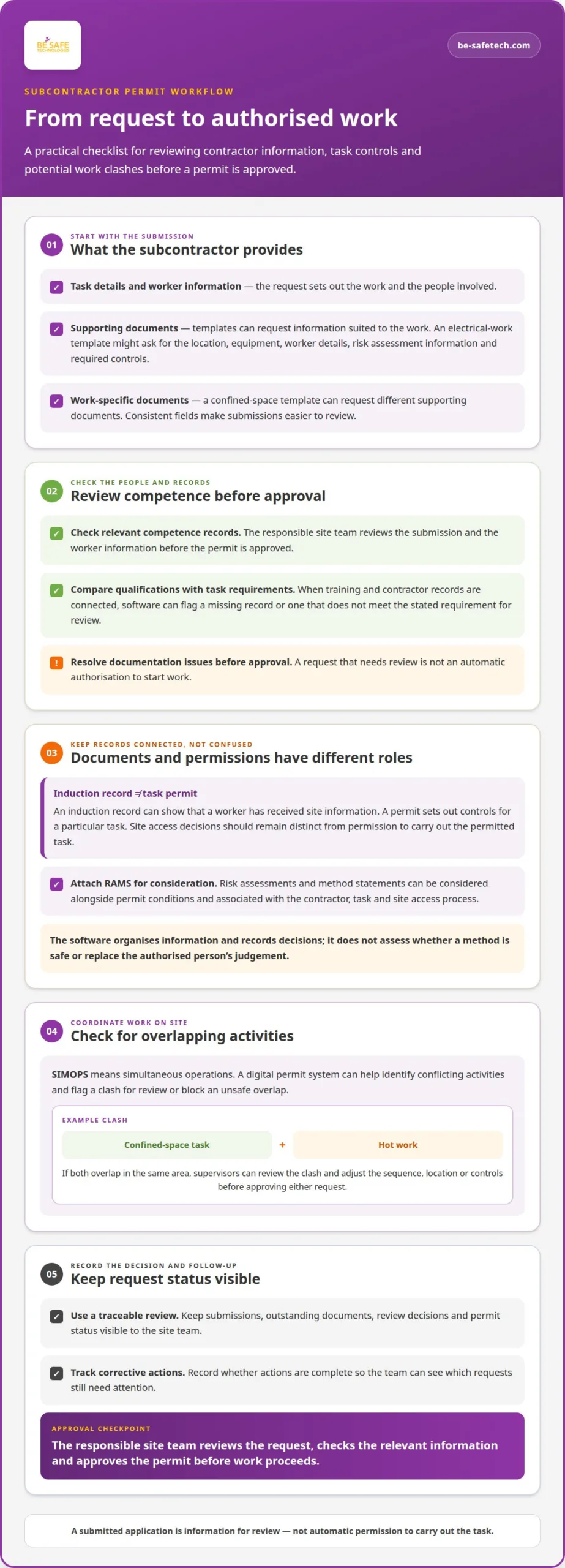
Yes. A digital permit workflow can let subcontractors submit requests with task details, worker information and supporting documents. The responsible site team reviews the submission, checks relevant competence records and approves the permit before work proceeds. Each request has a traceable status, rather than relying on a paper form passed between contractor and supervisor.
Contractor onboarding and permit approval are related but serve different purposes. An induction record can show that a worker has received site information; a permit sets out controls for a particular task. A connected process can link the contractor’s record to the permit request, helping supervisors see whether required information is ready for review. Site access decisions should remain distinct from permission to carry out the permitted task.
Automated competence checks depend on connecting the permit platform with relevant training and contractor records. When linked, software can compare a worker’s qualifications or certifications with the requirements for a task. For example, a request for work requiring a specific qualification can be held for review if the relevant record is missing or does not meet the stated requirement. The reviewer can resolve the documentation issue before approving the permit.
Templates help standardise what subcontractors submit. An electrical-work template might request the task location, equipment, worker details, risk assessment information and required controls. A confined-space template can request different supporting documents. Consistent fields make applications easier to review and create more useful records across contractors and work types.
RAMS, or risk assessments and method statements, can be attached to the application and considered alongside permit conditions. A connected workflow can associate those documents with the contractor, task and site access process. The permit software organises the information and records decisions; it does not itself assess whether a method is safe or replace the authorised person’s judgement.
Control of Work also needs coordination between activities. Digital permit systems can help identify conflicting simultaneous operations, known as SIMOPS. For example, if a confined-space task overlaps with hot work in the same area, the system can flag the clash for review or block the unsafe overlap. Supervisors can then adjust the sequence, location or controls before approving either request.
For contractor compliance monitoring, a clear workflow records submissions, outstanding documents, review decisions and permit status. Site teams can see which requests need attention and whether corrective actions are complete. Connecting contractor, training and permit records helps maintain oversight without treating a submitted application as automatic approval.
Digital inspections, checklists and electronic sign-off
Digital inspection workflows guide teams through pre-work checks, hazard controls and permit approval. For UK construction, compare platforms by checklist flexibility, permit types, mobile access and the records they retain.
Electronic Sign-Off and Permit Approval
A digital checklist can prompt an inspection of the work area before a permit progresses. For example, a pre-permit check can record whether workers have the required personal protective equipment and whether the area is safe. The platform can capture responses, supporting documents and required signatures against the application, giving reviewers a clear record of completed checks.
Permit types can be tailored to different tasks. Electrical-work permits may distinguish low-voltage and high-voltage work, while excavation permits may separate shallow and deep excavations. Each template can prompt for relevant hazards and controls instead of presenting one generic checklist. A reviewer can then assess whether the submitted information fits the specific work.
Electronic approval can make permit applications easier to monitor and sign off as work progresses. The assigned approver reviews inspection responses and supporting information, then records approval or returns the application for action. Look for a clear record of who completed each check and signed the permit, as well as a way to identify unanswered items before work starts.
Mobile Use and Offline Auditing
Mobile access lets workers and supervisors complete checks and review permits at the work area. Digital permit systems should support mobile approvals and offline access, so a weak site connection does not prevent access to the workflow. Check how the platform handles entries made offline and brings them into the permit record once connection returns, preserving a usable sequence of checks and decisions.
Which system is best depends on the site’s work types and approval process. Compare platforms by how they support electrical and excavation permit subdivisions, configurable checklists, mobile sign-off and offline access. The strongest fit is the one that can represent the site’s actual inspection stages without losing the required controls or making forms difficult to complete.
For an electronic inspection, a practical sequence is to select the permit type, complete the relevant checks, record any issue and route the application for approval. For example, an excavation checklist can prompt a review of the work area and required controls before the approver signs. The permit record then links the inspection responses to the task and decision.
Mobile approval and offline access are separate capabilities, so assess both. A platform may allow a person to read or complete a checklist offline, while approval steps still depend on a connected workflow. Confirm through the system’s demonstrated process how offline entries, electronic signatures and later auditing are handled. This comparison helps teams choose a workflow that works at the point of inspection.
Digital permit-to-work system components
A useful permit platform connects task details, risk controls, approvals and close-out in one workflow. Its components should reflect how work is planned and controlled across the construction workplace.
Start with a permit record that identifies the location, equipment, activity, hazards and control measures. It should state who is authorised to do the task and the period for completing it. For example, a permit for maintenance on site equipment can link the work area and equipment with the hazards, precautions and approval timeline.
Each permit should collect information relevant to its task. The record can include risk assessment details, required tools, supporting documents, relevant PPE and test results such as gas tests. It can also set mandatory actions, additional signatures or compulsory PPE as conditions for authorisation. This helps the reviewer see what must be completed before work begins, rather than relying on a blank form.
Emergency information belongs with the active permit. Include incident-response instructions and contact details for key people, so workers can find them alongside the task information. A permit should also record required authorising signatures and define how work is brought to a safe end. Closing the permit after completion records that the authorised work has finished.
For multi-site construction, consistent fields make permit records easier to review across locations. Capturing the same information about equipment, hazards, controls and approval timelines supports meaningful analysis. Mobile approvals and offline access help supervisors and workers use the workflow where work is happening. Consider whether the system can support multiple sites without making task-specific controls harder to follow.
Begin implementation by mapping the existing permit process, then digitise its necessary controls and streamline inefficient steps. Involve supervisors, workers and contractors early, and train them in both the permit procedure and the software. Assess the risks of moving from paper records, including how teams will access permits and record decisions during the transition.
Before rollout, test a complete permit from request through authorisation and active work to closure. For example, confirm that required PPE, signatures and test results are recorded before the permit proceeds, and that the final record shows completed work. A digital permit system supports coordination, but it does not replace a suitable risk assessment or the judgement needed to manage changing site conditions.
UK laws and HSE guidance: permit-to-work systems
For UK construction, HSE guidance HSG250 is a key reference for permit-to-work systems. The Health and Safety Executive (HSE) says issuing a permit does not, by itself, make a job safe. A permit supports the work controls; it cannot replace risk assessment or safe planning.
According to the HSE, HSG250 applies across industries that use permit-to-work systems and includes a checklist for assessing them. Construction teams can use that checklist to review how a permit is requested, authorised, communicated and closed. The focus is the effectiveness of the process, not whether a site uses paper or software.
According to the UK Government, HSG250 centres on paper permit systems but accounts for newer electronic methods where possible. This gives construction teams a reference when moving permit steps online. Map the current process first, then compare its controls with the guidance. For example, check that the digital workflow records authorisation, task conditions and permit closure, rather than simply storing a completed form.
The Health and Safety Executive (HSE) is Britain’s national regulator for workplace health and safety and provides further information on permit-to-work systems. Its guidance helps teams examine whether permit controls work in practice. A permit should identify the task and its controls, while the associated risk assessment considers hazards and suitable precautions. Keep both connected in work planning so the permit does not become a substitute for assessing risks.
For a practical review, follow the permit from request to close-out. Check that the authorised person can review task information, workers understand the conditions, and the permit can be suspended or closed when circumstances change. Then examine how the record captures approvals and actions needed before work continues. These checks assess the procedure, not just the software interface.
When digitising an existing process, involve supervisors, workers and contractors early. Train them in the permit procedure as well as the electronic workflow, and assess risks arising from the move away from paper. Test the process with a real task type, such as hot work, and confirm that required controls remain clear at each stage. HSG250’s checklist can help structure this review.
Use HSE guidance to assess the permit process, then configure the digital workflow to support its controls. A permit is one part of safe work planning, and the risk assessment remains essential.
Be-Safe Technologies
Be-Safe Technologies Ltd supports organisations that want to digitise health and safety processes and manage contractors. Compliance Genie is all-in-one health and safety management software, while Contractor Genie centralises contractor information, documents and site visits. Together, these platforms can support construction businesses organising safety processes and contractor management digitally.
For teams reviewing permit workflows, consider how health and safety and contractor management processes fit together. This can help identify where digital records and clearer oversight could support site operations, alongside the permit procedure and risk assessment.
To discuss your organisation’s health and safety or contractor management needs, contact Be-Safe Technologies Ltd.
Plan your next steps with confidence
Before selecting a digital permit-to-work system for construction, turn your priorities into a short decision brief. Set out the tasks the system must support, who will approve permits and which records managers need to review. This gives your evaluation a practical focus and keeps software discussions tied to site requirements.
Use that brief to discuss how digital health and safety processes could fit your organisation’s needs. Be-Safe Technologies Ltd can show you how Compliance Genie and Contractor Genie support health and safety and contractor management workflows, with options that can be tailored to your priorities.
When you’re ready to explore the next step, contact Be-Safe Technologies Ltd today. A clear set of requirements makes it easier to have a useful discussion and move forward with confidence.
Frequently Asked Questions
Can I customise my own permit categories?
That depends on the software’s configuration options. A system may let an organisation create categories around its work types and approval structure. Before adopting one, consider who can add or amend categories, how changes are controlled, and whether older permits remain understandable after a category changes. This keeps site terminology consistent and prevents similar tasks being split across confusing labels.
Can I see live permits on my site?
Some systems provide a current view of permit activity, but its usefulness depends on how promptly users update records. Consider whether supervisors can filter the view by work area or responsible team, and whether access can be managed for different roles. A live screen supports decisions only when it reflects the latest information entered by the people managing the work.
Do I have to manually close each permit?
A responsible person should confirm completion instead of relying only on a planned end time. Check whether close-out can record work that stopped early, was abandoned or needs a handover. These exceptions matter because a permit’s planned duration may no longer match what happened on site. Clear close-out information helps the next supervisor understand the task’s final status.
What is a digital permit-to-work system for construction?
A digital permit-to-work system administers formal permission to carry out specified construction work. Unlike a general work schedule, it records the authorisation process and the conditions attached to a task. To assess a system, follow a sample job from the worker’s point of view and check whether the permit’s scope and responsibilities are clear before work proceeds.
What features should a construction digital permit-to-work system include?
Assess how the system handles changes after authorisation, including revised task scope, suspended work and reassigned responsibility. These situations test whether the permit process remains clear beyond routine approvals. Also consider whether the software preserves earlier versions and makes current instructions easy to distinguish, helping prevent teams from acting on superseded information when site plans change.
How does a digital permit-to-work system work on a construction site?
A digital permit gives site teams a shared process for administering task permission, but workers still need to understand the limits of the authorised work. For example, a crew should know which work area and activity the permit covers, and what to do if the job changes. During rollout, test how workers access current instructions and how supervisors communicate amendments during a shift.
Which construction activities require a permit to work, such as hot work, confined spaces or excavation?
The work’s hazards and required controls determine whether a written permit procedure is appropriate. Examples include vessel entry, welding, cutting into pipework carrying hazardous substances, and tasks requiring electrical or mechanical isolation. These activities may need coordinated checks and clear authorisation. The permit procedure should reflect the task and its risks, rather than relying on a category name alone to establish that work is controlled.
Which digital permit-to-work systems are best for UK construction companies, and how do they compare?
The best system depends on each company’s needs. Compare checklist flexibility, permit types, mobile and offline access, retained records, and how well the system connects with task management and contractor or training records.