



Choose a compliance software alternative for your UK operations

The best alternative to Compliance 360 may not be another all-in-one platform. If you’re weighing Compliance 360 alternatives in the UK, the right fit depends on whether your priority is health and safety, contractor oversight, facilities compliance or wider governance processes.
It’s understandable to want one system that brings tasks, records and oversight together, but different software categories solve different operational problems. A platform built around safety processes may suit a different need from one focused on contractors or property compliance.
This guide explains the main types of alternatives and the features that can help you assess their suitability for UK operations. It also covers how to compare options, what to look for in free access such as trials or demonstrations, and where health and safety or contractor management software may fit into your decision.
Key Takeaways
- Match software to the work it needs to manage, such as health and safety, contractor oversight, or wider governance.
- Assess integration, action tracking, evidence, reporting and automation against your existing processes.
- Choose a platform around your operational priorities and the teams who will use it.
- Use free access options to explore workflows, governance and security before deciding whether a platform fits.
- For digital health and safety processes, consider Compliance Genie; for contractor management, consider Contractor Genie.
Compliance software alternatives and use cases
Compliance software alternatives serve different tasks, from recording safety actions to organising regulatory evidence. Start by comparing the use case, then assess reporting, integration and the records each option can manage.
Compliance management software
Compliance management software provides a structured place to assign responsibilities, record evidence and track actions. Compliance 360 is a compliance management platform; its specific features should be assessed against the requirements your organisation needs to manage. Regulatory reporting software has a narrower emphasis on preparing reports and maintaining supporting records, while EHS tools focus on workplace health and safety processes.
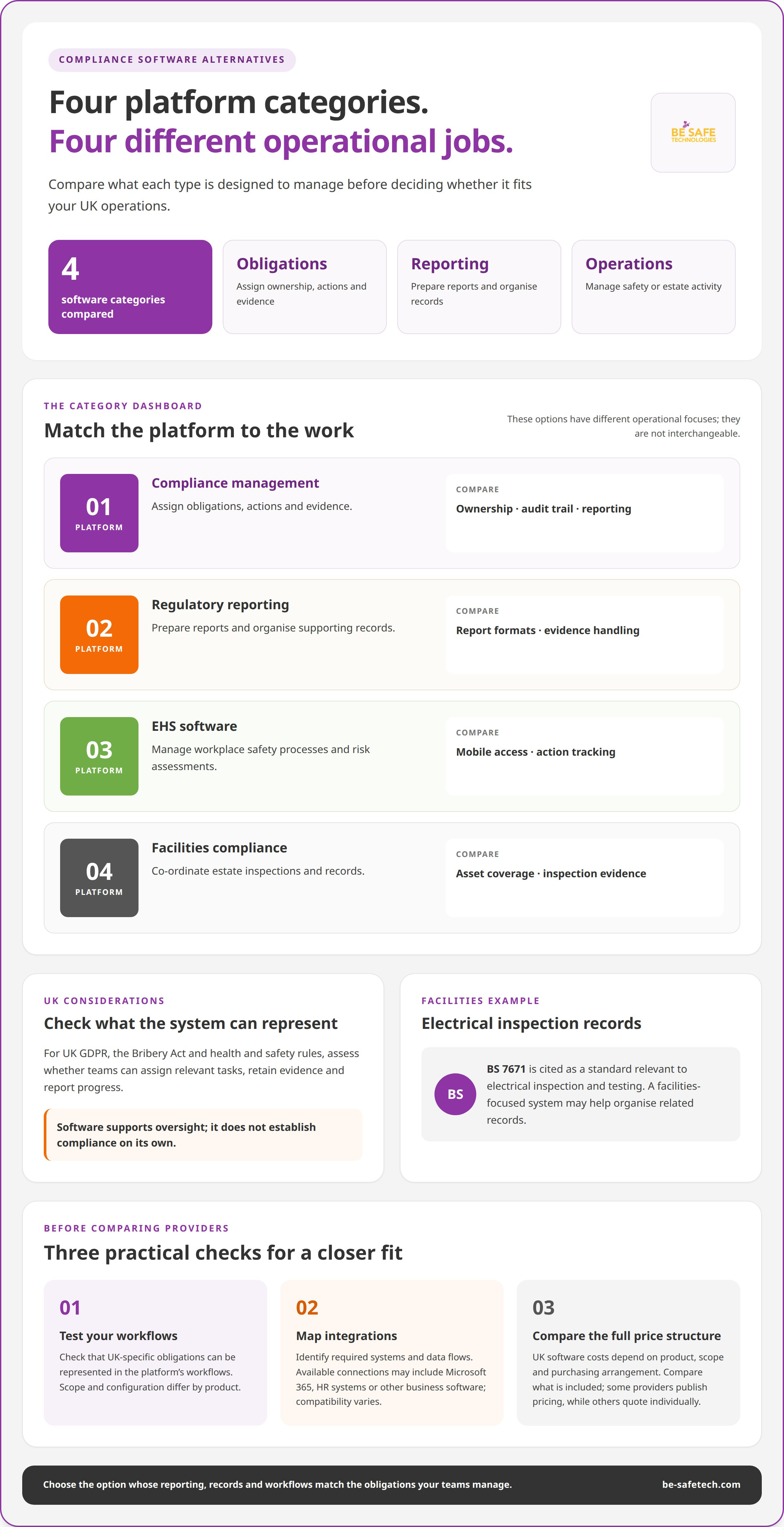
Use the comparison below to distinguish platform categories by their typical operational focus, rather than treating every option as interchangeable.
| Option | Typical use case | Useful comparison criteria |
|---|---|---|
| Compliance management platform | Assigning obligations, actions and evidence | Ownership, audit trail and reporting |
| Regulatory reporting software | Preparing reports and organising records | Report formats and evidence handling |
| EHS software | Managing safety processes and risk assessments | Mobile access and action tracking |
| Facilities compliance software | Co-ordinating estate inspections and records | Asset coverage and inspection evidence |
For UK estates, BS 7671 is cited as a standard relevant to electrical inspection and testing, according to the British Standards Institution. A facilities-focused system may help organise related records, while a broader platform can bring these alongside other compliance activity.
UK regulatory coverage
UK organisations comparing alternatives should distinguish between software that records obligations and the organisation’s responsibility to meet them. For UK GDPR, the Bribery Act and health and safety rules, assess whether the platform lets teams assign relevant tasks, retain evidence and report progress. These capabilities support oversight, but software alone does not establish compliance.
Which alternatives support those requirements depends on each product’s scope and configuration. Check whether UK-specific obligations can be represented in its workflows, rather than assuming a generic compliance label covers every rule.
Integration is also product-specific. Alternatives may connect with Microsoft 365, HR systems or other business software through available integrations or technical interfaces, but compatibility differs. Identify the systems and data flows your teams need before comparing providers.
UK software costs depend on the product, scope and purchasing arrangement. Some providers publish pricing, while others provide a bespoke quotation. Compare what each price includes and how it is structured, rather than relying on a headline figure.
Choose the option whose reporting, records and workflows match the obligations your teams actually manage.
Compliance management and GRC platform categories
Governance, risk and compliance platforms bring different control activities into one operating model. Their scope varies: a financial platform may centre on accounts, while a GRC system may connect risks, policies, assessments and reporting. Identifying the main category helps distinguish a specialist tool from a wider platform.
Financial management and accounting platforms
Accounting platforms organise invoices, expenses, payments and financial records. They can support financial controls by keeping transactions together and producing reports for review. Their core purpose, however, is managing financial information, not coordinating every regulatory obligation or workplace safety process. For example, a finance team may need transaction records for a review, while an EHS team needs a process for assigning and recording safety actions.
Compliance training and policy management
Training and policy systems focus on communicating requirements and recording staff activity. A platform in this category may hold policy documents, assign learning and record completion or assessment results. This can help organisations see which teams have received specific guidance. It differs from accounting software, which centres on financial records, and broader GRC platforms, which may connect training evidence with risks, controls and reporting.
Compliance reporting and management
Compliance reporting tools organise evidence and prepare information for internal reviews or external reporting. A compliance management platform may also assign responsibilities, track actions and retain records against defined controls. An advanced GRC system can connect these functions with risk assessments and governance processes, rather than treating each report as a separate task. For example, a reported issue can be linked to its owner, supporting evidence and follow-up action.
Identity and access management
Identity and access management platforms control how people access business systems and information. Administrators can use role-based permissions to give staff access suited to their work, then maintain records of access decisions. This category supports digital security controls, but it does not replace policy management, financial accounting or operational compliance reporting. Its value depends on how clearly access roles match teams, responsibilities and the systems they use.
How the categories fit together
Some organisations combine these tools; others favour a single platform with several functions. The right structure depends on where evidence sits and who needs to act on it. A finance team may prioritise transaction records, while governance teams may need linked assessments, controls and reporting. EHS teams need workflows suited to operational safety tasks, not simply a general record store.
Map each required activity to its users, evidence and reporting needs, then compare whether a specialist system or connected platform fits best.
Criteria for evaluating compliance alternatives
Compare each platform against real workflows, such as a site inspection, incident report or overdue corrective action. This keeps the decision grounded in how teams capture evidence, assign responsibility and report progress. For Compliance 360 alternatives UK teams are assessing, test whether staff can complete essential tasks without relying on spreadsheets.
Integration and action tracking
Map the systems an alternative must connect with, such as Microsoft 365, HR records or asset registers. Then trace one example: an inspection creates an action, assigns an owner and records completion evidence. Check whether integration supports that flow or requires duplicate entry. Ask how the platform handles failed transfers, changed records and access permissions.
Assess automation by following a recurring workflow from start to finish. For example, can a due-date reminder prompt an action owner and leave a record for managers? Distinguish configured automation from manual steps. Check whether reports draw from live records or require staff to combine information separately.
Security and UK data hosting
Security controls and hosting locations vary by provider, so don’t assume customer data is hosted in the UK. Review the provider’s security documentation and contractual terms for hosting locations, data access, backups, retention and deletion. Ask how access is controlled, whether multi-factor authentication is available, and how incidents are handled. These details help assess fit with your organisation’s information requirements.
Consider the data involved, too. An incident record may contain sensitive employee details, while an inspection record may focus on equipment and actions. Compare access controls for each user role, and check how evidence can be exported if responsibilities or systems change.
Evaluation, migration and implementation
Start with a short requirements list covering users, workflows, reports and integrations. Score each alternative against the same examples, such as closing a hazard action or retrieving an audit record. A consistent test makes differences between providers easier to see, without relying on feature names alone.
For migration, identify the records to move, their owners and any retention needs. Clean duplicate entries before transfer, then map fields between the old system and the new platform. Test sample records, attachments and permissions before wider use. During implementation, train users on specific tasks, such as submitting an inspection or updating an action. Review adoption through completed workflows and report accuracy, then adjust configuration where staff still depend on manual work.
When shortlisting Compliance 360 alternatives UK organisations can compare, prioritise the option that connects required systems, protects relevant records and makes each action traceable from assignment to closure.
Choosing an alternative based on operational needs
Begin with the work your teams need to control, not the longest feature list. A facilities team may prioritise inspection schedules, while an HR team may need training records. An organisation with several sites may need shared oversight alongside local ownership. These differences shape which vendor and platform suit daily operations.
For UK teams comparing Compliance 360 alternatives UK-wide, the best fit depends on operational needs. Small businesses may prioritise straightforward workflows for recording workplace hazards. Charities may need accessible reporting for staff, volunteers and trustees. Large enterprises often require consistent controls across departments, locations and existing systems. Choose a provider whose functions match those requirements, rather than relying on organisation size alone.
Map the operational process before comparing providers. For a site inspection, note who records findings, assigns action owners, supplies evidence and reports completion. Then consider what managers need to see across teams. This example helps reveal whether a platform supports the whole workflow or leaves staff to bridge gaps manually.
- Small business: prioritise straightforward setup, essential workflows and clear records.
- Charity: consider role-based access and reporting that supports governance responsibilities.
- Multi-site organisation: assess central oversight alongside local task ownership.
- Enterprise: examine integrations, permissions and reporting across departments.
Next, rank requirements as essential or desirable. A contractor-heavy operation may value site-visit records, while a manufacturing team may focus on risk assessments and corrective actions. Give each vendor the same operational example and compare the steps required. This makes differences in usability, reporting and administration easier to assess.
Plan for implementation as part of the decision. Identify the records to transfer, the teams that will use the platform and the existing systems involved. For example, test whether a manager can find a completed inspection without asking another team. Training, ownership and usable reports all contribute to operational success after launch.
Finally, compare the provider’s support for your organisation’s working model. A distributed enterprise may need consistent reporting across locations; a smaller team may need a simpler process with fewer hand-offs. A shortlist of Compliance 360 alternatives UK organisations can assess should reflect those differences. Select the alternative that supports priority operations, gives staff clear responsibilities and produces evidence managers can use.
Free trials and free versions
Free access can help teams assess a compliance platform before committing, but the format matters. A time-limited trial, guided demonstration and permanently free version provide different levels of access. For example, a demonstration may show an incident workflow, while a trial may let staff enter sample records themselves. Check which option is available and what it allows users to test.
Build a realistic test around one operational workflow. A site manager could record an inspection, attach evidence, assign a corrective action and produce a report. This reveals whether the software supports the full process or leaves manual steps between screens. Include the people who would perform each task, since administrators and frontline staff may experience the same workflow differently.
Look beyond the first screen. During a trial, test whether users can find a previous record, amend an action and retrieve its supporting evidence. Then review the reporting view: can a manager identify overdue work without combining separate spreadsheets? These examples help teams assess practical usability, rather than relying only on a vendor’s feature description.
Check the trial’s boundaries before importing real information. Access periods, user limits, available modules and data-export options can vary by provider. Use fictional or suitably anonymised examples when testing security and permissions. For instance, see whether a supervisor can access relevant site records without seeing information intended for another role.
A free version may have different limits from a trial. Assess whether it includes the workflows, monitoring and governance controls your organisation needs, or whether essential functions require a paid plan. A system that records an inspection but cannot support action follow-up may not represent the complete product. Treat any displayed price or feature limit as applying only to the version shown.
- Test the workflow: enter a sample inspection and follow its action through to closure.
- Review governance: check roles, approvals and the records managers can retrieve.
- Assess security: examine access controls using sample accounts and information.
- Check the transition: establish whether test records can be exported or removed.
Finally, capture findings in a short comparison record. Note which test tasks worked, which required manual work and which features were unavailable. This gives decision-makers a consistent basis for comparing access options, while keeping trial data separate from live compliance records.
Be-Safe Technologies: Compliance Genie – SaaS health and safety software
Be-Safe Technologies Ltd offers Compliance Genie for organisations looking to digitise health and safety processes and risk assessments. It is suited to UK organisations whose priority is managing those operational activities in mobile-first, cloud-based software, rather than adopting a platform centred on finance or wider governance, risk and compliance.
Compliance Genie is a SaaS health and safety platform. It is relevant when teams want to move health and safety processes and risk assessments into digital workflows. This is a more specific fit than a general compliance category: the central need is managing workplace safety activity, not accounting records, policy training or identity permissions.
Consider the tasks your team needs the software to support. If risk assessments and health and safety processes are central, Compliance Genie is a relevant option to assess. If your organisation’s main requirement is a broad GRC framework spanning unrelated governance areas, a dedicated health and safety platform may not cover that whole remit. Matching the system to the work helps keep software selection focused.
Contractor management is a related but distinct operational need. Contractor Genie is SaaS contractor management software that manages a company’s contractors and their site visits in one place. It is relevant where teams need to organise contractor information alongside site-visit management, rather than treating those activities as part of a general safety platform.
The two offerings address different requirements. Compliance Genie is the option for digitising health and safety processes and risk assessments. Contractor Genie is for managing contractors and site visits. An organisation with both needs can consider which activities each platform addresses, then assess how those needs fit its existing workflows.
Before choosing, define the task that prompts the search for an alternative. For example, a team seeking a digital way to manage risk assessments can evaluate Compliance Genie against that need. A team focused on contractor and site-visit management can consider Contractor Genie. This keeps the decision tied to operational priorities instead of assuming every compliance product covers the same functions.
If health and safety processes or contractor oversight are the areas you want to organise, Be-Safe Technologies Ltd offers software designed for those needs. Contact Be-Safe Technologies Ltd to discuss which option fits your operations.
Frequently Asked Questions
What features should UK buyers compare, including risk registers, audits, incident reporting, and policy management?
Compare how each feature supports a complete task, not just whether it appears on a feature list. For a risk register, assess how teams record hazards, assign owners and track actions. For audits and incident reports, consider evidence capture, follow-up and report retrieval. For policy management, examine how staff access current documents and how acknowledgements are recorded. Test these workflows with realistic examples from your organisation.
Which Compliance 360 alternatives support UK laws and regulations such as UK GDPR, the Bribery Act, and health and safety rules?
Support varies by product scope and configuration. Check whether UK-specific obligations can be represented in workflows for assigning tasks, retaining evidence and reporting progress; software alone does not establish compliance.