



Safety audit software for UK compliance and mobile audits
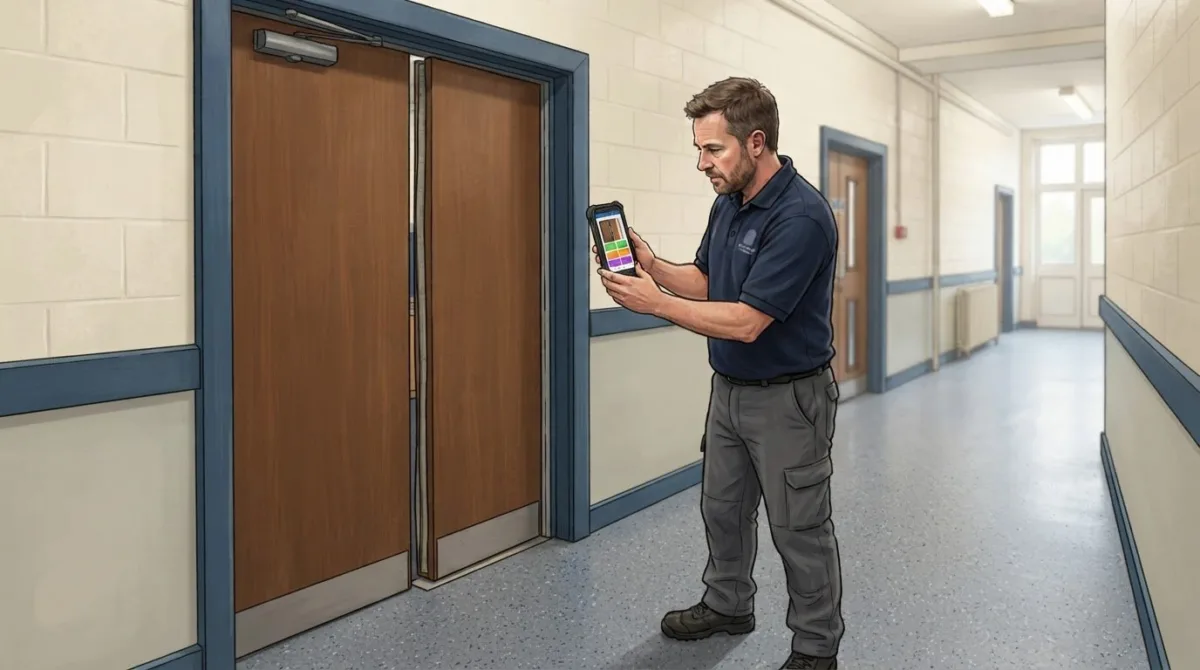
What if a safety audit gave you more than a completed checklist? Safety audit software in the UK helps teams capture evidence, record defects, assign follow-up actions and keep a reviewable inspection record. It brings fieldwork and reporting into one organised process, instead of leaving findings scattered across paper forms and spreadsheets.
It’s understandable to want a clear view of workplace risks and outstanding actions without adding unnecessary administration. UK law does not mandate company leaders to conduct health and safety audits, but a structured audit process can help organisations assess how their safety arrangements work and identify where follow-up is needed.
This article explains what health and safety audit and inspection software does, how mobile and offline tools support field teams, and which checklist, evidence and reporting features to look for. It also covers how software can support audit management in line with ISO 45001, while recognising that software alone does not achieve certification. You’ll see how to assess the practical fit for your organisation and where digital tools can make audit records easier to manage.
Key Takeaways
- Understand how audit software can bring evidence, findings and follow-up actions into a more organised process.
- Learn what to consider when field teams need to complete audits on mobile devices, including where connectivity is limited.
- See how well-designed checklists can make inspections more consistent and turn findings into useful reports.
- Identify the core capabilities that help plan audits, track actions and maintain reviewable records.
- Assess how links with HR, maintenance and reporting tools could fit your organisation’s existing workflows.
What is health and safety audit and inspection software?
Health and safety audit software records inspection evidence, defects and follow-up actions in one digital workflow. For example, a UK workplace can link an observation, such as a damaged guard, to its location, supporting documentation, action owner and later review.
For data security, GDPR and hosting, assess who can access personal data, how it is protected, where it is hosted and how long records are kept. Review the provider’s data-processing terms and controls alongside your organisation’s own information-handling practices.
Reducing duplicate data and paper use
A digital audit can replace a paper checklist followed by a separate spreadsheet entry. An inspector records a finding once, attaches a photograph or document, and assigns an action within the same record. This reduces repeated transcription between forms, email and shared files, while keeping the original observation connected to its follow-up.
Check how the system handles your existing templates and records. For example, when a team moves a fire safety checklist from paper, it should be able to organise questions, record answers and retrieve completed audits without creating another manual register. A central document repository can group procedures, inspection records and evidence by site or audit type. Clear naming, version control and access permissions help staff find the right document and distinguish current material from older records.
Performance insights and dashboards
Audit data is more useful when reports group findings by site, category, status or action owner. A dashboard might show open actions alongside completed inspections, helping an operational leader see where follow-up is concentrated. These views depend on consistent records: if teams use different labels for the same defect, comparisons are harder to interpret.
Check whether reports show the detail behind a summary. A leader reviewing repeated housekeeping findings, for example, needs to trace the dashboard figure back to individual observations, dates and actions. Filters can help distinguish trends from one-off issues, while exportable reports support internal reviews. The aim is not simply to produce a chart, but to make it easier to decide which findings need attention and track whether assigned actions are complete.
Platform integrations
Integrations can reduce manual transfers between audit records and other operational systems. Consider a finding that requires maintenance: a connected workflow may route the relevant information to a maintenance tool, while an HR connection may support appropriate workforce or training records. The data flow depends on the systems involved and how they are configured.
Before choosing an integration approach, map what information each team needs and where its authoritative record sits. For example, decide whether an audit platform should send an action status to a reporting tool or receive staff details from an HR system. Confirm which fields move, who can see them and how updates are handled. Clear ownership prevents conflicting records and helps keep reports useful across workplace, maintenance and management teams.
Mobile and offline audit capabilities
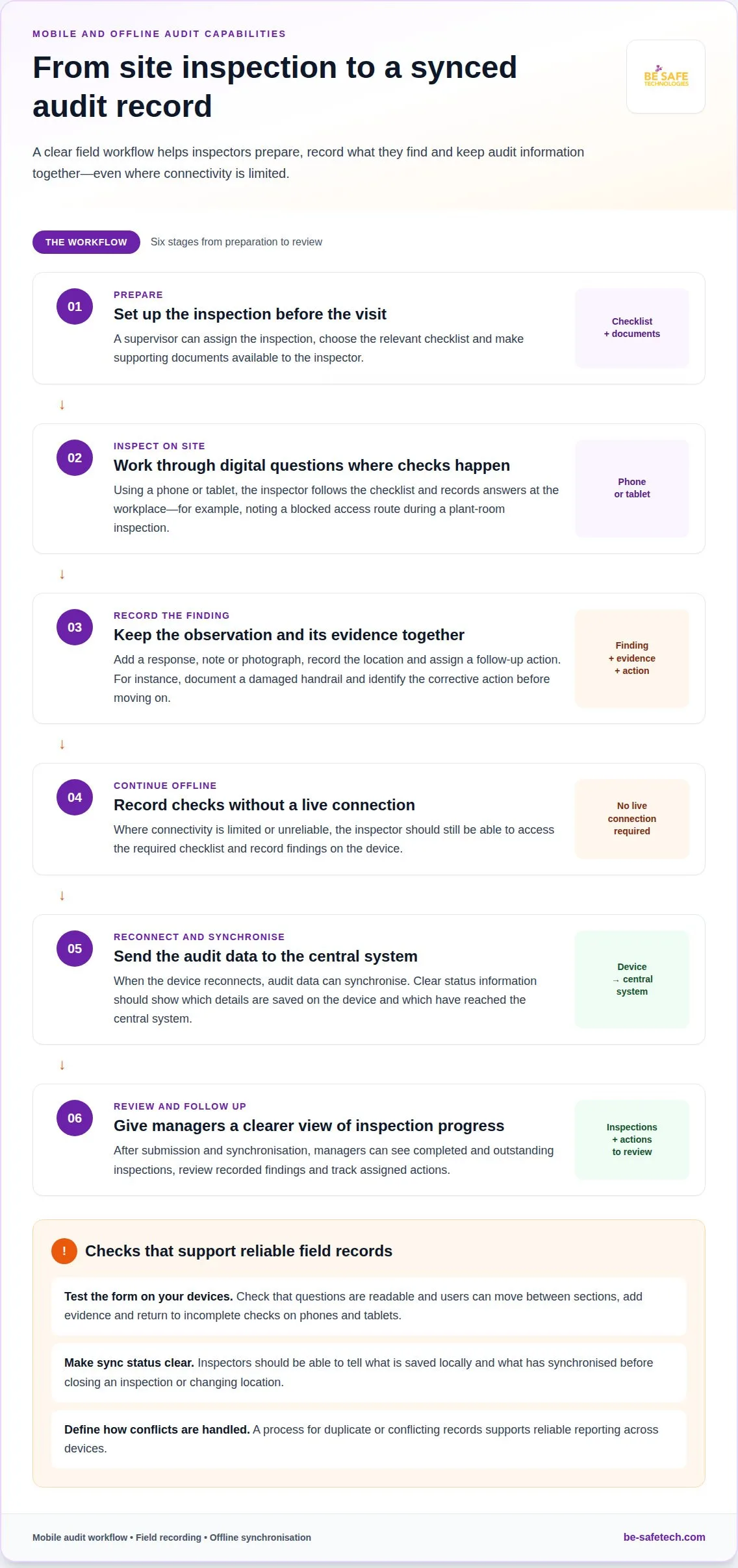
Mobile audit software lets inspection teams use phones or tablets at the workplace. Inspectors can follow digital questions, record answers and capture findings where they occur. During a plant-room inspection, for example, a team member can record a blocked access route against the relevant check instead of transcribing it later. This keeps the inspection close to the conditions being assessed.
Offline functionality matters when a site has limited or unreliable connectivity. Inspectors should be able to access the required checklist and record findings without a live connection. Once the device reconnects, the audit data can synchronise with the central system. This supports fieldwork in places such as basements, remote sites or large buildings with variable signal coverage.
Consider how the mobile app handles the whole inspection, not just its questions. A useful workflow may include recording a response, adding a note, attaching a photograph and assigning a follow-up action. For example, an inspector could document a damaged handrail, record its location and identify the corrective action before moving to the next area.
Offline records need clear status information. Inspectors should be able to tell which audit details are saved on the device and which have synchronised. This helps avoid uncertainty when someone closes an inspection or changes location before reconnecting. A defined process for resolving duplicate or conflicting records also supports reliable internal reporting across devices.
Assess usability on the devices your organisation uses in the field. Small screens can make long questions difficult to read, while poor navigation can slow an inspection. Test a representative checklist on a phone and a tablet, including how users move between sections, add evidence and return to incomplete checks. The aim is a practical form that supports accurate recording without distracting from the workplace inspection.
Mobile access can also shape how teams prepare for an audit. A supervisor can assign the inspection, choose the relevant checklist and make supporting documents available before the visit. The inspector can then complete the planned checks on site, capture exceptions and submit the record after synchronisation. This sequence gives managers a clearer view of completed and outstanding inspections.
For a mobile-first approach, assess whether mobile safety software supports the way your teams inspect sites, record evidence and synchronise audit data. Matching the workflow to real field conditions helps keep mobile audits practical for inspectors and useful for managers.
Audit checklists and automated reporting
Digital checklists give inspection teams a consistent structure for recording results. Reports and dashboards turn completed checks into information managers can review and act on.
Audit checklists
A checklist sets out the questions an inspector should address during a safety inspection. The relevant checks depend on the workplace and equipment, so a construction site may need workflows covering LOLER and PUWER inspections. A general workplace review may need different questions and evidence fields.
Assess whether each checklist reflects the task without making the inspection difficult to conduct. Questions should be clear, grouped by inspection area and relevant to the hazards being reviewed. For example, an equipment check might prompt the inspector to record its condition, add a finding and note any action required.
Check how the digital form handles incomplete answers and supporting evidence. Structured responses, such as compliant, requires action or not applicable, can make records easier to compare across multiple sites. Notes and photographs can add context to an exception, while a checklist owner can keep questions aligned with the organisation’s inspection process.
Useful checklists also distinguish the observation from the response. A failed check should connect to a finding and, where needed, an assigned action. This gives a reviewer a clear route from the original question to its outcome, rather than leaving a gap between inspection results and follow-up.
Automated reports and dashboards
Automated reports assemble recorded inspection results for review. A manager might filter findings by site, status or inspection type, then examine open actions separately from completed checks. This can reduce manual collation, provided teams record information consistently.
Dashboards help reveal recurring patterns, but their value depends on useful categories. If one team records “blocked exit” and another enters “obstructed route”, a combined report may not group those findings together. Agreeing clear labels for common outcomes helps leaders interpret trends across sites and focus on unresolved issues.
Look for reports that retain a link to the source record. A summary of outstanding actions should let a reviewer identify the related inspection, finding, owner and status. For example, a monthly management review can use that information to distinguish a newly raised issue from one awaiting closure.
Analytics should support decisions, not just produce attractive charts. Assess whether reports show changes over time, recurring findings and action completion in a way that suits internal reviews. A practical reporting cycle is to generate the view, discuss exceptions, assign or confirm next actions, then record the outcome for the next review.
Core capabilities of health and safety audit software
Useful inspection software connects audit planning with evidence, findings and follow-up. Its core value is keeping each stage of the health and safety workflow traceable.
Start with planning. Teams can organise audits by site, activity or equipment, then assign inspections to the people responsible. For example, a construction organisation might schedule equipment checks alongside general workplace reviews. Clear assignments help managers see what is planned, completed and in need of attention.
During an inspection, the system should support consistent recording. An inspector can complete relevant checks, capture evidence and describe a finding in context. If a check identifies a concern, the record can connect it to a follow-up action and an owner—whether arranging maintenance or scheduling accredited health and safety courses through providers like youcandoit.training. This creates a clear route from the original observation to review, rather than leaving separate notes without an agreed next step.
Audit workflows may need to cover different subjects across one organisation. Examples include LOLER and PUWER inspections, fire safety, electrical inspection, petrol, HVAC, water hygiene and general workplace health and safety checks. The relevant workflow depends on the organisation’s activities and the assets or locations being inspected. A well-organised system helps teams select the right process for each task.
Evidence management is another essential capability. An audit record should bring together completed checks, notes, supporting documents and follow-up actions. For instance, a finding about a damaged machine guard can be reviewed alongside its inspection context and action status. Connected records help supervisors follow progress without rebuilding the audit history from separate files.
Offline access can support inspections in areas without reliable connectivity. Teams can record the required details on a mobile device, then synchronise them when a connection returns. Managers should be able to distinguish submitted records from work still in progress. This matters when field teams inspect sites with different network conditions.
Audit management software can support organisations in planning, carrying out, evidencing and tracking audits in line with ISO 45001. It does not achieve certification by itself. The standard still depends on the organisation’s management system and how that system operates. Treat the software as a way to organise audit work and evidence, not as a substitute for the wider requirements of an ISO 45001 programme.
The practical test is whether the workflow connects these capabilities. A planned inspection should lead to recorded evidence, a reviewable finding and a tracked action. When those steps stay connected, managers can follow audit progress and identify where workplace processes need attention.
UK safety audit software: HR, maintenance & reporting
Integrations connect audit records with other systems used across an organisation. For example, an inspection finding can relate to a staff role, a maintenance request or a management report. This reduces manual transfers of the same details, but only when systems share information clearly and under control. Identify operational hand-offs before deciding which connections matter.
An HR connection can support workflows involving people, roles and training records. A site audit, for instance, may identify that a task requires staff with relevant training, such as first aid or medical emergency compliance from specialist providers like firstmedicaltraining.com. Linking the finding to the appropriate workforce record can help managers direct follow-up. Define which staff details are needed, who can access them and which system is the authoritative source for each field.
Maintenance links can connect an inspection finding to an equipment repair or site-maintenance process. If an inspector records a fault, the audit system could pass its description, location and supporting evidence into a maintenance workflow. The maintenance team can record progress in its own system, with status information returned for audit follow-up. Agree how teams handle updates, duplicate requests and actions that remain open.
Reporting integrations can bring audit information into wider operational reviews. For example, a reporting tool might group findings by site, category or action status alongside other management data. Decide whether reports need detailed records or summary fields, and define each measure consistently. Without shared categories, a dashboard can use different labels for similar findings and obscure useful comparisons.
Connections can use different methods, including a built-in connector, an application programming interface or a structured file exchange. Each approach needs agreed fields, update frequency and ownership. Map one example from start to finish: an inspection raises a defect, maintenance receives the relevant details, and the action status returns to the audit record. This reveals missing steps before teams depend on the workflow.
Give access controls and data quality as much attention as convenience. Set permissions so each team sees information relevant to its work, and decide how to handle errors or failed transfers. Test the connection with a sample record, such as a training-related audit action, then compare the information in both systems. Clear ownership helps prevent outdated records and conflicting status updates.
To discuss how digital audit workflows could fit your organisation’s processes, explore safety software options.
Be-Safe Technologies Ltd: Compliance Genie – SaaS health and safety software
Be-Safe Technologies Ltd offers Compliance Genie, mobile-first, cloud-based SaaS health and safety software for organisations that want to digitise and manage safety processes and risk assessments. The platform supports teams moving from paper-based audit routines to organised digital records.
Compliance Genie can support organisations seeking a central way to manage health and safety activity, including audit and inspection workflows. For contractor oversight, Contractor Genie centralises contractor information and site visits in one system.
If you’re considering a digital approach to safety audits or contractor management, contact Be-Safe Technologies Ltd to discuss your requirements.
Plan a practical next step for your audit process
Before adopting safety audit software in the UK, choose one audit workflow to assess first. Map who completes it, who reviews findings and how actions should progress. This gives your team a practical way to judge whether a digital process fits day-to-day work.
Then consider how the system would fit your existing records and routines. A clear implementation plan can set out what information needs to move between teams, how staff will use the process and what managers need to review. Defined requirements make it easier to discuss the right fit and avoid unnecessary steps.
Be-Safe Technologies Ltd offers Compliance Genie for health and safety software, alongside Contractor Genie for contractor management. To discuss how these options could support your organisation’s processes, contact Be-Safe Technologies Ltd.
A considered first step can help your team build a more organised approach to safety management with confidence.
Frequently Asked Questions
One platform or several specialist tools?
Choose one platform when it covers your main workflows without adding unnecessary complexity. Several specialist tools may suit organisations with distinct needs, such as contractor access management alongside internal audits. Compare how information moves between systems, who maintains duplicate records and how managers see outstanding work. For example, a firm coordinating contractor visits and staff inspections should consider whether separate systems add administration or provide clearer oversight.
What are the benefits of audit management software?
Audit management software can help teams organise inspections and oversee follow-up. A manager can review completed audits, identify overdue actions and see which records need attention without gathering updates from separate spreadsheets. It can also give inspectors a consistent way to record findings. The benefit depends on good workflows and clear ownership: software cannot decide which risks matter most or replace informed review.
What is safety audit software and what features should UK businesses look for?
Safety audit software is a digital system for planning and recording workplace audits and managing their outcomes. For UK organisations, useful capabilities can include configurable inspection forms, evidence capture, action ownership and reporting. Consider the tasks teams perform, the devices they use and how records must be accessed later. For example, a business with several sites may need site-based permissions and reporting that keeps each location’s audit history distinct.
What are the best safety audit software platforms available in the UK?
There is no single best platform for every organisation; the right fit depends on its audit processes and users. Compliance Genie is Be-Safe Technologies Ltd’s mobile-first, cloud-based health and safety platform, while Contractor Genie manages contractor information and site visits. Compare each product’s relevant workflows, reporting and device support against your operational needs. A tool designed for contractor oversight may not be the main choice for an organisation focused on internal audits.
How do UK safety audit software products compare on features and usability?
Compare products against the same practical task, such as recording an inspection finding and assigning its follow-up. Consider whether staff can navigate the workflow, managers can retrieve the resulting record and reports suit internal reviews. Check supported devices and available integrations against your existing systems. A feature list alone won’t show how well a platform fits your organisation’s roles, terminology and approval steps.
Does safety audit software support UK health and safety laws, including the Health and Safety at Work Act 1974?
Software can help organise audit records and follow-up actions, but it cannot establish legal compliance by itself. No law mandates company leaders to conduct health and safety audits; an audit can still help review workplace arrangements. The Health and Safety at Work Act 1974 is relevant to UK health and safety management, but a digital tool does not replace an organisation’s responsibilities or competent decisions about its circumstances.
Can safety audit software help meet ISO 45001 requirements and prepare for certification?
Yes, audit management software can support planning, evidence collection and action tracking in line with ISO 45001. For example, an organisation can use audit records to show how findings were identified and followed up. The software alone does not achieve certification. Certification depends on the organisation’s wider management system and its implementation, so treat digital records as supporting evidence rather than a substitute for the standard’s requirements.
How do mobile safety audits and offline data capture work in safety audit software?
Mobile audits let an inspector complete digital records on a phone or tablet at the worksite. Where offline capture is available, entries can be saved without a live connection and synchronised later. The process differs between platforms, so consider how users can tell which records have synchronised and how incomplete entries are handled. This matters particularly for inspections in areas with unreliable connectivity.