



Permit to Work Software for UK Safety Teams

Permit to work software in the UK helps teams create, review, approve, issue and close permits, making key steps and decisions easier to track.
Paper permits can be difficult to coordinate when several jobs, people and safety documents need attention at once. A permit-to-work system structures the process by supporting risk assessment, the assignment of controls and authorisation before work begins.
This guide explains why permit-to-work systems matter, which activities may require a permit and how software can support approvals, credentials, risk assessments and method statements. It also covers oversight across multiple permits and practical points to consider when choosing a system, so you can assess where digital tools may make safety processes clearer and easier to manage.
Key Takeaways
- Use permits to organise how high-risk work is assessed, controlled and authorised before it begins.
- Choose templates and approval steps that reflect the work, responsibilities and decisions your teams need to record.
- Keep worker credentials and equipment certification information connected to the relevant work so teams can review it as part of planning.
- Attach risk assessments and method statements to permits to keep safety documents in context and accessible.
- Use a shared view of active permits to help teams monitor work across sites and identify where attention is needed.
Why are permit to work systems important?
High-risk construction work needs clear controls before a task starts and a record of decisions as it progresses. Permit-to-work software can organise permit creation, approval, issue and closure, while helping teams monitor active work alongside its risk assessments.
Digital permit creation and approvals
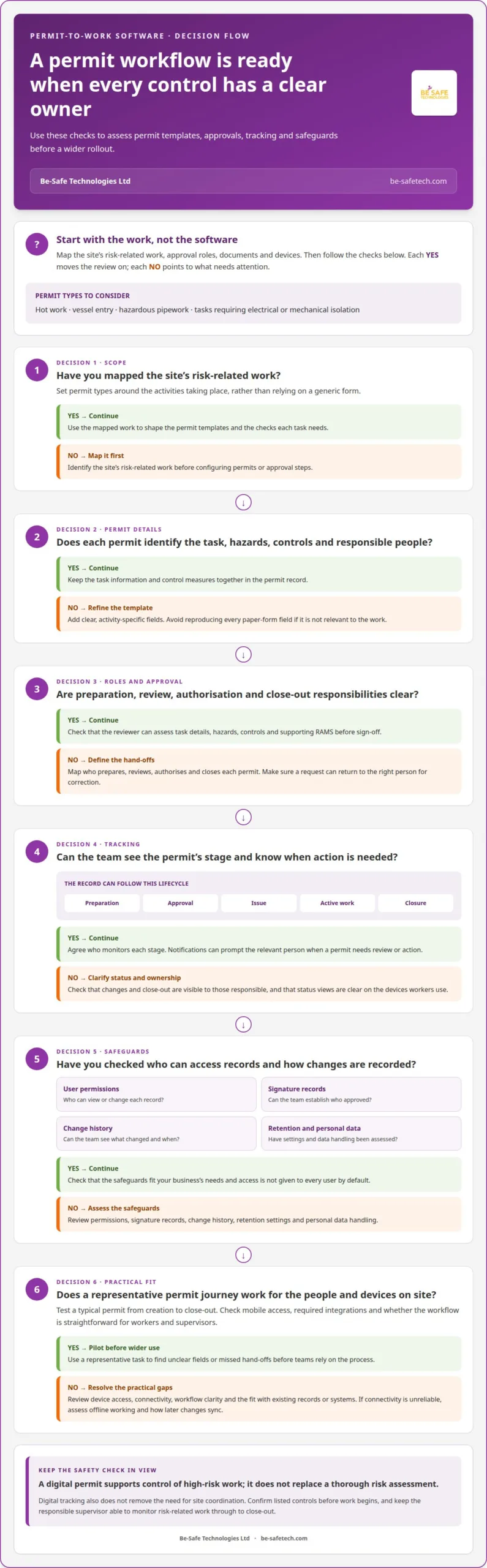
UK systems can support the creation, review, approval, issue and closure of permits, although features vary by platform. For construction, set up permit types around the work, such as hot work, vessel entry, hazardous pipework or tasks requiring electrical or mechanical isolation. Each permit should identify the task, hazards, controls and responsible people. Digital signatures and access from suitable devices can make approval and site review more practical.
Before choosing a system, map your site’s risk-related work, approval roles, documents and devices. Compare whether the workflow is straightforward for workers and supervisors, supports mobile access at the worksite and connects with the records or systems your business needs. Don’t choose on a feature list alone: test a typical permit journey from creation to close-out.
Lifecycle tracking and notifications
A digital permit record can show its stage, from preparation and approval through issue, active work and closure. Notifications can prompt the relevant person when a permit needs review or action, helping teams follow the process without relying on a paper copy being passed around. Agree who monitors each stage, and ensure changes and close-out are visible to those responsible.
Digital tracking does not remove the need for site coordination. Before work begins, for example, a supervisor can review the permit status and confirm that the listed controls are in place. When comparing products, assess whether notifications and status views are clear on the devices workers use, and whether required integrations fit existing processes.
Compliance and data safeguards
A permit supports control of high-risk work, but it does not replace a thorough risk assessment. Step Change in Safety describes permit-to-work systems as an essential part of task risk assessment; its Permit to Work Pocket Card is based on HSG250. Use those principles to shape permit steps, rather than treating a digital form as proof that a task is safe.
For UK legal and HSE guidance, apply the relevant risk-assessment process and use HSG250 as a reference for permit procedures. For system safeguards, assess user permissions, signature records, change history, retention settings and how personal data is handled. These checks help establish who approved a permit, what changed and when, without giving access to every user.
Setup, training and risk reduction
Implement the system in stages: map existing permits, define templates and approval roles, then test a representative task before wider use. Train workers, supervisors and approvers in the steps they perform, including how to access records on site and raise an issue. A short pilot can reveal unclear fields or missed hand-offs before teams rely on the process.
Digital systems can create new risks if users share logins, skip approvals or cannot access a device. Reduce these risks with individual access, clear fallback steps, practical training and regular reviews of permit records. Maintain a workable process for interruptions, and ensure the responsible supervisor can monitor risk-related work through to close-out.
Customisable templates, roles and approval workflows
Well-designed workflows make permit responsibilities clear to site teams, contractors and approvers. Templates should reflect the hazards of each activity and guide users through the right steps without adding irrelevant fields.
Custom templates and site roles
Start by mapping who prepares, reviews, authorises and closes each permit. A site supervisor, for example, might check the work area while a competent approver reviews the controls before authorisation. Templates can then request the details each role needs, such as the work location, task scope, hazards and control measures.
Custom fields should match the activity, not simply reproduce every paper form. A hot-work template, for instance, can prompt users for task-specific controls, while an isolation permit can capture the relevant isolation details. Check that required fields are clear on a phone and that users can see the permit’s status and next action.
Team and contractor workflows
On a shared site, contractors may submit RAMS, meaning risk assessments and method statements, for review alongside a permit request. A clear workflow identifies who receives and reviews the documents, and how any changes are sent back to the contractor. This helps prevent teams from treating a submitted document as an approved work permit.
Set access according to each person’s role: a contractor needs to provide task information, whilst a site approver needs to assess it. Contractor-heavy sites can also consider contractor management software to organise contractor information and site visits alongside permit processes. Keep the workflow clear about which record governs the work and who updates it after a change or incident.
Permit review and sign-off
A useful approval path shows the permit’s status at every stage, from submission to review, authorisation and close-out. Before sign-off, the reviewer should be able to assess the task details, hazards, controls and supporting RAMS. If information needs correction, the workflow should return the request to the right person rather than leave responsibility unclear.
Mobile workflows can help site roles review information where the work takes place, provided the interface supports their tasks and devices. If a site has unreliable connectivity, assess whether the system supports offline work and how changes sync later. Don’t assume every system handles this in the same way. Test a real approval journey with workers and contractors before adopting it across activities.
Worker credentials and equipment certifications
A permit can link each worker and item of equipment to the task they’re assigned. Before issue, record the person’s role-specific credentials, relevant training and any equipment certification needed for the work. For example, a confined-space task may require the team to review who is assigned, what equipment is planned and whether the required records are current.
Keep these checks focused on the job. A permit workflow can prompt the coordinator to review worker information and equipment records before approval, then retain the evidence with the permit. For isolation work, the reviewer can check that assigned workers understand their responsibilities and that the equipment information matches the task. This creates a traceable hand-off between planning and site operations.
Right to work and task competence are separate checks. UK employers must check a prospective employee’s immigration status before offering them a job; that check does not establish whether someone has the credentials for a particular workplace activity. For a Skilled Worker Visa in 2026, the minimum salary is £41,700, or the going rate if higher. The Scale-up Visa route lists a £39,100+ minimum salary in 2026.
For sponsored workers, keep immigration records within the appropriate employment process and assess work-related credentials separately. A permit system should focus on the worker’s role, relevant task information and acknowledgement of specific controls. When issuing a permit, provide the worker with instructions and require acknowledgement before work starts. Record any changes and repeat the acknowledgement when revised information affects the task.
Equipment records also need clear ownership. Identify who checks each document, which item it covers and whether it applies to the planned activity. A lifting operation, for example, may involve different equipment and checks from a confined-space entry. A permit workflow can prompt a review of the relevant record, but it doesn’t replace inspection, competent assessment or the site’s existing control process.
Digital records may reduce time spent locating paperwork and chasing approvals, helping workers avoid delays caused by missing information. Actual productivity and cost effects depend on how well the process fits site operations, how often permits are used and how much rework incomplete submissions create. Software pricing is set after a quote request and depends on the case; factors include user numbers, sites, configuration and implementation needs.
Measure the process as well as storing records. Track where permits wait for credentials, equipment documents or worker acknowledgement, then adjust the workflow to address recurring hold-ups. A completed record should show what was reviewed, who acknowledged the controls and whether an outstanding issue prevented the permit from being issued.
Attachments for risk assessments and method statements
Permit-to-work software manages the digital creation, review, approval, issue and closure of permits. UK teams can attach risk assessments and method statements, or RAMS, so reviewers can see task documents alongside the permit.
It can support permits for high-risk activities such as hot work, vessel entry, cutting into pipework carrying hazardous substances, and work requiring electrical or mechanical isolation. These activities occur across construction and other workplaces, so templates should reflect the task rather than assume one permit suits every job.
A permit is a formal process for assessing risks, setting controls and authorising high-risk work before it starts. It does not replace a robust risk assessment. Step Change in Safety describes permit-to-work procedures as an essential part of task risk assessment.
That distinction matters during review. The risk assessment identifies hazards and control measures for the work, while the permit helps apply and authorise those controls at the job location. For example, a permit for cutting into hazardous pipework should be reviewed alongside the assessment and method statement for that specific task.
Attachments keep supporting documents linked to the relevant permit. A reviewer can check that the RAMS relates to the stated activity, location and work system, then determine whether document revisions require another review. The organisation should define who uploads each document, who checks it and how approval is recorded. This provides a clear route for questions or corrections before issue.
Use templates to prompt the right documents and checks for each permit type. A hot-work template might request the relevant task assessment and method statement; an electrical or mechanical isolation template should guide users towards documents addressing that work. These are prompts, not substitutes for assessing actual hazards or selecting suitable controls.
For practical tracking, make each attachment’s title, version and review status visible alongside its permit. If a method statement changes after review, the approver needs to identify the revised document and decide whether the permit requires further review. Keep the previous record available where the system supports it, so the approval trail shows which documents informed the decision.
Before adopting a digital work system, test it with one permit type and its supporting documents. Follow the steps from upload to review, approval and close-out, including how workers access the current version on site. This reveals missing fields, unclear responsibilities or attachment checks that need refining before the organisation applies the process to other high-risk activities.
Begin by checking that each attachment is current and clearly linked to the work being authorised. In the UK, a permit to work does not replace robust risk assessment; it can help make the assessment meaningful at the worksite. The digital record should support discussion of the task where the work takes place, rather than treat the presence of a document as proof that risks have been assessed. Reviewers can use the attached RAMS to confirm that the task’s controls can be applied at the work location and raise gaps before authorisation.
Multi-permit oversight and dashboards
When several permits are active across a site, supervisors need a clear view of their status and location. A dashboard can bring active work, pending approvals and completed records into one view, helping teams prioritise reviews and coordinate operations.
A useful live permit dashboard should distinguish permits awaiting approval from authorised work and permits nearing close-out. A site manager, for example, could filter by location, activity or status before reviewing tasks that may overlap. Clear visibility helps direct attention, but the dashboard still depends on accurate permit information and timely updates from the people doing the work.
Maps can add useful context when a site has separate work areas or multiple buildings. A map view may help a supervisor see where active tasks are in relation to other work, access routes or shared areas. Assess whether map details remain readable on mobile devices and whether location information is specific enough for teams to find the relevant activity.
Reporting can help safety teams understand how the permit process works over time. Useful measures might include permits awaiting review, common reasons for returned requests or recurring delays between submission and approval. These indicators can help an organisation identify process bottlenecks and adjust roles, templates or review steps. Treat reports as prompts for investigation, not proof that controls were followed on site.
To streamline oversight, decide what information each role needs before configuring dashboard views. A project manager may need a site-wide summary, while a supervisor may need active permits for one work area. Keep the main view focused on decisions: what needs attention, who owns the next step and whether work is authorised. Too many filters or status labels can make urgent information harder to find.
Mobile access matters when supervisors review permits away from an office. Test whether the dashboard presents essential details clearly on a phone, including the task location, current status and relevant documents. One practical test is asking a supervisor to find a specific active permit during a site walk and identify its approval state without navigating through unrelated records.
Choose analytics that answer practical questions. Can reporting show where requests regularly pause, or which activities lead to repeated document corrections? Use the findings to improve the work system and clarify responsibilities. A map or dashboard cannot replace direct site checks, communication between teams or competent review of risk controls.
During software evaluation, test dashboard visibility with realistic permit records and roles, including a mobile user and a site manager. Explore digital health and safety software as a next step towards organising permit information and oversight.
Be-Safe Technologies: Compliance Genie – SaaS health and safety software
Be-Safe Technologies Ltd’s Compliance Genie is SaaS health and safety software for organisations digitising safety processes and risk assessments alongside their permit arrangements. Its mobile-first, cloud-based platform helps manage health and safety processes, while Contractor Genie manages contractors and their site visits in one place. These tools can help teams organise wider safety or contractor processes alongside permit control, without treating a permit as a substitute for risk assessment or site coordination.
Consider whether your current workflow needs broader digital management of safety records, risk assessments or contractor visits. To discuss how Be-Safe Technologies Ltd’s software could fit your organisation’s processes, contact Be-Safe Technologies Ltd or visit be-safetech.com.
Make your next permit process easier to manage
Before choosing permit-to-work software in the UK, identify the operational friction you want to address. Is it unclear ownership, slow review, scattered records or limited oversight across sites? Starting with a specific need helps your team assess whether a digital process fits the way work is planned and controlled.
Involve the people who prepare, approve and carry out permits in that discussion. Their day-to-day experience can help shape a process that works on site as well as being clear to managers. Then consider how digital health and safety tools could support your organisation’s wider requirements.
Discuss your requirements with Be-Safe Technologies and take a considered next step towards clearer, more manageable safety processes.
Frequently Asked Questions
What are the benefits of using permit to work software?
Permit-to-work software in the UK can make permit information easier to find and follow across teams. During a shift handover, for example, an incoming supervisor can review the current permit record and see outstanding actions without relying on a verbal update alone. A consistent digital process can also help organisations identify recurring workflow issues, such as incomplete submissions, and improve how permits are prepared and reviewed.
Which UK permit-to-work software providers are available and what features do they offer?
Be-Safe Technologies offers Compliance Genie, SaaS health and safety software. Permit-to-work systems in the UK can support permit creation, review, approval, issue and closure, with features varying by platform.
How do UK permit-to-work software products compare for usability, mobile access and integrations?
Compare products by testing a typical permit from creation to close-out. Check that the workflow is clear for workers and supervisors and works on the devices used on site. Review required integrations and, where connectivity is unreliable, whether offline work and later syncing are supported.