


Incident Reporting Software UK: A Practical Guide for 2026

What if reporting an incident became a straightforward part of the working day, rather than another form to put off? For organisations weighing up incident reporting software uk, the goal isn’t simply to move paperwork online. It’s to give staff a clear way to raise concerns and managers a practical route from report to follow-up.
When details are spread across paper forms and spreadsheets, reports can be delayed or incomplete, actions can be hard to track and recurring issues may be more difficult to spot. Staff are more likely to report when the process is clear and manageable. Consistent records also help managers review what happened and decide where further attention may be needed.
This guide explains how software can support reporting, review and learning, and what to assess when choosing a platform. It covers practical considerations such as ease of use, follow-up visibility and record retrieval, so you can judge whether a system fits your processes. Be-Safe Technologies’ Compliance Genie is a mobile-first, cloud-based platform for managing health and safety processes, including risk assessments and regulatory compliance.
Key Takeaways
- Incident reporting software uk can help organise reporting and review in a digital process, while staff and managers remain responsible for sound judgement.
- Map each stage, from submission to recording outcomes, and assign clear ownership so reports can be followed through.
- Compare platforms against your organisation’s needs, including reporting access, record retrieval and management visibility.
- A phased introduction, with clear instructions and staff training, can help employees adopt the reporting process.
- See how Compliance Genie supports digital management of health and safety processes, risk assessments and compliance.
What incident reporting software does for UK workplace safety
Incident reporting software gives an organisation a digital way to record workplace events, review what happened and manage its response. Depending on the system and the organisation’s process, a record may include the event, its location, people involved and any follow-up required. The aim is to make information easier to organise and review, not to decide automatically what an event means or what action is appropriate.
Software supports the process, but it doesn’t replace competent judgement. People still need to assess the circumstances, decide whether an investigation is appropriate and determine what action is proportionate. The Health and Safety at Work Act 1974 sits within the UK’s workplace safety framework, but an internal record in software isn’t the same as a legal report. For events that may need reporting under RIDDOR, use current guidance from the Health and Safety Executive (HSE) to assess the criteria and reporting requirements.
Which workplace events might an organisation record?
Organisations may record injuries, work-related ill health, near misses, hazardous conditions and damage to equipment or property. A hazard is a source of potential harm. A near miss is an event that caused no injury or ill health but could have done so. “Incident” is often used as a broader term, but categories aren’t universal. Define them to reflect your work and reporting policy, and consult current HSE guidance to distinguish events that may be reportable.
Clear categories help staff describe what they observed without having to make a legal assessment themselves. For example, a worker might report a spill, a damaged guard or a fall, then provide the relevant details. A manager can review the information and decide what further assessment is needed. Use plain language in the reporting process, and explain how staff should raise an urgent concern under your organisation’s procedures.
Why move from paper forms to digital reporting?
Paper forms may be familiar, but they can be harder to access across sites and take time to collate. Spreadsheets make sorting information possible, yet separate files and inconsistent formats can complicate review. Digital records can provide a more consistent place to capture and retrieve information, depending on how the system is set up and used.
A mobile-first, cloud-based approach can make a reporting route accessible on mobile and desktop devices, which may suit staff working away from a fixed office. Short prompts and clear instructions help people understand what to submit and where it goes. Software alone can’t guarantee complete or timely reporting, or prevent incidents. Its value depends on a process people understand and managers follow through.
Consistent records can also help managers spot repeated locations, event types or circumstances that may deserve closer examination. A pattern isn’t proof of a cause and shouldn’t replace investigation. It can point to useful questions, such as whether a task, work area or existing control needs review. That is how recording can support learning rather than becoming an administrative end in itself.
How incident reporting software supports the full reporting lifecycle
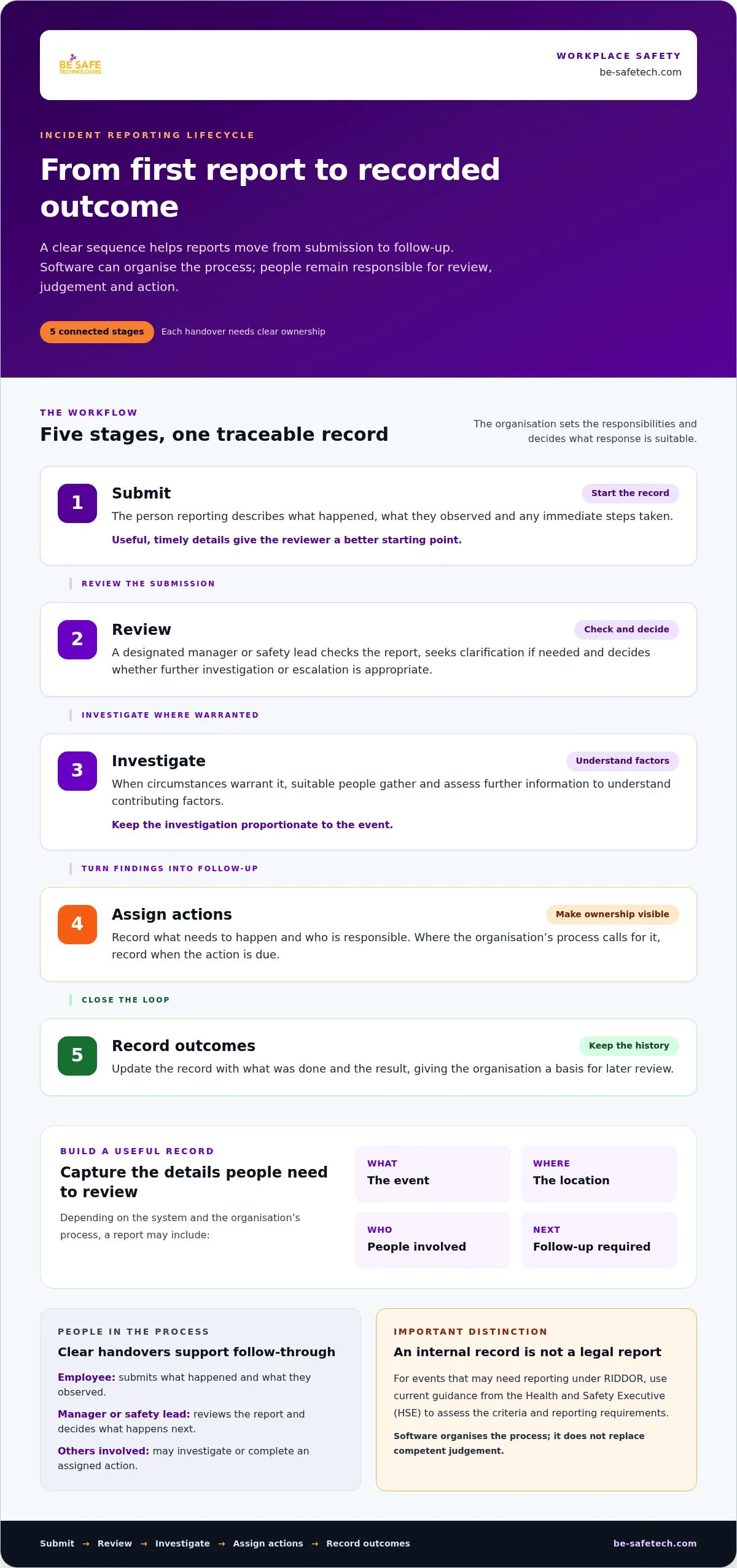
An incident reporting workflow is the agreed sequence for submitting and reviewing a report, investigating where appropriate, assigning follow-up actions and recording outcomes. Software can help organise these steps, but the organisation decides who is responsible at each stage and what response is suitable.
A clear process helps prevent a report from becoming a record nobody revisits. Those involved may include the employee submitting information, a line manager or safety lead reviewing it, and others asked to investigate or complete an action. Assign responsibilities in line with your organisation’s policy, roles and assessment of risk.
- Submit: The person reporting provides a clear account of what happened, what they observed and any immediate steps taken. Timely, relevant details give the reviewer a better starting point.
- Review: A designated manager or safety lead checks the submission, seeks clarification if needed and decides whether further investigation or escalation is appropriate.
- Investigate: Where the circumstances warrant it, suitable people gather and assess further information to understand contributing factors. The investigation should be proportionate to the event.
- Assign actions: The organisation records what needs to happen, who is responsible and, where its process calls for it, when the action is due.
- Record outcomes: The record is updated with what was done and the result, giving the organisation a basis for later review.
From first report to review
A straightforward reporting route and plain instructions help staff focus on useful facts rather than lengthy explanations. A reviewer can consider the circumstances, identify gaps and decide what happens next. For events that may be reportable under RIDDOR, follow current guidance from the Health and Safety Executive (HSE). An internal report and a regulatory report serve different purposes.
Make the handover clear. Staff should know where a submission goes and what to do if the matter needs immediate attention under workplace procedures. Managers need an agreed way to assess reports, request more information and refer concerns to the right person. Software can provide a shared record of this progression where its functions and the organisation’s setup support it.
From follow-up actions to organisational learning
Assigning an action is only part of follow-up. An organisation can record its owner, expected completion point and outcome within its process, then review whether the response addressed the underlying issue. Marking a record as closed shows that a step has been completed. It doesn’t, by itself, demonstrate that the risk has been reduced or the cause understood.
Over time, managers can review records for repeated event types, locations or circumstances and decide what merits closer examination. This is a human review of the information, not an automatic conclusion about cause. If a platform provides status, ownership or due-date views, those may help highlight outstanding actions and support oversight. Choose incident reporting software uk to make your organisation’s agreed workflow easier to follow, not to replace it.
For organisations looking to connect reporting with wider digital safety processes, Compliance Genie’s health and safety platform supports the digitisation and management of health and safety processes, risk assessments and compliance.
How to compare incident reporting software for your organisation
The right platform should fit the way people work and how your organisation reviews reports. Start with your current process, then compare incident reporting software uk against the practical needs you identify. A long feature list matters less than whether staff can report clearly and managers can take responsibility for follow-up.
Match software capabilities to reporting needs
Map how a report moves from the person who raises it to the manager who reviews it. Note where information is delayed, hard to find or difficult to compare. Then separate essential requirements from optional features. Essentials might include an accessible reporting route, clear workflow ownership, straightforward record retrieval and management reporting that supports your review process.
Test the process against realistic situations. Could an employee at a separate work site understand how to submit a concern? Could a manager identify which reports need review and find relevant records later? Consider the needs of both employees and managers, including whether the process is usable on the devices and in the settings where reporting takes place. Assess each platform against your organisation’s policies, rather than assuming one set of categories or steps will suit every workplace.
- Reporting access: Can employees reach and understand the reporting route in their usual working environment?
- Workflow ownership: Is it clear who reviews submissions and takes responsibility for next steps?
- Review visibility: Can managers see the information they need to oversee reports and follow-up?
- Record retrieval: Can authorised staff locate previous records when they need to review a matter?
- Management reporting: Can the information help managers examine recurring issues in a useful way?
Use a short list of priority requirements to compare platforms consistently. If a feature doesn’t solve a real problem in your mapped process, treat it as optional. This keeps selection focused and makes trade-offs easier to explain to staff and decision-makers.
Assess information governance and supplier assurance
Before selection, set out how your organisation expects incident records to be accessed, reviewed and retained. Consider who needs access for their role, how responsibilities are managed and how long records should be kept under internal policy. Then assess supplier information against your procurement and security requirements. A product claim or certificate alone won’t answer every governance question.
Be-Safe Technologies Ltd holds ISO 9001 and ISO 27001 certifications. These company-level credentials provide assurance context, but they don’t prove that a particular software function meets every requirement your organisation has. Your evaluation should still consider the evidence and information relevant to your own approval process.
Once you have defined your priorities, consider how a digital health and safety platform such as Compliance Genie may fit into your wider approach to managing safety processes and compliance. A clear requirements list gives you a practical basis for assessing fit and planning adoption.
How to introduce incident reporting software and encourage staff use
A successful rollout starts with the reporting process, not the software settings. Before introducing incident reporting software uk, map how staff raise concerns today, who receives them and what happens next. This helps preserve useful practices, identify gaps and avoid transferring unclear responsibilities into a new system.
Prepare the process before rollout
Document existing reporting routes, decision points and responsibilities across relevant teams and sites. Agree the terms staff should use for common events, who reviews reports and how urgent concerns are escalated under organisational policy. Plan how historic records will be handled, including who can access them and how long they should be retained in line with your organisation’s retention policy.
Then introduce the new process in manageable stages:
- Map the current route: Note where reports begin, who reviews them and where delays or handover issues arise.
- Agree responsibilities: Set out who submits, reviews and follows up reports, and how concerns are escalated.
- Run a pilot: Test the process with a representative group or work area, including employees and managers who will use it.
- Train and communicate: Give each group short, role-specific guidance and explain where to report and what happens afterwards.
- Review and refine: Use feedback and early experience to improve instructions or clarify the process before wider use.
Keep initial instructions short and accessible. Staff should understand what to report, how to raise it and what to do if they need an immediate response under workplace procedures. Use familiar language and align examples with your reporting policy. Don’t ask employees to make technical or regulatory decisions that belong with a responsible reviewer.
Build participation and review performance
Training works best when it reflects real responsibilities. An employee may need to know how to raise a concern and provide relevant information. A manager may need to understand how to review it, decide next steps and communicate the outcome appropriately. Use practical workplace scenarios to check that each person understands their role, then invite questions during the pilot.
Manager behaviour matters too. Acknowledging reports, explaining the next step and sharing appropriate updates can help staff see that concerns receive attention. Set expectations for how managers respond while respecting confidentiality and the needs of those involved. If a report cannot be acted on in the way an employee expects, a clear explanation can still help maintain trust in the process.
Review the rollout against measures that reflect quality, not just volume. Consider whether reports contain useful information, responsibilities are clear, follow-up is completed and staff find the route practical. A rise or fall in report numbers alone doesn’t show whether the system is working. Discuss patterns and feedback with the people responsible for safety. Treat adoption and improved oversight as goals to monitor, not outcomes to assume.
To explore how a digital health and safety platform could support your organisation’s processes, discover Compliance Genie.
How Compliance Genie fits into a digital UK safety process
Choosing incident reporting software uk is part of a wider decision about how your organisation manages health and safety information. Reporting processes don’t sit in isolation. The context of an event may relate to a risk assessment, a workplace procedure or another area of compliance. Reviewing these processes together can help you understand where a digital platform may support your approach, without assuming every task needs the same workflow.
Connect reporting with wider health and safety management
Compliance Genie is Be-Safe’s mobile-first, cloud-based health and safety platform. It supports the digitisation and management of health and safety processes, risk assessments and regulatory compliance. This wider scope is relevant when assessing how reporting fits alongside the systems and responsibilities your organisation already uses.
For broader context, explore the health and safety compliance software pillar and its discussion of digital safety management. If you’re reviewing the related process of assessing workplace risks, the risk assessment software guide can help you consider that area separately. These subjects are connected, but the platform’s stated scope should be distinguished from specific incident forms, workflows, dashboards or alerts. Base your decision on the needs and requirements you have identified.
A practical assessment might consider how staff access health and safety processes on mobile and desktop devices, and how managers maintain oversight of the organisation’s wider safety approach. A mobile-first, cloud-based platform is designed to make digital processes accessible across devices. How it fits a particular reporting workflow depends on the organisation’s requirements and the platform’s supported functions. Keep those distinctions clear as you compare options.
Explore a platform that supports digital safety management
When considering Compliance Genie, focus on its role in digitising and managing health and safety processes, risk assessments and compliance. Assess how these capabilities relate to your organisation’s priorities, existing procedures and plans for managing safety information. This keeps the evaluation focused on practical fit rather than assumptions about particular incident-reporting functions.
Bring your process map, essential requirements and governance considerations into the evaluation. That gives decision-makers a grounded way to consider where digital management could fit and which questions matter for their workplace. It also keeps expectations realistic: technology can support a defined process, while the organisation remains responsible for its decisions and day-to-day practice.
Explore how Compliance Genie supports digital health and safety management for your organisation.
Make your next step a practical one
Before choosing incident reporting software uk, decide what you want the reporting process to make easier for staff and managers. Turn that into a short set of priorities, then use it to guide your evaluation and keep the decision grounded in how work actually happens.
Once a system is in place, keep refining the process. Set a point to review staff feedback, the clarity of responsibilities and whether follow-up receives appropriate attention. Small adjustments to guidance or working practices can help keep reporting understandable as your organisation changes.
Be-Safe Technologies Ltd develops EHS platforms for organisations across the UK and Europe. Explore Compliance Genie for digital health and safety management and consider how it could support your organisation’s next step towards clearer, more manageable processes.
Frequently Asked Questions
Is incident reporting software a legal requirement in the UK?
Buying incident reporting software isn’t, by itself, a legal requirement. Whether your organisation has duties to keep records or report particular events depends on the circumstances and the rules that apply to its work. Digital tools can support internal record-keeping, but they don’t decide whether a duty applies. Check current guidance from the Health and Safety Executive (HSE) and seek competent advice where needed.
Does incident reporting software replace RIDDOR reporting?
No. An internal digital record shouldn’t be treated as a RIDDOR report or as proof that an event doesn’t need reporting. The organisation remains responsible for assessing the circumstances against current criteria and following the relevant reporting process if required. For example, recording an injury internally doesn’t itself notify the regulator. Check current HSE guidance for the applicable criteria and timescales.
Can employees use incident reporting software to report near misses?
Yes, an organisation can include near misses in its internal reporting process where its policy and chosen system support this. For example, a worker might report a close call involving a vehicle, even if nobody was injured, so the circumstances can be reviewed. Explain what information staff should provide and how reports are considered. Near-miss counts alone don’t show whether workplace risks are being managed effectively.
How much does incident reporting software cost in the UK?
There isn’t one price that applies to every organisation. Costs can vary with the supplier, user numbers, package and implementation requirements, so compare current published UK prices where available. Check what the stated price covers, including the licence basis and any included services or modules. For incident reporting software uk, assess the commercial terms against your requirements rather than assuming an advertised rate will suit your organisation.
Can incident reporting software be used across multiple sites?
A digital process can support reporting across several sites if the platform and its setup meet your organisation’s needs. Before rollout, agree which practices should be consistent and where local arrangements differ. For example, a central safety team may need a shared approach to review, while site managers follow local escalation procedures. Assess access and oversight requirements across locations instead of assuming every system works the same way.
What should an organisation consider before moving incident reports online?
Start by checking who needs to submit, review and access records, and how existing reports will be managed. Consider whether employees can use the proposed route in their working environment, what training they’ll need and how record retention aligns with internal policy. A pilot can help identify practical barriers, such as unclear instructions or responsibilities. Check current UK guidance for requirements relevant to your organisation.