


Facilities management compliance software for UK sites

A compliance record is useful only when site teams can find it, act on it and show what happened. For UK sites, facilities management compliance software can bring asset records, inspections, maintenance tasks, health and safety documents, and audit evidence into a more organised digital workflow. This helps teams track workplace activity and keep records accessible, including when a contract ends.
When assets, safety responsibilities and supporting evidence sit in separate files, day-to-day oversight becomes harder. Digital systems give facilities teams a clearer way to organise information, monitor actions and maintain consistent records across sites.
This article explains how facilities management software supports asset tracking and compliance, what to consider when managing health and safety processes, and how structured data can simplify contract-end handovers. It also covers practical capabilities to assess, factors that shape software costs and how a digital platform can fit into facilities management.
Key Takeaways
- Bring asset records, inspection activity and certificates into a clearer digital process so teams can see what needs attention.
- Organise asset information to support maintenance planning and show the evidence behind compliance activity.
- Plan contract-end handovers by agreeing which records and files need to be transferred, in what format and by whom.
- Connect digital records with practical health and safety processes, including responsibilities relevant to the Health and Safety at Work Act 1974.
- Assess software by how well it supports your sites’ workflows, compliance records and day-to-day oversight.
What Is Facilities Management Software?
Facilities management software brings information about buildings, assets, inspections and compliance into digital workflows. Facilities management compliance software in the UK should help organisations assign actions, retain evidence and produce useful reports.
Digital audits and inspections
Digital audits give teams structured records to complete during site inspections. For example, an inspector can record an issue, attach evidence and assign follow-up work. Certificate reminders can help teams spot upcoming review dates and organise the required actions. When assessing software, consider how easily staff can record findings, find certificates and track outstanding tasks across sites.
Start implementation by mapping each inspection to the relevant building, asset or work area. Define who completes it, where findings are recorded and how managers review open actions. This creates a consistent process for contractors and employees, instead of separate forms that are difficult to compare. Mobile access can help staff record information at the point of inspection.
Compliance tracking and audit reports
Compliance tracking brings obligations, assigned tasks and supporting evidence into a reportable view. Managers can use reports to identify overdue actions, recurring issues and gaps in records. Useful reports make clear what was checked, when it happened, who recorded the outcome and what action followed. Check whether reports can be filtered by site, asset, task or responsible team.
UK organisations can choose from facilities management, computer-aided facilities management and dedicated compliance platforms. Capterra UK lists 644 facility management software results, so compare products against your actual workflows rather than their category labels. To implement a system, map current processes, assign ownership, transfer priority records and train the people who will use it.
Centralised records and audit trails
Centralised records give authorised users one organised place to find inspection forms, certificates and reports. An audit trail can record activity, changes and access, helping managers understand how a record developed. Authentication and access controls should reflect user responsibilities, so staff and contractors can find relevant information without unnecessary access.
Features and integrations vary between platforms. Compare inspection tools, reporting, record storage and the systems your organisation needs to connect. Check that each connection supports a clear task, such as transferring work orders or asset details. Reduce implementation risks by setting permissions, checking transferred records and agreeing how to correct errors. Review access regularly and ensure reports reflect current records, not outdated copies.
Asset tracking and regulatory requirements
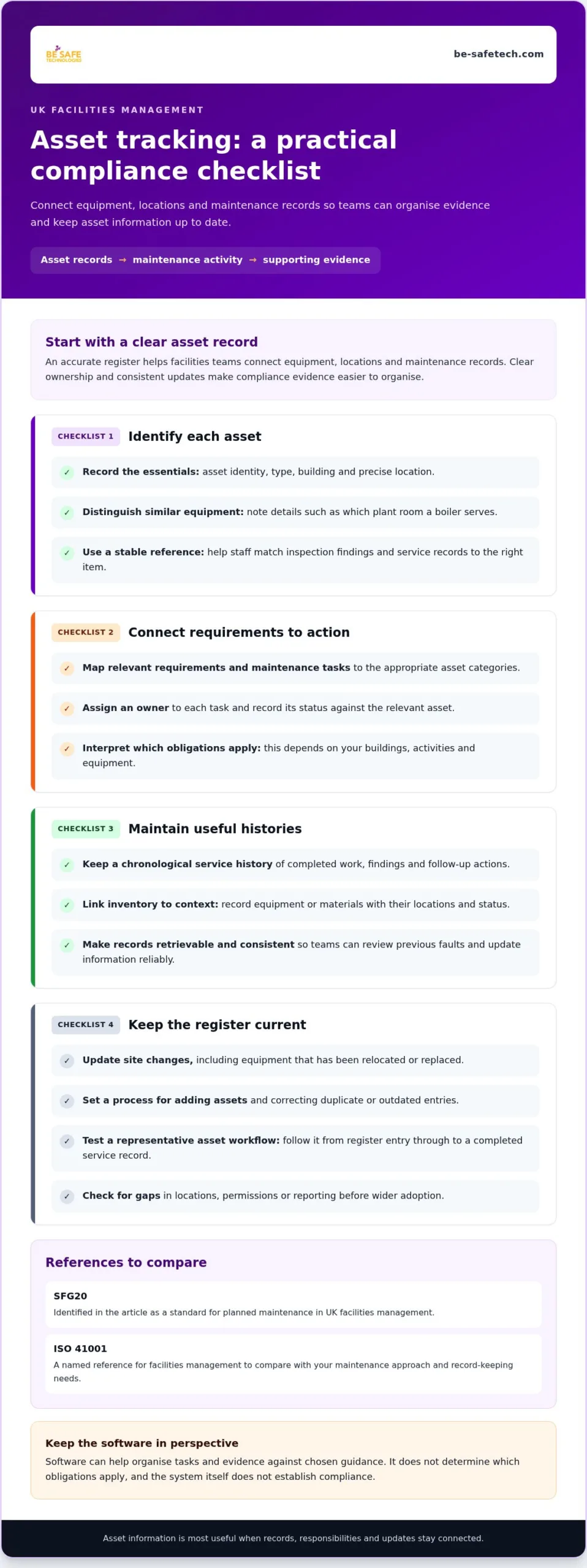
An accurate asset register helps facilities teams connect equipment, locations and maintenance records. Clear ownership and consistent updates make compliance evidence easier to organise.
Start by recording each asset’s identity, type, building and precise location. Add details that distinguish similar equipment, such as whether a boiler serves a particular plant room or another area. A stable asset reference helps staff match inspection findings and service records to the right item. Keep the register aligned with site changes, including relocated or replaced equipment.
Next, map relevant requirements and maintenance tasks to asset categories. Software can help teams organise records against applicable regulations and industry guidance, but it cannot determine which obligations apply. Facilities managers still need to interpret requirements for their buildings, activities and equipment. For effective oversight, assign each task to an owner and record its status against the relevant asset.
Asset service histories and inventory
A service history gives teams a chronological view of work completed on an asset, including findings and follow-up actions. For example, a maintenance team can use it to see whether a recurring fault has been recorded before. Inventory records add context by linking equipment or materials to their locations and status. Check that users can update records consistently and retrieve the relevant history.
Use the register to support practical decisions, not just record keeping. A location-based view can help a facilities manager identify equipment serving a particular floor before planning work. Linking service entries to the correct asset also makes it easier to review patterns, prepare reports and pass accurate records between teams. Set a clear process for adding assets and correcting duplicate or outdated entries.
Standards and guidance
SFG20 is identified as a standard for planned maintenance in UK facilities management. ISO 41001 is another named reference for facilities management; compare both with your organisation’s maintenance approach and record-keeping needs. Software can help organise tasks and evidence against chosen guidance, but the system itself does not establish compliance.
Before selecting a platform, map your asset categories, sites and existing maintenance schedules. Identify which records staff need to capture, who approves updates and how managers review overdue work. Then test a representative asset through the workflow, from register entry to completed service record. This practical check can reveal gaps in locations, permissions or reporting before wider adoption.
Data export and end-of-contract arrangements
Contract-end planning should define which facilities records will move, who receives them and how the transfer will be checked. Clear processes help maintain continuity when a new facilities management team takes responsibility.
Agree the handover scope before the contract ends. It may include asset registers, maintenance histories, inspection evidence, open actions, contractor details and site documents. For example, a new team taking over a building needs to connect unresolved maintenance tasks with the right asset and location. Record who prepares each dataset, who approves it and how missing or inconsistent entries will be resolved.
Confirm the available export formats and whether files retain useful structure. Documents without asset references, dates or status fields can be difficult to use. Review a sample export containing an asset record, a completed task and an open action. Check the fields, attachments and links between records, then agree on a secure transfer method and a named recipient.
Use a documented handover process with these measures:
- Scope: list the records, sites, assets and contractor information included.
- Ownership: assign a person to prepare, approve and receive each transfer.
- Validation: compare exported records with a sample from the live system.
- Completion: record acceptance, outstanding issues and agreed follow-up actions.
Contractor and subcontractor records need particular care. A handover may include company details, site access records, work assignments and evidence linked to completed tasks. Separate current information from historic records, and identify which contractors remain active after the change. Workforce information also needs clear access rules, so incoming staff can do their jobs without receiving unrelated personal data.
Facilities managers working under contract need to meet agreed Service Level Agreements (SLAs) and demonstrate delivery. A structured handover can show completed work, unresolved requests and evidence of performance against those agreements. Set out how outgoing and incoming teams will reconcile open work, allocate responsibility and report exceptions. This gives each party a traceable record of the transition.
Contract terms should explain data access, export, transfer responsibilities and retention arrangements. GDPR is relevant when facilities managers handle contractor information and maintenance records, so include personal data in the handover review. Identify what the incoming team needs, restrict access to appropriate roles and record the transfer decision. A planned handover makes data a usable operational resource rather than an unstructured archive.
Health and safety compliance
A health and safety management system connects policies, responsibilities, training and evidence with day-to-day site processes. Software can organise these elements, assign actions and make records easier to review across facilities.
The Health and Safety at Work Act 1974 is identified as relevant to facilities management, according to the UK legislation portal. The Building Safety Act 2022 is also identified as relevant to facilities management, according to the UK legislation portal. The Fire Safety Order 2005 is identified as relevant to UK facilities management, according to the UK legislation portal. These references help frame a compliance register, but the organisation must map obligations to its buildings and activities.
Start by listing applicable policies and procedures, then assign an owner to each. Record the current version, approval status and where employees can find it. A facilities team can use the system to review changes, share updated procedures and keep evidence of staff training. For example, a site induction record can show who received relevant instructions and when.
Scheduled checks can also be organised as trackable tasks. The research identifies annual gas safety checks, monthly fire extinguisher inspections and emergency lighting tests every month. A digital schedule can link each task to a location, responsible person, completion record and follow-up action. Managers can review overdue entries and see whether reported issues have been resolved.
For equipment-related processes, facilities teams should account for CDM regulations and LOLER where relevant to their work. Software can help assign responsibilities and retain records, but a task list alone does not establish compliance. Teams need to define the checks, competent roles and evidence required for each activity, then keep procedures accessible and current.
Building safety information also needs careful organisation. The Building Safety Act does not explicitly require CAFM software, but it requires a digital golden thread of information for higher-risk buildings. A digital system can help organise building records and make information easier to retrieve. Define which documents belong in the record, who maintains them and how updates are reviewed.
To integrate health and safety work into a consistent management system, set up clear workflows:
- Assign each policy, inspection and corrective action to a responsible role.
- Connect records to the relevant building, work activity or equipment.
- Review open actions and update procedures when processes change.
- Keep training evidence and supporting documents with their related tasks.
These steps make it easier for a facilities manager to follow activity from instruction to evidence. Reports can bring together completed checks, outstanding actions and records needing review, giving managers a practical view of site activity without treating software as a substitute for sound safety procedures.
Facilities management software benefits and compliance
Facilities management software can connect maintenance planning, contracted work and compliance evidence across an estate. Its value lies in linking operational tasks to clear ownership, records and review, rather than simply storing documents.
Efficiency is a common buying aim: 68% of CAFM software buyers want to drive efficiency. A practical way to pursue it is to map repeated processes, then identify where digital workflows can reduce duplicate entry or missed handovers. For example, a reported maintenance issue can be linked to an asset, assigned to a team and followed through to completion.
Preventative maintenance is another benefit. Software can help teams plan, record and oversee maintenance, including schedules guided by SFG20, a UK standard for planned maintenance. A facilities manager can use task status and service evidence to review whether planned work is progressing. Automated workflows can support reminders and assignment, while people remain responsible for completing checks and judging findings.
Compliance tracking can bring together relevant documents, procedures and evidence. Facilities teams may need to consider Environment Agency requirements, building regulations and employment law, alongside obligations relevant to their sites. A system can record the requirements the organisation tracks, the supporting evidence and the next action. This offers a more usable view than separate files maintained by different teams.
Contracted work benefits from the same structure. Facilities managers working under contract need to meet agreed Service Level Agreements (SLAs) and demonstrate delivery. Work records can link a request with its assigned contractor, completion evidence and any follow-up. Operational reports then help managers review delivery and identify items needing attention, rather than relying only on informal updates.
Software can also support oversight of mobile maintenance activity, stock and purchasing, and operational monitoring. Choose functions that fit your processes. For instance, a site team managing routine repairs may value clear work assignments and progress records, while a manager responsible for several buildings may need reports grouped by location. Occupant and personnel information should also be handled in line with GDPR.
To assess a platform, compare its workflows with the work your teams perform. Consider whether it can:
- Connect planned maintenance, work orders and compliance evidence.
- Make task ownership and outstanding actions visible to managers.
- Support reporting across the relevant buildings and contractors.
- Organise information access around user responsibilities.
The key takeaway is to choose software around the compliance and operational outcomes your estate needs, then define how teams will use its records. Discuss your facilities compliance software requirements as a practical next step for reviewing digital health and safety processes.
Be-Safe Technologies: Compliance Genie – SaaS health and safety software
Be-Safe Technologies Ltd offers Compliance Genie, SaaS health and safety software for organisations digitising health and safety processes and risk assessments. It provides facilities teams with a digital way to manage these activities alongside the compliance workflows covered in this guide.
Where contractor oversight is also required, Contractor Genie is SaaS contractor management software that manages contractor details and site visits in one place. The products address related but distinct needs: health and safety processes and contractor management.
Consider these platforms when reviewing how your organisation manages safety information or contractor site visits. Contact Be-Safe Technologies Ltd to discuss how Compliance Genie or Contractor Genie could fit your facilities management processes.
Make your next compliance review actionable
Use your next facilities review to define what better oversight should look like in practice. Assign a clear owner to each process, decide how managers will review progress, and choose a small group of workflows to assess first. This gives your team a practical basis for deciding whether facilities management compliance software in the UK fits its priorities.
Keep the decision grounded in how work moves between site teams, managers and contractors. Document one current process, identify where information becomes difficult to follow, and define what a clearer record needs to show. This turns software discussions into a focused operational decision, rather than a feature checklist.
If you’re ready to discuss digital health and safety processes for your organisation, contact Be-Safe Technologies. A considered next step can help your team move forward with greater clarity.
Frequently Asked Questions
How much does FM software cost in the UK?
FM software pricing depends on the system’s scope and is provided after a quote request. Cost factors can include the number of users and sites, required functions, integrations, implementation and support arrangements. A basic maintenance tool and a platform covering several operational processes have different requirements. Compare costs against the workflows you need to manage, rather than choosing on licence price alone.
What are compliance management systems?
A compliance management system comprises the policies, processes and procedures an organisation uses to meet its compliance obligations. Digital software can help put these arrangements into practice by linking responsibilities with records and review tasks. For example, a manager might use a system to assign a procedure review, record its approval and retain evidence that relevant staff received the updated document.
How much does facilities management compliance software cost in the UK?
The price depends on the requirements and is provided after a quote request. Factors include the number of buildings and users, required compliance workflows, data migration, integrations and configuration. A business assessing one site may have different requirements from one coordinating contractors and reporting across a wider estate. Define the scope first, then compare quotes against those needs.
Which UK health and safety laws and regulations should facilities management compliance software support?
Software should help an organisation organise records and actions relevant to the rules that apply to its buildings and activities. According to the UK legislation portal, the Health and Safety at Work Act 1974, Building Safety Act 2022 and Fire Safety Order 2005 are relevant to facilities management. Assess whether the system can associate internal responsibilities and evidence with applicable requirements, rather than treating a software feature as proof of compliance.
How does software help manage fire safety, asbestos, legionella and electrical compliance in UK buildings?
Software can organise records and workflows for fire safety, asbestos, legionella and electrical compliance, linking each topic to the relevant building or equipment. For example, a facilities team can assign a review, record a finding and track the resulting action. Before adopting a workflow, define the responsible roles, required evidence and review process for each area. Software supports oversight; it does not replace competent assessment or action.
What data security, GDPR and audit-trail requirements should UK buyers check?
Check how the system controls access, records user activity and supports the handling of personal information under GDPR. Review how roles and permissions are managed, what actions appear in audit logs, and how records can be exported or deleted under agreed processes. For example, contractor details may need different access from general asset records. Confirm that reports give authorised managers a useful history of changes and decisions.
Which UK facilities management compliance software platforms are available?
UK organisations can choose facilities management, computer-aided facilities management (CAFM) and dedicated compliance platforms. Capterra UK lists 644 facility management software results.
How do UK facilities management compliance software products compare on features and integrations?
Features and integrations vary by platform. Compare inspection tools, reporting, record storage and connections to the systems your organisation uses. Check that each integration supports a clear task, such as transferring work orders or asset details.