



Asbestos Register Software UK: Export PDFs and Track Actions
A PDF export is useful when it gives people a clear, shareable record of asbestos locations, condition and actions. Yes, asbestos register software in the UK can support PDF exports, alongside signed-off records, building-by-building oversight and remedial action tracking. According to the UK legislation portal, Regulation 4 of the Control of Asbestos Regulations 2012 outlines the duty to manage asbestos in non-domestic premises.
Keeping an asbestos register current takes more than saving a document. Survey findings, inspections and remedial work need to be reflected in the records so people responsible for a building can use organised, up-to-date information.
This article explains how software can help you export a usable PDF, record sign-off and manage asbestos information across multiple buildings. It also covers assigning and tracking remedial actions through to closure, so the register supports day-to-day oversight rather than becoming a static file.
Key Takeaways
- PDF exports can make asbestos information easier to share, while the live register remains the working record.
- Keep sign-off details and change histories together so it is clear who updated records and when.
- Link asbestos information to building plans to help people locate materials across a property portfolio.
- Turn survey recommendations into assigned actions, then track progress and record evidence when each is closed.
- Choose software that helps keep records organised and current as inspections, removals and other work take place.
1. What is asbestos management software?
Asbestos management software replaces disconnected spreadsheets and paper files with organised digital records. It can bring survey findings, material details, photographs, inspections, risk assessments and actions into a searchable register. The UK Control of Asbestos Regulations 2012 are a regulatory framework this software is designed to support, according to the UK legislation portal.
For non-domestic premises, the duty to manage asbestos includes maintaining information about its location and condition. Regulation 4 of the Control of Asbestos Regulations 2012 outlines this duty, according to the UK legislation portal. The Health and Safety Executive says asbestos has been banned in the UK since November 1999, but asbestos-containing materials can remain in buildings.
A useful register gives each building and material a clear record. It can include the material’s type, amount and condition, its location, survey findings, inspection dates and photographs. Grouping records by site, building, floor or room helps staff find the relevant information without searching unrelated files. A site plan can link each entry to its physical location.
Keeping records current is an ongoing process, not a one-off upload. Update the register when inspections reveal new information, material condition changes, or removal, repair or sealing work takes place. Review the management plan at the same time, including responsibilities, monitoring arrangements, information sharing and planned actions. This keeps the record aligned with what is known about the building.
Software pricing depends on factors such as portfolio size, user access and required functions. CRM, scheduling and field-service tools can support the workflow by assigning inspections, recording site visits and routing follow-up actions to named staff.
Can asbestos register software manage surveys, risk assessments and asbestos management plans? Yes, a system can organise survey records, assessments and plan information alongside the register, provided its functions cover those tasks. Mobile access can help staff consult records on site; offline capture should retain entries until connectivity returns, while QR codes can provide a route to location-specific information where supported.
To import existing surveys, gather the available files, match records to buildings and locations, then enter or upload the information in the system’s accepted format. Check key fields, such as material condition and inspection dates, against the source records before relying on the digital register. Inaccurate or outdated entries can leave workers with misleading location or condition information, weakening the management plan and complicating maintenance or refurbishment decisions.
2. Audit trails and signed-off records
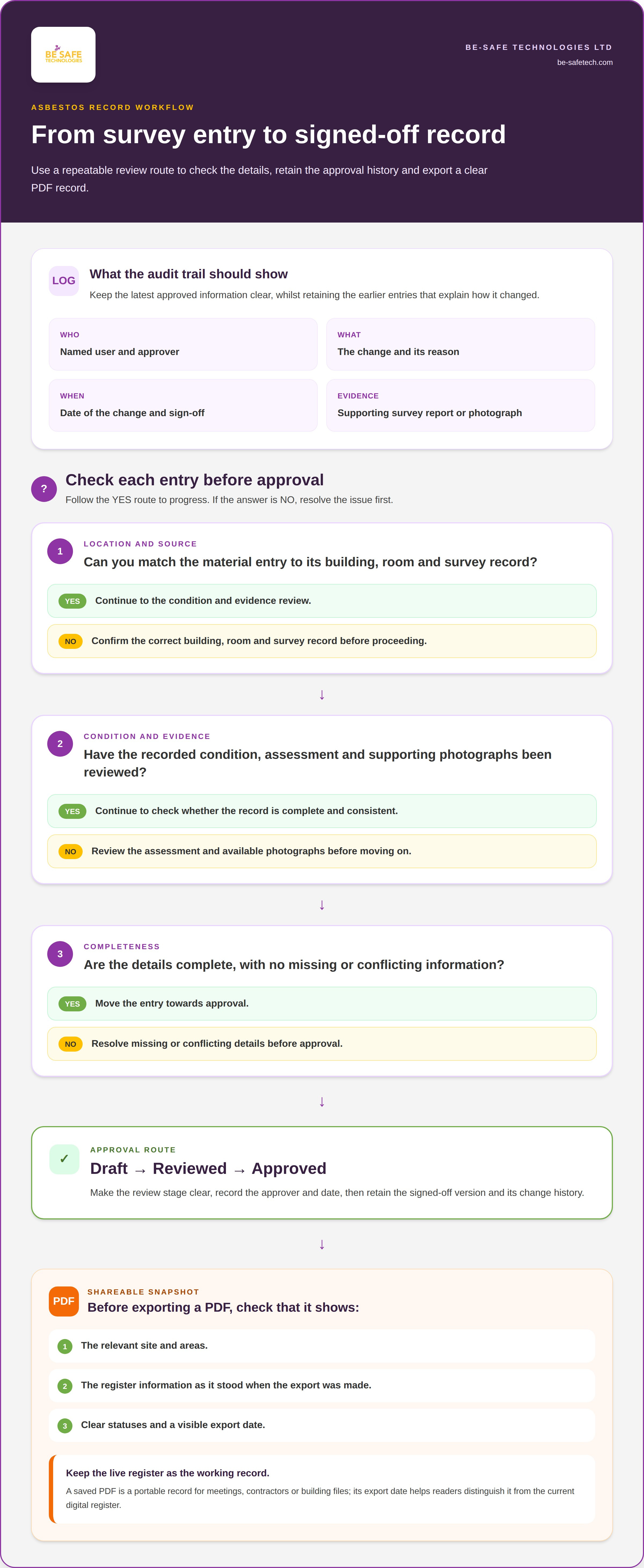
An audit trail records who changed an asbestos entry, what changed and when. That history matters when a survey result, assessment or site instruction leads to an update. For example, a facilities manager reviewing a ceiling tile entry can see whether its condition was changed after an inspection, rather than relying on an unexplained replacement value.
Good record keeping separates current information from its history. The register should show the latest approved details clearly while retaining earlier entries for reference. Link each change to a named user, date, reason and supporting evidence, such as a survey report or photograph. This makes it easier to trace how a decision developed.
A practical sign-off process gives each record a defined route from draft to approval. It can distinguish the person entering survey findings from the person reviewing them, making it clear whether the information is ready to use. For example, a survey entry might move from “draft” to “reviewed” and then “approved”, with its change history retained.
Before a report is signed off, reviewers can follow a consistent sequence:
- Match the material entry to its building, room and survey record.
- Review the recorded condition, assessment and supporting photographs.
- Resolve missing or conflicting details before approval.
- Record the approver and date, then retain the signed-off version.
PDF reports provide a portable record for meetings, contractors or building files. A useful export identifies the relevant site and areas, shows the register information as it stood when exported, and presents statuses clearly. Keep the export date visible so readers can distinguish a saved report from the live digital record.
Audit trails also help explain changes across a portfolio. If a maintenance team reports damaged material, the record can show when the information was added, who reviewed it and whether the related report was updated. A clear history supports accurate handovers between facilities staff, duty holders and contractors, without treating an old PDF as the current register.
Consistent approval steps make reviews easier to repeat across buildings. A records workflow can support that process by bringing assessments, survey reports and sign-off details together. Teams refining their digital safety record process can explore digital health and safety software as a way to organise related workflows.
3. Can I manage multiple buildings?
Yes. A portfolio can be organised by site, building, floor and room, helping staff move from an overview of the estate to a specific location. For example, a facilities team can select a school site, open its main building, then find recorded asbestos-containing material on the relevant floor plan. Clear site labels help prevent records from one property being mistaken for another.
Linking each asbestos register entry to a site plan helps workers locate materials. The plan should identify the building and area clearly, while the linked record provides material details, condition and survey evidence. A floor drawing can add room-level context, such as a ceiling void or service cupboard. This is useful when maintenance teams plan work that could disturb building fabric.
CAD floor plans can provide a practical base for location records. A typical workflow is to select the relevant drawing, identify the room or area, and associate the asbestos entry with that location. If plans change after refurbishment, replace the drawing or clearly mark the new version as superseding the earlier one. Keep the building name and revision details visible so staff can distinguish current layout information from archived evidence.
For each property, organise plan and register information consistently:
- Use the same site, building, floor and room names across the register and drawings.
- Mark known or presumed materials at their recorded locations.
- Attach survey photographs or reports as supporting evidence.
- Record plan changes and register edits in the audit trail.
Inspections can update the relevant location without disrupting records for other buildings. If an inspection finds a change in material condition, staff can amend the entry and retain supporting evidence. If refurbishment changes room names or removes a partition, update the affected drawing and associated records together. This keeps portfolio information aligned as buildings change.
Asbestos regulations require relevant information to reach people liable to disturb asbestos-containing materials. A plan-linked register can help a duty holder share location-specific information with maintenance staff and contractors before planned work. For example, a contractor preparing to access a ceiling can see the recorded area and material details, rather than relying on a portfolio-wide report with no location context.
For a multi-site organisation, useful filters include site, building, survey status and inspection history. These views help facilities teams identify which records relate to a particular property and where follow-up is needed. Consistent naming, linked drawings and a retained audit trail turn a large portfolio into clear, traceable building records.
4. Tracking remedial actions to completion
A survey recommendation should become a trackable action, not remain buried in a report. For each material requiring attention, record the work required, its location, an owner and a due date. Possible actions include encapsulation, labelling, repair or removal. A clear status, such as open, in progress or closed, shows what still needs attention across the site.
Assigning an owner makes responsibility visible. The owner may coordinate the work, while a separate reviewer confirms completion. For example, if a survey identifies damaged material in a plant room, the record can link the recommendation to that room, name the person coordinating follow-up and retain the target date. This creates a practical route from finding to resolution.
Keep asbestos information available to people whose work could disturb the material. Before planned maintenance or removal, the relevant location and condition details can inform the work arrangements. Under the Control of Asbestos Regulations 2012, asbestos management is the regulatory context for these records. A digital action log helps connect survey findings, planned work and follow-up evidence.
A consistent action workflow can include:
- Record the recommendation against the correct material and building location.
- Set an owner, due date and status for each required task.
- Attach relevant work records, photographs or completion evidence.
- Review the evidence, close the action and update the register.
For asbestos removal site compliance, keep the work record connected to the affected material. Once removal is complete, update the register to show the changed status and retain supporting documentation. If the work involved repair, sealing or encapsulation instead, record that outcome accurately. A closed action should explain what happened, where it happened and what evidence supports closure.
Overdue or blocked actions need to be visible. A status view can distinguish work awaiting approval from work awaiting completion evidence, helping the responsible team direct follow-up. If a due date changes, record the revised date and reason instead of silently replacing the original. This preserves the action’s history and helps reviewers understand delays.
Keep the management plan aligned with completed actions and changes to material condition. For example, after remedial work changes the recorded condition, update both the relevant register entry and any associated follow-up arrangements. This gives duty holders a current record for future inspections and work planning. Digital tracking supports the process, but accurate entries and appropriate review remain essential to sound asbestos management.
5. Use of asbestos register software
Software is most useful when it supports the full record lifecycle, from survey entry to review and action. Staff can filter a live register by building, portfolio, survey type and status, then update records when survey or removal information is signed off. This makes it easier to find accurate asbestos information without searching separate spreadsheets.
Use the register as a working source, not simply a place to store PDFs. For example, a facilities manager can open a building record, review its material entries and find the latest survey information before planned maintenance. A dated PDF export can support sharing, while the live register remains the source for current updates.
Which asbestos register software platforms are popular in the UK? Popularity alone does not identify the right platform for every organisation. Focus on whether a system supports your portfolio, register records, management plan, reporting and action workflow, rather than choosing by name recognition alone.
Before implementation, map how information should move through the system. Assign responsibility for each site, agree consistent building and room names, set record approval steps, then establish review arrangements. Decide who can edit records and who can view them, especially when contractors need asbestos information before work that could disturb containing materials.
Field access can help during inspections. Check whether the software you choose supports offline records and how it handles synchronisation, so staff know what to expect when connectivity is interrupted. In all cases, review survey entries before adding them to the register as accurate information. Keep photographs and location details associated with the relevant record.
Use the system’s review functions to make outstanding work visible. Filters for status or survey type can help a facilities team identify records awaiting approval or follow-up. Review dates and re-inspections can also be tracked, supporting a planned approach to keeping information current. PDF exports provide a shareable snapshot, while a live system can retain later changes and their history.
Choose asbestos register software UK organisations can fit to their working processes, rather than selecting features in isolation. For a considered starting point, explore digital safety workflow options and identify how they could support your records, reviews and staff access.
Be-Safe Technologies
Be-Safe Technologies Ltd helps organisations digitise health and safety processes and manage contractor activity. Compliance Genie is its cloud-based SaaS health and safety management platform, supporting digital health and safety processes and risk assessments. Contractor Genie is SaaS contractor-management software for centralising contractor records and managing site visits.
These tools may suit organisations looking to organise wider safety processes or contractor management alongside asbestos arrangements. Consider how these responsibilities fit your existing workflows, including how staff share information and oversee site visits. Contact Be-Safe Technologies Ltd to discuss whether Compliance Genie or Contractor Genie fits your organisation’s software needs.
Build a consistent approach across your organisation
Choosing asbestos register software for UK organisations is also an opportunity to agree how information will be governed. Decide who owns each record, who reviews changes and how updates are communicated to people responsible for buildings. Clear roles help make register maintenance part of everyday operational planning, rather than a task that falls between teams.
Consider how the process will work as responsibilities change. A new facilities manager, contractor or maintenance team should be able to understand where information sits and how their work connects with it. Practical procedures for handovers and record ownership can support continuity as sites, staff and planned works change.
The next step is to consider how digital health and safety processes could fit your organisation’s current arrangements. Be-Safe Technologies offers software for managing health and safety processes and contractor activity. Contact Be-Safe Technologies Ltd to discuss your organisation’s needs and take a considered next step towards clearer oversight.
Frequently Asked Questions
Can I export an asbestos register PDF?
Yes, software with an export function can produce a PDF. Before printing or circulating one, check that text, symbols and plan annotations remain legible at the intended page size. For a site noticeboard or printed work pack, include enough context for readers to identify the relevant premises and keep location markings with their explanations.
What is asbestos management software?
Asbestos register software handles asbestos-related information and associated management processes. Its role is to organise and make records accessible, not to create survey findings or determine the condition of materials. For example, a team can use a digital system to make relevant records available to authorised colleagues, while competent people remain responsible for interpreting findings and deciding what action is appropriate.
Can I manage multiple buildings?
Yes, software can support records for multiple buildings. For sites changing ownership or management, plan how records will be handed over, archived and associated with the correct premises. Keeping a clear property identity with each file helps prevent records being confused during a transfer. Agreeing who maintains access after handover also helps the incoming team continue managing information.
What does this FAQ cover?
These answers cover common questions about digital asbestos records, software selection and UK responsibilities. Use them as a starting point when discussing requirements with colleagues, particularly if facilities, health and safety, property and maintenance teams share responsibility. They can help identify operational questions to resolve before introducing a system, such as who approves records and how staff receive relevant information.
Is data hosted in the UK?
Compliance Genie is hosted on the UK Microsoft Azure platform. For an organisation assessing its information arrangements, hosting location is one consideration alongside user access, internal permissions and record-handling procedures. Agree which roles need access to asbestos information, and how access should change when staff responsibilities change. These practical controls help teams manage information appropriately within their own working arrangements.
Is this system HSE compliant?
Using software alone does not establish that an organisation complies with its duties. Treat the system as a tool for supporting documented processes, not as a compliance certificate or an endorsement by the Health and Safety Executive. An internal review can consider whether staff understand their responsibilities, records support decisions, and management arrangements work in practice across the organisation.
What is asbestos register software and who needs it in the UK?
Asbestos register software is a digital system for organising asbestos register information and related tasks. It is relevant to organisations responsible for managing asbestos in non-domestic premises. Its practical value depends on how the organisation works: a team coordinating maintenance across several premises may need different access arrangements from staff managing one building. Identify who needs information and what decisions they make before choosing a system.
What UK laws require an asbestos register and management plan?
The Control of Asbestos Regulations 2012 provide the relevant legal framework, and Regulation 4 outlines the duty to manage asbestos in non-domestic premises, according to the UK legislation portal. For practical planning, organisations can identify who holds responsibility for each premises and how relevant records inform planned work. This helps connect legal responsibilities with internal roles and everyday decisions.